# Programming with Amos (part 3)
*Part of the IBM SPSS Amos online Help, rendered for AI use. See `llms.txt` for the index.*
#### Use the Amos Graphics classes to draw a path diagram
The Amos Graphics plugin below draws the following path diagram.
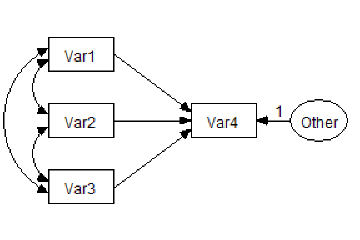
Imports Microsoft.VisualBasic Imports Amos Imports Amos.Pd Public Class CustomCode Implements IPlugin Public Function Mainsub() As Integer Implements IPlugin.Mainsub If FileNew() Then Return 0 End If Dim E As PDElement 'Coordinates of variables Dim Y1 As Single, Y2 As Single, Y3 As Single, Y4 As Single Dim X1 As Single, X2 As Single, X3 As Single Y1 = 1 Y2 = 2 Y3 = 3 Y4 = 5 X1 = 1 X2 = 3 X3 = 4.5 'Height and width of variables Dim XHeight As Single, XWidth As Single XHeight = 0.5 XWidth = 0.7 'Draw the variables E = DiagramDrawObserved(X1, Y1, XWidth, XHeight) E.NameOrCaption = "Var1" E.NameFontSize = 16 E = DiagramDrawObserved(X1, Y2, XWidth, XHeight) E.NameOrCaption = "Var2" E.NameFontSize = 16 E = DiagramDrawObserved(X1, Y3, XWidth, XHeight) E.NameOrCaption = "Var3" E.NameFontSize = 16 E = DiagramDrawObserved(X2, Y2, XWidth, XHeight) E.NameOrCaption = "Var4" E.NameFontSize = 16 E = DiagramDrawUnobserved(X3, Y2, XWidth, XHeight) E.NameOrCaption = "Other" E.NameFontSize = 12 'Draw the paths DiagramDrawPath("Var1", "Var4") DiagramDrawPath("Var2", "Var4") DiagramDrawPath("Var3", "Var4") E = DiagramDrawPath("Other", "Var4") E.Value1 = 1 E.ParameterFontSize = 14 'Draw the covariances DiagramDrawCovariance("var3", "var2") DiagramDrawCovariance("var2", "var1") DiagramDrawCovariance("var3", "var1") 'Improve the path diagram's appearance EditSelectAll() EditTouchUp("Var1") Pd.Refresh() EditTouchUp("Var1") EditDeselectAll() EditFitToPage() End Function Public Function Name() As String Implements IPlugin.Name End Function Public Function Description() As String Implements IPlugin.Description End Function End Class
#### Use the Amos Graphics classes to draw double-headed arrows
The following Amos Graphics plugin draws double-headed arrows among the selected exogenous variables. (Use [](https://ai-docs.amosdevelopment.com/02-amos-graphics-reference-guide-part-1.md#t_selectoneobjectatatime) or [](https://ai-docs.amosdevelopment.com/02-amos-graphics-reference-guide-part-1.md#t_selectallobjects) beforehand to select the exogenous variables that you want to be correlated.)
Imports Microsoft.VisualBasic Imports Amos Imports AmosEngineLib.AmosEngine.TMatrixID Public Class CustomCode Implements IPlugin Public Function Mainsub() As Integer Implements IPlugin.Mainsub Dim SelectedEx As New Collection Dim x As PDElement Dim i As Integer Dim j As Integer 'Construct the collection of selected, exogenous variables For Each x In Pd.PDElements If x.IsSelected And x.IsExogenousVariable Then SelectedEx.Add(x) End If Next 'Draw the double-headed arrows For i = 1 To SelectedEx.Count For j = i + 1 To SelectedEx.Count x = Pd.DiagramDrawCovariance(SelectedEx(i), SelectedEx(j)) x.IsSelected = True Next Next 'Try to improve the appearance of the path diagram If SelectedEx.Count > 0 Then Pd.EditTouchUp(SelectedEx(1)) Pd.EditTouchUp(SelectedEx(1)) End If 'The user will probably want to modify the curvature of the new 'double-headed arrows. Pd.EditShapeOfObject() End Function Public Function Name() As String Implements IPlugin.Name End Function Public Function Description() As String Implements IPlugin.Description End Function End Class
#### Use the Amos Graphics classes to name unobserved variables
The following Amos Graphics plugin assigns names to any unnamed, unobserved variables. Latent variables are given names like "F1", "F2", and so forth. Unique variables are given names like "e1", "e2", and so forth.
Imports Microsoft.VisualBasic Imports Amos Imports AmosEngineLib.AmosEngine.TMatrixID Public Class CustomCode Implements IPlugin Public Function Mainsub() As Integer Implements IPlugin.Mainsub Const UniquePrefix = "e" Const LatentPrefix = "F" Dim UniqueCounter As Integer, LatentCounter As Integer UniqueCounter = LargestVariableNumber(UniquePrefix) LatentCounter = LargestVariableNumber(LatentPrefix) Dim E As PDElement For Each E In Pd.PDElements If E.NameOrCaption = "" Then If E.IsUnobservedVariable Then 'E.Undraw() If E.IsUniqueVariable Then UniqueCounter += 1 E.NameOrCaption = UniquePrefix & UniqueCounter Else LatentCounter += 1 E.NameOrCaption = LatentPrefix & LatentCounter End If 'E.Draw() End If End If Next Pd.Refresh() End Function 'Examine all variable names of the form, Prefix. 'For example, if Prefix is "X", then examine variable 'names like "X1", "X2", "X001", "X25", etc. 'Return the largest value of , rounded off to an integer. Private Function LargestVariableNumber(ByVal Prefix As String) As Integer Dim E As PDElement, S1 As String, S2 As String For Each E In Pd.PDElements S1 = Left$(E.NameOrCaption, Len(Prefix)) S2 = Mid$(E.NameOrCaption, Len(Prefix) + 1) If UCase$(S1) = UCase$(Prefix) Then If IsNumeric(S2) Then If S2 > LargestVariableNumber Then LargestVariableNumber = S2 End If End If End If Next End Function Public Function Name() As String Implements IPlugin.Name End Function Public Function Description() As String Implements IPlugin.Description End Function End Class
#### Use the Amos Graphics classes to resize all rectangles in Amos Graphics
The following Amos Graphics plugin resizes each rectangle in the path diagram so that it is 1.4 times larger than the largest observed variable name. The [Undraw](https://ai-docs.amosdevelopment.com/04-programming-with-amos-part-1.md#t_undrawmethod) method hides each rectangle before the size changes, and the [Draw](https://ai-docs.amosdevelopment.com/04-programming-with-amos-part-1.md#t_drawmethod) method draws it after the change. The [UndoToHere](https://ai-docs.amosdevelopment.com/04-programming-with-amos-part-1.md#t_undotoheremethod) / [UndoResume](https://ai-docs.amosdevelopment.com/04-programming-with-amos-part-1.md#t_undoresumemethod) method pair allows you to undo the changes by pressing [](https://ai-docs.amosdevelopment.com/02-amos-graphics-reference-guide-part-1.md#t_undothepreviouschange).
Imports Amos Imports Amos.Pd Public Class CustomCode Implements IPlugin Public Function Mainsub() As Integer Implements IPlugin.Mainsub Dim x As PDElement Dim LargestWidth As Single, LargestHeight As Single LargestWidth = 0 LargestHeight = 0 For Each x In PDElements If x.IsObservedVariable Then If x.NameWidth > LargestWidth Then LargestWidth = x.NameWidth If x.NameHeight > LargestHeight Then LargestHeight = x.NameHeight End If Next LargestWidth = LargestWidth \* 1.4 LargestHeight = LargestHeight \* 1.4 UndoToHere() If LargestWidth > 0.2 And LargestHeight > 0.1 Then For Each x In PDElements If x.IsObservedVariable Then x.Width = LargestWidth x.Height = LargestHeight End If Next Pd.Refresh() End If DiagramRedrawDiagram() UndoResume() End Function Public Function Name() As String Implements IPlugin.Name End Function Public Function Description() As String Implements IPlugin.Description End Function End Class
### Examples using the AmosEngine class
#### Use the AmosEngine class to evaluate derivatives numerically and display the results with the Amos Debug class
The following program fits the model of Example 8 and displays derivatives evaluated at the discrepancy function minimum. For purposes of comparison, approximate derivatives based on finite differences are also displayed.
Imports AmosEngineLib Module MainModule Dim Sem As New AmosEngine Dim ad As New AmosDebug.AmosDebug Sub Main() Dim Originalparameters() As Double Sem.BeginGroup(AmosEngine.AmosDir & "Examples\English\UserGuide.xls", "Grnt_fem") Sem.AStructure("visperc = (1) spatial + (1) err_v") Sem.AStructure("cubes = (a) spatial + (1) err_c") Sem.AStructure("lozenges = (b) spatial + (1) err_l") Sem.AStructure("paragraph = (1) verbal + (1) err_p") Sem.AStructure("sentence = (c) verbal + (1) err_s") Sem.AStructure("wordmean = (d) verbal + (1) err_w") If (Sem.FitModel() = 0) Then 'Save parameter values so they can be restored Sem.ParameterVector(Originalparameters) TestDerivatives() 'Restore the parameter values and display them Sem.PutParameterVector(Originalparameters) ad.PrintX(Originalparameters, "Parameter values") End If Sem.Dispose() End Sub Sub TestDerivatives() Dim Ind As Integer, F As Double Dim G() As Double, GNumeric() As Double Dim H() As Double, HNumeric() As Double Sem.Evaluate2e(Ind, F, G, H) If Ind <> 0 Then Throw(New System.exception("Could not evaluate function and derivatives.")) End If NumericDerivatives(Sem, GNumeric, HNumeric) ad.DecimalPlaces = 8 ad.PrintX(G, "1st Derivatives") ad.PrintX(GNumeric, "Numerical 1st Derivatives") ad.PrintTriangle(H, "2nd Derivatives") ad.PrintTriangle(HNumeric, "Numerical 2nd Derivatives") End Sub Sub NumericDerivatives(ByVal Sem As AmosEngine, ByRef GNumeric() As Double, ByRef HNumeric() As Double) Const Delta As Double = 0.0001 Dim NParams As Integer Dim FPlus As Double, FMinus As Double Dim FPP As Double, FMM As Double Dim FPM As Double, FMP As Double Dim i As Integer, j As Integer, k As Integer Dim DTempi As Double, DTempj As Double NParams = Sem.NumberOfParameters ReDim GNumeric(NParams - 1) ReDim HNumeric(NParams \* (NParams + 1) \ 2 - 1) '1st Derivatives For i = 1 To NParams DTempi = Sem.ParameterValue(i) Sem.PutParameterValue(i, DTempi + Delta) FPlus = Evaluate() Sem.PutParameterValue(i, DTempi - Delta) FMinus = Evaluate() Sem.PutParameterValue(i, DTempi) GNumeric(i - 1) = (FPlus - FMinus) / (2 \* Delta) Next '2nd Derivatives k = 0 For i = 1 To NParams For j = 1 To i DTempi = Sem.ParameterValue(i) DTempj = Sem.ParameterValue(j) If i = j Then FPM = Evaluate() FMP = FPM Sem.PutParameterValue(i, DTempi + 2 \* Delta) FPP = Evaluate() Sem.PutParameterValue(i, DTempi - 2 \* Delta) FMM = Evaluate() Else Sem.PutParameterValue(i, DTempi + Delta) Sem.PutParameterValue(j, DTempj + Delta) FPP = Evaluate() Sem.PutParameterValue(j, DTempj - Delta) FPM = Evaluate() Sem.PutParameterValue(i, DTempi - Delta) FMM = Evaluate() Sem.PutParameterValue(j, DTempj + Delta) FMP = Evaluate() End If Sem.PutParameterValue(i, DTempi) Sem.PutParameterValue(j, DTempj) HNumeric(k) = (FPP + FMM - FPM - FMP) / (4 \* Delta ^ 2) k = k + 1 Next Next End Sub Function Evaluate() As Double Dim Ind As Integer Dim F As Double Sem.Evaluate0(Ind, F) If Ind <> 0 Then Throw(New System.Exception("Could not evaluate function.")) End If Evaluate = F End Function End Module
#### Use the AmosEngine class to test for scale- and location-invariance
The following program performs a crude test of scale-invariance ([Browne, 1982](https://ai-docs.amosdevelopment.com/08-references.md#t_browne_1982), page 75) by changing the scale of each observed variable, one variable at a time, and re-fitting the model after each change of scale. Changing the scale of a variable consists of pre- and post-multiplying the sample covariance matrix by a diagonal matrix. The model is reported to be "probably scale-invariant" if every change of scale has a small effect on the discrepancy function. If means/intercepts are explicit model parameters, an additional crude test of location-invariance is performed by changing the location of each observed variable (i.e., adding a constant to its sample mean) and re-fitting the model. The model is reported to be "probably location- invariant" if every change of location has a small effect on the discrepancy function.
A more thorough test of scale-invariance and location-invariance could be achieved by examining the implied moments after each change of scale and location.
Imports System Imports System.Diagnostics Imports AmosEngineLib Imports AmosEngineLib.AmosEngine.TMatrixID Imports Microsoft.VisualBasic Module MainModule Sub Main() Dim Sem As New AmosEngine Dim i As Integer, j As Integer Sem.NeedEstimates(SampleCovariances) Sem.NeedEstimates(SampleMeans) SpecifyModel(Sem) TestModelForInvariance(Sem) Sem.Dispose() End Sub Sub TestModelForInvariance(ByVal Sem As AmosEngine) 'Discrepancy function values within Eps of each other are considered to be equal Const Eps As Double = 0.0000000001 Const ScaleFactor As Double = 10 Const LocationShift As Double = 1 Dim BaselineF As Double Dim Covariances(,) As Double, Means(,) As Double Dim VariableNames() As String Dim NVariables As Integer Dim i As Integer, j As Integer Dim IsScaleSensitive As Boolean, IsLocationSensitive As Boolean If Sem.NumberOfGroups <> 1 Then Throw(New exception("This routine works only for 1-group models.")) End If BaselineF = MinimumDiscrepancy(Sem) Sem.GetEstimates(SampleCovariances, Covariances) Sem.RowNames(SampleCovariances, VariableNames) NVariables = UBound(Covariances) Dim VectorMeans() As Double If Sem.IsModelingMeansAndIntercepts() Then Sem.GetEstimates(SampleMeans, Means) 'Means() is now a 2-dimensional array with 1 row, 'but a 1-dimensional array of means is required. ReDim VectorMeans(NVariables - 1) For i = 0 To NVariables - 1 VectorMeans(i) = Means(0, i) Next End If 'Test for scale-invariance For i = 0 To NVariables - 1 ScaleOneVariable(Covariances, i, ScaleFactor) If Sem.IsModelingMeansAndIntercepts() Then Sem.PutSampleMoments(Covariances, VectorMeans) Else Sem.PutSampleCovariances(Covariances) End If If Math.Abs(MinimumDiscrepancy(Sem) - BaselineF) > Eps Then IsScaleSensitive = True Debug.WriteLine( _ "The model is probably sensitive to the scale of " & VariableNames(i)) End If ScaleOneVariable(Covariances, i, 1 / ScaleFactor) Next If Not IsScaleSensitive Then Debug.WriteLine("The model is probably scale-invariant.") End If 'Test for location-invariance If Sem.IsModelingMeansAndIntercepts() Then Dim DTemp As Double For i = 0 To NVariables - 1 DTemp = VectorMeans(i) VectorMeans(i) = VectorMeans(i) + LocationShift Sem.PutSampleMoments(Covariances, VectorMeans) If Math.Abs(MinimumDiscrepancy(Sem) - BaselineF) > Eps Then IsLocationSensitive = True Debug.WriteLine( _ "Model is probably sensitive to the location of " & VariableNames(i)) End If VectorMeans(i) = DTemp Next If Not IsLocationSensitive Then Debug.WriteLine("Model is probably location-invariant.") End If End If End Sub Sub ScaleOneVariable(ByVal ScaledCovariances(,) As Double, ByVal k As Integer, ByVal ScaleFactor As Double) Dim i As Integer Dim NVariables As Integer NVariables = UBound(ScaledCovariances, 1) + 1 For i = 0 To NVariables - 1 ScaledCovariances(i, k) = ScaledCovariances(i, k) \* ScaleFactor ScaledCovariances(k, i) = ScaledCovariances(k, i) \* ScaleFactor Next End Sub Function MinimumDiscrepancy(ByVal Sem As AmosEngine) As Double If Sem.FitModel() <> 0 Then Throw(New exception("Could not fit model.")) End If MinimumDiscrepancy = Sem.Cmin() End Function Sub SpecifyModel(ByVal Sem As AmosEngine) 'Example 8 Sem.BeginGroup(AmosEngine.AmosDir & "Examples\English\UserGuide.xls", "Grnt_fem") Sem.AStructure("visperc = (1) spatial + (1) err_v") Sem.AStructure("cubes = (a) spatial + (1) err_c") Sem.AStructure("lozenges = (b) spatial + (1) err_l") Sem.AStructure("paragraph = (1) verbal + (1) err_p") Sem.AStructure("sentence = (c) verbal + (1) err_s") Sem.AStructure("wordmean = (d) verbal + (1) err_w") End Sub End Module