# Programming with Amos (part 1)
*Part of the IBM SPSS Amos online Help, rendered for AI use. See `llms.txt` for the index.*
# Programming with Amos
You can extend the capabilities of Amos in two ways:
You can write programs that use Amos as a component. Your programs can make use of the Amos classes to incorporate the results of a structural modeling analysis into some larger data analysis project. (See [Writing a Main Program that Uses Amos](#t_scripteditor-frmscript).)
You can add functionality to Amos by creating classes containing methods that are called by Amos. (See [Writing Classes that are Used by Amos](#t_7827).)
## Getting Started
Before you start writing programs that use Amos (or are used by Amos), it is a good idea to get some experience doing structural equation modeling with Amos. One way to do this is by working through the tutorial and some of the examples in the *User's Guide*.
The *User's Guide* contains many examples of programs that use Amos. The *Programming Reference Guide* contains many more. Although almost all of the examples in the Amos documentation use Visual Basic, C# is just as easy to use for Amos programming.
The Amos programming examples in the *Programming Reference Guide* and in the online help are installed with Amos. By default they are installed in the folder
C:\Program Files\IBM\SPSS\Amos\\Programming
Most of the examples in the Amos documentation are small, intended to demonstrate the use of one or two methods or properties at a time. Some larger examples, such as the following, perform nontrivial tasks.
- [Use the Amos Graphics classes to change the appearance of latent variables](https://ai-docs.amosdevelopment.com/05-programming-with-amos-part-2.md#t_usetheamosgraphicsclassestochangetheappearanceoflatentvariables)
- [Use the Amos Graphics classes to resize all rectangles](https://ai-docs.amosdevelopment.com/06-programming-with-amos-part-3.md#t_usetheamosgraphicsclassestoresizeallrectanglesinamosgraphics)
- [Use the Amos Graphics classes to draw a path diagram](https://ai-docs.amosdevelopment.com/06-programming-with-amos-part-3.md#t_usetheamosgraphicsclassestodrawapathdiagram)
- [Use the Amos Graphics classes to calculate a new fit measure](https://ai-docs.amosdevelopment.com/05-programming-with-amos-part-2.md#t_usetheamosgraphicsclassestocalculateanewfitmeasure)
- [Use the Amos Graphics classes to draw double-headed arrows](https://ai-docs.amosdevelopment.com/06-programming-with-amos-part-3.md#t_usetheamosgraphicsclassestodrawdoubleheadedarrows)
- [Use the Amos Graphics classes to name unobserved variables](https://ai-docs.amosdevelopment.com/06-programming-with-amos-part-3.md#t_usetheamosgraphicsclassestonameunobservedvariables)
For even larger examples of Amos programming, see the folder
C:\Program Files\IBM\SPSS\Amos\\Programming\Plugins
which contains the source code for the plugins on the *Plugins* menu of Amos Graphics.
## Programming Tools
Amos comes with a built-in program editor that can be used for writing and executing Amos programs.
- To write a main program, start the built-in program editor by opening the Windows **Start** menu and searching for IBM SPSS Amos Program Editor.
- To write a [plugin](https://ai-docs.amosdevelopment.com/03-amos-graphics-reference-guide-part-2.md#t_what-is-a-plugin_), start the built-in program editor from the Amos Graphics menu by clicking [Plugins→Plugins](https://ai-docs.amosdevelopment.com/03-amos-graphics-reference-guide-part-2.md#t_createeditandrunmacros).
- To write a class to compute Bayesian custom estimands (see Example 29 in the User's Guide), start the built-in program editor from the **Bayesian SEM** menu by clicking **View **®** Custom estimands**.
- To create a (non-Bayesian) [user-defined estimand](https://ai-docs.amosdevelopment.com/03-amos-graphics-reference-guide-part-2.md#t_userdefinedtatusbar) click the status bar at the bottom of the Amos Graphics window and select Define new estimands from the menu that pops up.
For main programs and plugins (but not for custom estimands) you can use the development tool of your choice. For examples using Visual Studio 2015, see
- [Writing a Main Program with Visual Studio 2015](#t_7864)
- [Writing a Plugin with Visual Studio 2015](#t_7830)
## Setting up for Python
Before running Python programs that uses Amos, it may be necessary to execute the following lines from a command line prompt. You only have to do this once, not every time you run python.
1. pip install pythonnet
2. python -m pip install --upgrade pythonnet clr_loader
## Writing a Main Program that Uses the AmosEngine Class
You can write programs in Visual Basic or C# that make use of the AmosEngine class. In this way you can specify and fit a model by writing Visual Basic or C# code, avoiding the use of Amos Graphics entirely. You can also write programs that use structural equation modeling as part of a larger data analysis project. Examples 1 through 21 in the *User's Guide* show how to write programs that specify and fit models using the AmosEngine class.
### Using the Built-in Code Editor
The *User's Guide* contains a step-by-step tutorial on using Amos's built-in editor to write a main program. The tutorial is in the **Modeling in VB.NET** section of Example 1 in the *User's Guide*.
#### Open
Open an existing Amos program.
#### Print preview
Display onscreen a preview of the Amos program, showing how the program will look when it is printed after you press the Print button.
#### Print
Print the Amos program. Press the Print preview button to see what the program will look like when it is printed.
#### Copy
Copy selected text to the clipboard.
#### Run
Run the Amos program. Any syntax errors will be displayed on the Syntax errors tab at the bottom of the window. Output written using the System.Diagnostics.Debug class will be displayed on the Debug output tab.

### Using Visual Studio 2015
This section shows how to use Visual Studio 2015 to fit the model of Example 1 in the *User's Guide*.
1. (You only have to do this once.) Install Visual Studio 2015. The free Visual Studio Community 2015 can be used.
2. (You only have to do this once.) Double-click the file **Amos.VSIX** in the Amos program folder. This installs Visual Studio templates that give you a head start in writing Amos programs.
3. Open Visual Studio and click **File > New Project**.
4. In the **New Project** dialog, select **Visual Basic** and then **Amos Engine XX Console App**, where **XX** is the version of Amos you want to use.  You can enter your own values for **Name**, **Location** and **Solution name**, or just accept the default values.
5. Click **OK** to close the **New Project** dialog.
6. View Module1 by clicking **Module1** in **Solution Explorer**. 
7. Enter the code for **Sub Main** as follows (just below the comment "Your code goes here".)  The *User's Guide* gives a line-by-line explanation of the code for **Sub Main** in the **Modeling in VB.NET** section of Example 1.
8. To run the program, click **Debug > Start Debugging** on the menu, or press the F5 key. After the program runs, the Amos Output window will open to display the program output.
## Writing Classes that are Used by Amos
You can use Visual Basic or C# to create classes that Amos uses to perform analyses that it cannot perform "out of the box". There are ways in which you can enhance the capabilities of Amos by writing classes that contain methods that Amos calls.
You can write an Amos Graphics plugin. This is a class containing methods that Amos Graphics can call at key points during a structural equation modeling analysis. (See [Writing a Plugin for Amos Graphics](#t_plugineditor-frmscript).)
When you are doing Bayesian estimation, you can estimate the posterior distribution of any function of the model parameters by creating a class that defines a *custom estimand*. (See [Calculating Custom Estimands](#t_estimandeditor-frmscript).)
### Writing a Plugin for Amos Graphics
A plugin is a class that augments the capabilities of Amos Graphics. It contains methods that Amos Graphics can call at key points during an analysis. Plugins that you write have access to the Amos Graphics classes and to the AmosEngine class.
Amos comes with some pre-written plugins that appear on the **Plugins** menu. Source code for the pre-written plugins is in the folder [%amosprogram%](https://ai-docs.amosdevelopment.com/10-additional-topics-not-in-the-table-of-contents.md#t_environment-variables)\Programming\Plugins
The following two sections each give a step-by-step demonstration of writing a plugin. The plugin that is created during the demonstration does not do any useful work. Its purpose is to show how to write a simple plugin that can respond to events that occur while Amos Graphics is running. After you go through the steps of the demonstration, the plugin will appear as an item on the Amos Graphics **Plugins** menu with the name **A simple plugin**. When you click **A simple plugin**, a messagebox will display "Installing a simple plugin". After that, clicking any point on the path diagram will display another messagebox with the text "You released a mouse button.".
A mouse click is only one of many [events](#t_7808) that your plugins can respond to.
#### Writing a Plugin with the Built-in Code Editor
This section shows you how to use Amos's built-in editor to write a plugin in Visual Basic. Writing a plugin in C# is similar.
1. On the Amos Graphics menu, click **Plugins -> Plugins**. The **Plugins** dialog opens. 
2. In the **Plugins** dialog, click **Create**. The plugin editor opens. 
3. Add code for the **Name**, **Description** and **Mainsub** methods as shown in the following figure.  Amos calls the **Name** function to obtain the name of the plugin. The plugin's name will appear on the Amos Graphics **Plugins** menu. In the present example **"A simple plugin"** will be placed on the **Plugins** menu. It is OK if the **Name** function returns an empty string (""). In that case, the name of the file that contains the plugin will be placed on the **Plugins** menu. Amos calls the **Description** function to obtain a description of the plugin. A plugin's description is typically longer than its name. A plugin's description is displayed when the plugin is selected from the list in the [Plugins](https://ai-docs.amosdevelopment.com/03-amos-graphics-reference-guide-part-2.md#t_createeditandrunmacros) dialog. It is OK for the **Description** function to return an empty string (""). Amos calls the **Mainsub** function when you select **A simple plugin** from the **Plugins** menu. In this example, clicking **A simple plugin** on the **Plugins** menu will display the message "Installing a simple plugin".
4. Scroll down through the source code until you locate the **MouseUp** method. 
5. Insert code for the **MouseUp** method as follows. 
6. To let Amos know that it should call the **MouseUp** method when you release the mouse button, use the **AddHandler** keyword as shown in the following figure. 
7. The plugin as specified up to this point displays a message every time you release the mouse button. You can stop this behavior only by closing Amos Graphics and re-opening it. However, you can cause the plugin to stop responding to mouse clicks by using the **RemoveHandler** keyword. Just as the **AddHandler** keyword causes Amos to call the **Pd_MouseUp** method for every mouse click, the **RemoveHandler** keyword can be used to cause Amos to stop calling the **Pd_Mouseup** method. In the following figure, **RemoveHandler** is executed immediately after the first "mouse up" message appears. As a result Amos calls the **Pd_MouseUp** method for a single mouse click only. 
8. You may if you wish delete any method other than **Name**, **Description**, **Mainsub** and **MouseUp**. Amos always calls **Name**, **Description** and **Mainsub**, and so they must be present. In the present example, it is possible that **MouseUp** will be called because of the **AddHandler** line in **Mainsub**. The other methods will never be called and can be deleted, making the code for the plugin look like this: 
9. Click the **Check Syntax** toolbar button to check for syntax errors. Any error messages will be displayed in the **Syntax Errors** area. If there are no syntax errors, you will see the message **Syntax is OK**. 
10. After correcting any typing mistakes so that pressing the **Check Syntax** toolbar button produces the message **Syntax is OK.**, close the plugin editor window (by clicking the "x" in the upper-right corner). You will be asked if you want to save the plugin.  Click **Yes**.
11. The **Save As** dialog opens, with the Amos **Plugins** directory as the default directory. (Plugins must be saved in the **Plugins** directory.)  Enter a file name for the plugin and click **Save**. (The file name **SimplePlugin** was entered in the figure above.)
12. Close the **Plugins** dialog.
13. To test the new plugin, click **A simple plugin** on the **Plugins** menu.
##### Open
Open an existing plugin.
##### Print preview
Display onscreen a preview of the plugin as it will be printed if you press the Print button.
##### Print
Print the plugin. Press the Print preview button to see what the plugin will look like when it is printed.
##### Copy
Copy selected text to the clipboard.
##### Check syntax
Check the plugin for syntax errors.
Any syntax errors will be displayed in the area labeled Syntax errors at the bottom of the window. If there are no syntax errors, the message Syntax is OK will be displayed.

#### Writing a Plugin with Visual Studio 2015
This section shows how to use Visual Studio 2015 to write an Amos plugin in Visual Basic. The plugin created here will draw two observed variables called **ThingOne** and **ThingTwo**.
1. (You only have to do this once.) Install Visual Studio 2015. You can use any edition of Visual Studio 2015, including the free Visual Studio Community 2015.
2. (You only have to do this once.) Double-click the file **Amos.VSIX** in the Amos program folder. This installs Visual Studio templates that give you a head start in writing Amos programs.
3. Open Visual Studio and click **File > New Project**.
4. In the **New Project** dialog, select **Visual Basic** and then **Amos XX Plugin**, where **XX** is the version of Amos you want to use.  You can enter your own values for **Name**, **Location** and **Solution name**, or just accept the default values.
5. Click **OK** to close the **New Project** dialog.
6. View Module1 by clicking **Module1** in **Solution Explorer**. 
1. Add code to the functions **Name**, **Description** and **MainSub** as shown in the following figure.  Amos calls the **Name** function to obtain the name of the plugin. Amos puts this name on the Amos Graphics **Plugins** menu. In the present example **Two Observed Variables** will be placed on the **Plugins** menu. It is OK for the **Name** function to return an empty string (""). In that case, the **Plugins** menu will display the name of the file in in which you save the plugin. Amos calls the **Description** function to obtain a description of the plugin. A plugin's description is typically longer than its name. A plugin's description is displayed when the plugin is selected from the list in the [Plugins dialog](https://ai-docs.amosdevelopment.com/03-amos-graphics-reference-guide-part-2.md#t_createeditandrunmacros). It is OK if the **Description** function returns an empty string (""). Amos will call the **MainSub** function (in other words, it will draw two variables called ThingOne and ThingTwo) when you select **Two Observed Variables** from the **Plugins** menu. In this example, only the name of each new observed variable is specified. You can also specify the location and size of the rectangle that represents an observed variable, and you can place constraints on the variable's mean and variance. See [the Observed Method](#t_8349) for more details.
2. Create the plugin by clicking **Build > Rebuild Solution**.
3. To test the plugin, click **Plugins** on the Amos Graphics main menu. The Plugins menu will contain the entry **Draw Observed Variables**. 
4. Click **Plugins > Two Observed Variables** to draw the new variables 
### Calculating Custom Estimands
When doing Bayesian estimation, you can supply a class that calculates some function (that you specify) of the model parameters. Amos calls upon your class repeatedly to calculate the function, each time with a different set of parameter values. In the end, Amos uses the information gathered in this way to approximate the posterior distribution of your function. This function is referred to in the Amos documentation as a *custom estimand*.
Example 29 in the *User's Guide* shows how to specify a custom estimand in Visual Basic. Specifying a custom estimand in C# is similar.
#### Open
Open an existing file of Bayesian custom estimands.
#### Print preview
Display onscreen a preview of the file containing custom estimands, showing how the file will look when it is printed after you press the Print button.
#### Print
Print the file that contains custom estimands. Press the Print preview button to see what the file will look like when it is printed.
#### Copy
Copy selected text to the clipboard.
#### Run
Estimate the custom estimands. Calculation of the estimates is based on the MCMC samples that have already been collected. The calculation may take a while if the number of accumulated MCMC samples is large.
## Class Reference
### Amos Graphics Class Reference
Amos Graphics provides two classes:
1. The Pd class is used to draw path diagrams.
2. Objects of type **PDElement** make up the elements of a path diagram, such as rectangles, ellipses, arrows or figure captions.
If you are not using Amos's built-in program editor, you need to provide a reference to **Amos.dll** in order to use the **Amos Graphics** classes. In Visual Studio 2003:
- Click **Project -> Add Reference**.
- In the **Add Reference** dialog, click **Browse**.
- When the **Select Component** dialog opens, select Amos.dll from the Amos program directory and click **Open**.
- In the **Add Reference** dialog, click **OK**.
#### Pd Class Members
The **Pd** class is used to draw path diagrams.
##### Properties
This section documents the properties of the Pd class.
###### AmosDir Property
The Amos program directory.
Syntax
*result = Pd***.AmosDir**
The **AmosDir** property syntax has the following parts:
| Part | Description |
| --- | --- |
| *result* | The Amos program directory. *result* is a character string ending with a backslash character, for example, "C:\Program Files\IBM\SPSS\Amos\\". |
###### IsViewingPathDiagram Property
Gets or sets a value that is True if the **Path Diagram** view is selected and False otherwise. For example,
Pd.IsViewingPathDiagram=True
displays the **Path Diagram** view.
See [IsViewingTables Property](#t_8381).
###### IsViewingTables Property
Gets or sets a value that is True if the **Tables **view is selected and False otherwise. For example,
Pd.IsViewingTables=True
displays the **Tables **view.
See [IsViewingPathDiagram Property](#t_8380).
###### NGroups Property
*Help context ID: 6617*
Gets the number of groups.
Syntax
*result* = **Pd.NGroups**
The **NGroups** property syntax has the following parts:
| Part | Description |
| --- | --- |
| *result* | The number of groups. |
See [example](#t_ngroupspropertyexample).
###### NGroups Property Example
When you run this plugin, a message box displays the number of groups.
Imports Microsoft.VisualBasic Imports Amos Public Class CustomCode Implements IPlugin Public Function Mainsub() As Integer Implements IPlugin.Mainsub MsgBox("Number of groups = " & Pd.ngroups) End Function Public Function Name() As String Implements IPlugin.Name End Function Public Function Description() As String Implements IPlugin.Description End Function End Class
###### NotReady Property
*Help context ID: 6745*
The **NotReady** property always returns False. It is provided for compatibility with earlier versions of Amos.
Syntax
*result* = **Pd.NotReady**
The **NotReady** method syntax has the following parts:
| Part | Description |
| --- | --- |
| *result* | True. |
See [DiagramDrawIndicatorVariable Method Example](#t_diagramdrawindicatorvariablemethodexample)
###### PageHeight Property
*Help context ID: 6620*
Gets the page height in inches.
Syntax
*result* = **Pd.PageHeight**
The **PageHeight** method syntax has the following parts:
| Part | Description |
| --- | --- |
| *result* | The height of the path diagram. If the path diagram's height is obtained from the Windows printer driver, *value* may be smaller than the height of a sheet of paper because the printer may be incapable of printing to the edges of the paper. |
See [example](#t_pageheightpropertyexample).
###### PageHeight Property Example
Running this plugin draws an ellipse in the center of the path diagram. The ellipse is one fourth as tall and one fourth as wide as the path diagram.
Imports Microsoft.VisualBasic Imports Amos Imports Amos.Pd Public Class CustomCode Implements IPlugin Public Function Mainsub() As Integer Implements IPlugin.Mainsub Dim X As Single, Y As Single Dim Width As Single, Height As Single X = PageWidth / 2 Y = PageHeight / 2 Width = PageWidth / 4 Height = PageHeight / 4 DiagramDrawUnobserved(X, Y, Width, Height) End Function Public Function Name() As String Implements IPlugin.Name End Function Public Function Description() As String Implements IPlugin.Description End Function End Class
###### PageWidth Property
*Help context ID: 6619*
Gets the page width in inches.
Syntax
*result* = **Pd.PageWidth**
The **PageWidth** method syntax has the following parts:
| Part | Description |
| --- | --- |
| *result* | The width of the path diagram. If the path diagram's width is obtained from the Windows printer driver, *value* may be smaller than the width of a sheet of paper because the printer may be incapable of printing to the edges of the paper. |
See [PageHeight Property Example](#t_pageheightpropertyexample)
###### PDElements Property
*Help context ID: 6618*
Gets the collection of all rectangles, ellipses, arrows and figure captions in the path diagram for the current group.
Syntax
*result* = **Pd.PDElements**
The **PDElements** method syntax has the following parts:
| Part | Description |
| --- | --- |
| *result* | The collection of all rectangles, ellipses, arrows and figure captions in the path diagram for the current group. The collection is 1-based. That is, the items in the collection are indexed starting with 1. |
See [IsCovariance Property Example](#t_iscovariancepropertyexample)
###### ProjectName Property
*Help context ID: 6746*
Gets the name of the file that contains the current path diagram, but without the ".amw" extension.
Syntax
*result* = **Pd.ProjectName**
The **ProjectName** method syntax has the following parts:
| Part | Description |
| --- | --- |
| *result* | The file name, without the ".amw" extension. |
##### Methods
This section documents the methods of the Pd class.
###### AmwFileName Method
*Help context ID: 6638*
Gets the name of the AMW file associated with the model.
Syntax
**Pd.AmwFileName**()
###### AnalyzeBayesianEstimation Method
Equivalent to the Amos Graphics menu item **Analyze** ® **Bayesian Estimation**.
Syntax
**Pd.AnalyzeBayesianEstimation** ()
###### AnalyzeCalculateEstimates Method
*Help context ID: 6507*
Fits the specified models. This method is equivalent to the menu selection **Analyze **®** Calculate Estimates**.
Syntax
**Pd.AnalyzeCalculateEstimates** ()
###### AnalyzeDataImputation Method
Equivalent to the Amos Graphics menu item **Analyze** ® **Data Imputation**.
Syntax
**Pd.AnalyzeDataImputation** ()
###### AnalyzeDegreesOfFreedom Method
*Help context ID: 6579*
Displays degrees of freedom. This method is equivalent to the menu selection **Analyze **®** Degrees Of Freedom**.
Syntax
**Pd.AnalyzeDegreesOfFreedom** ()
###### AnalyzeManageGroups Method
*Help context ID: 6594*
Opens a dialog for adding, deleting and renaming groups. This method is equivalent to the menu selection **Analyze **®** Manage Groups**.
Syntax
**Pd.AnalyzeManageGroups** ()
###### AnalyzeManageGroupsAdd Method
*Help context ID: 6612*
Adds a new group.
Syntax
**Pd.AnalyzeManageGroupsAdd** ()
###### AnalyzeManageGroupsDelete Method
*Help context ID: 6613*
Deletes the currently selected group. This method is equivalent to pressing the **Delete** button in the **Manage Groups** dialog.
Syntax
**Pd.AnalyzeManageGroupsDelete** ()
See [GroupSelect Method Example](#t_groupselectmethodexample)
###### AnalyzeManageGroupsRename Method
*Help context ID: 6614*
Renames the currently selected group.
Syntax
**Pd.AnalyzeManageGroupsRename** (*newGroupName*)
The **AnalyzeManageGroupsRename** method syntax has the following parts:
| Part | Description |
| --- | --- |
| *newGroupName* | New name for the currently selected group. |
See [GroupSelect Method Example](#t_groupselectmethodexample)
###### AnalyzeManageModels Method
*Help context ID: 6593*
Opens a dialog for creating, modifying and deleting models. This method is equivalent to the menu selection **Analyze **®** Manage Models**.
Syntax
**Pd.AnalyzeManageModels** ()
###### AnalyzeModelingLab Method
*Help context ID: 6571*
Runs the Modeling Lab. This method is equivalent to the menu selection **Analyze **®** Modeling Lab**.
Syntax
**Pd.AnalyzeModelingLab** ()
###### AnalyzeMultipleGroupAnalysis Method
Equivalent to the Amos Graphics menu item **Analyze**®**Multiple-Group Analysis**.
Syntax
**Pd.AnalyzeMultipleGroupAnalysis** ()
###### AnalyzeSpecificationSearch Method
Equivalent to the Amos Graphics menu item **Analyze** ® **Specification Search**.
Syntax
**Pd.AnalyzeSpecificationSearch** ()
###### AnalyzeToggleObservedUnobserved Method
*Help context ID: 6522*
Changes rectangles to ellipses, and ellipses to rectangles.
Syntax
**Pd.AnalyzeToggleObservedUnobserved** ()
**Pd.AnalyzeToggleObservedUnobserved** (*theElement*)
**Pd.AnalyzeToggleObservedUnobserved** (*variableName*)
**Pd.AnalyzeToggleObservedUnobserved** (*elementNumber*)
The **AnalyzeToggleObservedUnobserved** method syntax has the following parts:
| Part | Description |
| --- | --- |
| *theElement* | A rectangle or ellipse (of type **PDElement**). |
| *variableName* | (String) The name of a variable. |
| *elementNumber* | An integer that specifies a rectangle or ellipse in the path diagram. The objects in a path diagram are numbered starting with 1. |
Calling **AnalyzeToggleObservedUnobserved** with no arguments is equivalent to the menu selection **Analyze **®** Toggle Observed/Unobserved**.
###### BuildNumber Method
*Help context ID: 6635*
Gets the build number that is displayed in the **About** box.
Syntax
*result = ***Pd.BuildNumber** ()
The **BuildNumber**method syntax has the following parts:
| Part | Description |
| --- | --- |
| *result* | (Integer) The build number. |
###### CanRespond Method
*Help context ID: 6655*
If Amos Graphics has an open modal dialog that may prevent it from responding correctly to calls to its methods and properties, the **CanRespond **method returns an explanatory string. Otherwise, it returns an empty string.
Syntax
*result*=**Pd.CanRespond** (*callerDisplaysErrorMessage*)
The **CanRespond**method syntax has the following parts:
| Part | Description |
| --- | --- |
| *result* | (String) The empty string ("") if Amos Graphics can respond. Otherwise, a description of the condition that prevents Amos Graphics from responding. |
| *callerDisplaysErrorMessage* | (boolean) False if you want Amos Graphics to display a message box with a description of any condition that prevents it from responding. True if you want the calling program to assume responsibility for displaying such messages. |
See [example](#t_canrespondmethodexample).
###### CanRespond Method Example
The following plugin checks to make sure that there are no open modal dialogs that may prevent Amos Graphics from responding correctly. Then the plugin specifies the data file for group number 1.
Imports System Imports Microsoft.VisualBasic Imports Amos Imports PXMLPersist.CDataTable Public Class CustomCode Implements IPlugin Public Function Mainsub() As Integer Implements IPlugin.Mainsub Dim S As String 'Wait until Amos Graphics can respond Do S = Pd.CanRespond(True) If S = "" Then Exit Do End If If MsgBox(S, vbOKCancel) = vbCancel Then Return 0 End If Loop ' Change the data file for group number 1 If Pd.SetDataFile(1, cDatabaseFormat.mmEXCEL97, _ Pd.AmosDir & "Examples\English\userguide.xls", _ "grant", "", 0) = 0 Then MsgBox("Successful",, "CanRespond Example") Else MsgBox("Unsuccessful",, "CanRespond Example") End If End Function Public Function Name() As String Implements IPlugin.Name End Function Public Function Description() As String Implements IPlugin.Description End Function End Class
###### Caption Method
Creates a figure caption.
Syntax
*result* = **Pd.Caption** (*theCaption*)
*result* = **Pd.Caption** (*theCaption, x, y, position*)
The **Caption** method syntax has the following parts:
| Part | Description |
| --- | --- |
| *result* | (*Object of type ***PDElement**) The newly created figure caption. |
| *theCaption* | (*String*) The figure caption text. |
| *x* | (*Double*) The horizontal position of the caption measured in units of 1/96 inch. (The horizontal position is also affected by the *position* argument.) |
| *y* | (*Double*) The vertical distance from the top edge of the path diagram to the center of the figure caption, measured in units of 1/96 inch. |
| *position* | (*Of type ***PDElement.TitlePositionEnum**) An enumeration that specifies one of the following ways of formatting the new figure caption: Centered at the caption's x coordinate Left Justified at the caption's x coordinate Right justified at the caption's x coordinate Centered horizontally on the path diagram |
###### ClickMouse Method
*Help context ID: 6610*
Clicks the mouse on a rectangle, ellipse, arrow or figure caption.
Syntax
**Pd.ClickMouse** (*theElement*)
**Pd.ClickMouse** (*variableName*)
**Pd.ClickMouse** (*elementNumber*)
The **ClickMouse** method syntax has the following parts:
| Part | Description |
| --- | --- |
| *theElement* | A path diagram object (of type **PDElement**). |
| *variableName* | (String) The name of a variable. |
| *elementNumber* | An integer that specifies an object in the path diagram. Objects are numbered starting with 1. |
###### CopyAnalysisPropertiesTo Method
*Help context ID: 6650*
Copies the properties in the **Analysis Properties** window to an **AmosEngine** instance.
Syntax
*result = ***Pd.CopyAnalysisPropertiesTo** (*sem*)
The **CopyAnalysisPropertiesTo**method syntax has the following parts:
| Part | Description |
| --- | --- |
| *result* | (Integer) 0 = no error*.* |
| *sem* | An object of type **AmosEngine**. |
###### Cov Method
Draws a double-headed arrow.
Syntax
*result* = **Pd.Cov** (*variable1, variable2*)
*result* = **Pd.Cov** (*variable1, variable2, covarianceValue*)
*result* = **Pd.Cov** (*variable1, variable2, covarianceName*)
*result* = **Pd.Cov** (*variableName1, variableName2*)
*result* = **Pd.Cov** (*variableName1, variableName2, covarianceValue*)
*result* = **Pd.Cov** (*variableName1, variableName2, covarianceName*)
The **Cov** method syntax has the following parts:
| Part | Description |
| --- | --- |
| *result* | (*Object of type ***PDElement**) The new double-headed arrow. |
| *variable1, variable2* | (*Objects of type ***PDElement**) The two variables to be connected by the new double-headed arrow. |
| *variableName1, variableName2* | *(Strings) *Names of the two variables to be connected by the new double-headed arrow. |
| *covarianceValue* | (*Double*) The value of the covariance represented by the new double-headed arrow. |
| *covarianceName* | (*String*) A name for the covariance represented by the new double-headed arrow. |
Remarks
If you do not specify a name or value for the covariance represented by the double-headed arrow, the covariance will be unconstrained.
###### DiagramDrawCovariance Method
*Help context ID: 6504*
Draws a double-headed arrow.
Syntax
*covariance *= **Pd.DiagramDrawCovariance**()
*covariance *= **Pd.DiagramDrawCovariance**(*theElement1*, *theElement2*)
*covariance *= **Pd.DiagramDrawCovariance**(*variableName1*, *variableName2*)
*covariance *= **Pd.DiagramDrawCovariance**(*elementNumber1*, *elementNumber2*)
*covariance *= **Pd.DiagramDrawCovariance**(*x1, y1, x2, y2*)
The **DiagramDrawCovariance** method syntax has the following parts:
| Part | Description |
| --- | --- |
| *covariance* | The newly drawn covariance. (An object of type **PDElement**.) |
| *theElement1, theElement2* | (Of type **PDElement**) The two variables to be connected by a double-headed arrow. |
| *variableName1, variableName2* | (String) The names of the two variables to be connected by a double-headed arrow. |
| *elementNumber1, elementNumber2* | *(Integer)* Numbers that identify the two variables to be connected by a double-headed arrow. Objects in a path diagram are arbitrarily numbered beginning with 1. |
| *x1, y1* | (*Single*) Coordinates of one of the variables to be connected by a double-headed arrow. *x1* is its distance in inches from the left edge of the path diagram. *y1* is its distance in inches from the top edge. |
| *x2, y2* | (Single) Coordinates of one of the variables to be connected by a double-headed arrow. *x2* is its distance in inches from the left edge of the path diagram. *y2* is its distance in inches from the top edge. |
Calling **DiagramDrawCovariance** with no arguments is equivalent to the menu selection **Diagram **®** Draw Covariance**.
See [Use the Amos Graphics classes to draw a path diagram](https://ai-docs.amosdevelopment.com/06-programming-with-amos-part-3.md#t_usetheamosgraphicsclassestodrawapathdiagram)
###### DiagramDrawIndicatorVariable Method
*Help context ID: 6577*
Draws an indicator variable and an associated residual variable for an existing unobserved variable.
Syntax
**Pd.DiagramDrawIndicatorVariable** ()
**Pd.DiagramDrawIndicatorVariable** (*theElement*)
**Pd.DiagramDrawIndicatorVariable** (*variableName*)
**Pd.DiagramDrawIndicatorVariable** (*elementNumber*)
The **DiagramDrawIndicatorVariable** method syntax has the following parts:
| Part | Description |
| --- | --- |
| *theElement* | (Of type **PDElement**) An unobserved variable (ellipse). |
| *variableName* | (String) The name of an unobserved variable (ellipse). |
| *elementNumber* | (Integer) A number that identifies an unobserved variable (ellipse). Objects in a path diagram are arbitrarily numbered beginning with 1. |
Calling **DiagramDrawIndicatorVariable** with no arguments is equivalent to the menu selection **Diagram **®** Draw Indicator Variable**.
See [example](#t_diagramdrawindicatorvariablemethodexample).
###### DiagramDrawIndicatorVariable Method Example
The plugin below draws the following path diagram.
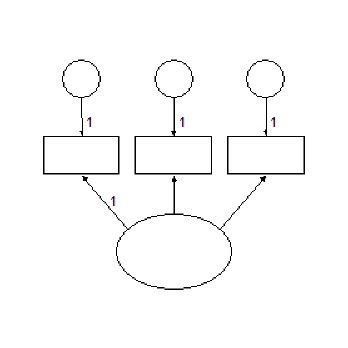
Imports Microsoft.VisualBasic Imports Amos Public Class CustomCode Implements IPlugin Public Function Mainsub() As Integer Implements IPlugin.Mainsub Dim E As PDElement Pd.FileNew(Pd.PDSaveChangesEnum.pdPromptToSaveChanges) E = Pd.DiagramDrawUnobserved(3, 3, 2, 1) Pd.DiagramDrawIndicatorVariable(E) Pd.DiagramDrawIndicatorVariable(E) Pd.DiagramDrawIndicatorVariable(E) Pd.Refresh() Pd.EditFitToPage() End Function Public Function Name() As String Implements IPlugin.Name End Function Public Function Description() As String Implements IPlugin.Description End Function End Class
###### DiagramDrawObserved Method
*Help context ID: 6501*
Draws observed variables (rectangles).
Syntax
*variable* = **Pd.DiagramDrawObserved** ()
*variable* = **Pd.DiagramDrawObserved** (*x*, *y*, *width*, *height*)
The **DiagramDrawObserved** method syntax has the following parts:
| Part | Description |
| --- | --- |
| *variable* | The newly drawn observed variable. (An object of type **PDElement**.) |
| *x* | Horizontal coordinate of the center of the rectangle, expressed in inches from the left margin. |
| *y* | Vertical coordinate of the center of the rectangle, expressed in inches from the top margin. |
| *width* | Width of the rectangle, in inches. |
| *height* | Height of the rectangle, in inches |
Calling **DiagramDrawObserved** with no arguments is equivalent to the menu selection **Diagram **®** Draw Observed**.
See [Use the Amos Graphics classes to draw a path diagram](https://ai-docs.amosdevelopment.com/06-programming-with-amos-part-3.md#t_usetheamosgraphicsclassestodrawapathdiagram)
###### DiagramDrawPath Method
*Help context ID: 6503*
Draws regression weights (single-headed arrows).
Syntax
*weight *= **Pd.DiagramDrawPath**()
*weight *= **Pd.DiagramDrawPath**(*theElement1*, *theElement2*)
*weight *= **Pd.DiagramDrawPath**(*variableName1*, *variableName2*)
*weight *= **Pd.DiagramDrawPath**(*elementNumber1*, *elementNumber2*)
*weight *= **Pd.DiagramDrawPath**(*x1, y1, x2, y2*)
The **DiagramDrawPath** method syntax has the following parts:
| Part | Description |
| --- | --- |
| *weight* | The newly drawn arrow (regression weight). (An object of type **PDElement**.) |
| *theElement1, theElement2* | (Of type **PDElement**) The new arrow points from *theElement1* to *theElement2*. |
| *variableName1, variableName2* | (String) The names of two variables. The new arrow points from *variableName1* to *variableName2*. |
| *elementNumber1, elementNumber2* | (Integer) Numbers that identify two variables. Objects in a path diagram are arbitrarily numbered beginning with 1. The new arrow points from the first variable to the second. |
| *x1, y1* | (Single) Coordinates of the variable that the new arrow points from. *x1* is its distance in inches from the left edge of the path diagram. *y1* is its distance in inches from the top edge. |
| *x2, y2* | (Single) Coordinates of the variable that the new arrow points to. *x2* is its distance in inches from the left edge of the path diagram. *y2* is its distance in inches from the top edge. |
Calling **DiagramDrawPath** with no arguments is equivalent to the menu selection **Diagram **®** Draw Path**.
See [Use the Amos Graphics classes to draw a path diagram](https://ai-docs.amosdevelopment.com/06-programming-with-amos-part-3.md#t_usetheamosgraphicsclassestodrawapathdiagram)
###### DiagramDrawUniqueVariable Method
*Help context ID: 6578*
Draws a unique (residual) variable for an existing variable.
Syntax
**Pd.DiagramDrawUniqueVariable** ()
**Pd.DiagramDrawUniqueVariable** (*theElement*)
**Pd.DiagramDrawUniqueVariable** (*variableName*)
**Pd.DiagramDrawUniqueVariable** (*elementNumber*)
The **DiagramDrawIndicatorVariable** method syntax has the following parts:
| Part | Description |
| --- | --- |
| *theElement* | (Of type **PDElement**) A variable (ellipse or rectangle). |
| *variableName* | (String) The name of a variable. |
| *elementNumber* | (Integer) A number that identifies a variable (ellipse or rectangle). Objects in a path diagram are arbitrarily numbered beginning with 1. |
Calling **DiagramDrawUniqueVariable** with no arguments is equivalent to the menu selection **Diagram **®** Draw Unique Variable**.
See [example](#t_diagramdrawuniquevariablemethodexample).
###### DiagramDrawUniqueVariable Method Example
The plugin below draws the following path diagram.
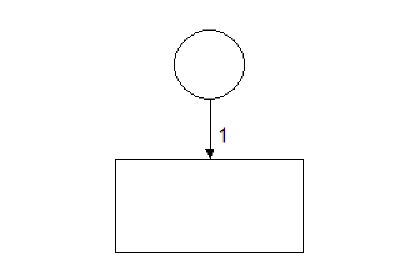
Imports Microsoft.VisualBasic Imports Amos Public Class CustomCode Implements IPlugin Public Function Mainsub() As Integer Implements IPlugin.Mainsub Dim E As PDElement Pd.FileNew(Pd.PDSaveChangesEnum.pdPromptToSaveChanges) E = Pd.DiagramDrawObserved(3, 3, 2, 1) Pd.DiagramDrawUniqueVariable(E) Pd.Refresh() Pd.EditFitToPage() End Function Public Function Name() As String Implements IPlugin.Name End Function Public Function Description() As String Implements IPlugin.Description End Function End Class
###### DiagramDrawUnobserved Method
*Help context ID: 6502*
Draws unobserved variables (ellipses).
Syntax
*variable* = **Pd.DiagramDrawUnobserved** (*x*, *y*, *width*, *height*)
The **DiagramDrawUnobserved** method syntax has the following parts:
| Part | Description |
| --- | --- |
| *variable* | The newly drawn unobserved variable (ellipse). (An object of type **PDElement**.) |
| *x* | Horizontal coordinate of the center of the ellipse, expressed in inches from the left margin. |
| *y* | Vertical coordinate of the center of the ellipse, expressed in inches from the top margin. |
| *width* | Width of the ellipse, in inches. |
| *height* | Height of the ellipse, in inches |
Calling **DiagramDrawUnobserved** with no arguments is equivalent to the menu selection **Diagram **®** Draw Unobserved**.
See [Use the Amos Graphics classes to draw a path diagram](https://ai-docs.amosdevelopment.com/06-programming-with-amos-part-3.md#t_usetheamosgraphicsclassestodrawapathdiagram)
###### DiagramFigureCaption Method
*Help context ID: 6506*
Draws new figure captions, and edits existing figure captions.
Syntax
**Pd.DiagramFigureCaption** ()
**Pd.DiagramFigureCaption** (*theElement*)
**Pd.DiagramFigureCaption** (*elementNumber*)
The **DiagramFigureCaption** method syntax has the following parts:
| Part | Description |
| --- | --- |
| *theElement* | (Of type **PDElement**) An existing figure caption. |
| *elementNumber* | (Integer) A number that identifies a figure caption. Objects in a path diagram are arbitrarily numbered beginning with 1. |
Calling **DiagramFigureCaption** with no arguments is equivalent to the menu selection **Diagram **®**Figure Caption**.
###### DiagramLoupe Method
*Help context ID: 6525*
Magnifies the region under the mouse pointer. This method is equivalent to the menu selection **Diagram **®** Loupe**.
Syntax
**Pd.DiagramLoupe**()
###### DiagramRedrawDiagram Method
*Help context ID: 6583*
Redraws the path diagram. This method is equivalent to the menu selection **Diagram **®** Redraw Diagram**.
Syntax
**Pd.DiagramRedrawDiagram**()
See [IsObservedVariable Property Example](#t_isobservedvariablepropertyexample)
###### DiagramScroll Method
*Help context ID: 6530*
Scrolls the path diagram.
Syntax
**Pd.DiagramScroll** ()
**Pd.DiagramScroll** (*x, y*)
The **DiagramScroll** method syntax has the following parts:
| Part | Description |
| --- | --- |
| *x* | The path diagram is scrolled x inches to the right. |
| *y* | The path diagram is scrolled y inches down. |
Calling **DiagramScroll** with no arguments is equivalent to the menu selection **Diagram **®** Scroll**.
See [example](#t_diagramscrollmethodexample).
###### DiagramScroll Method Example
The following plugin scrolls the path diagram one inch to the right.
Imports System Imports Amos Imports Microsoft.VisualBasic Public Class CustomCode Implements IPlugin Public Function Name() As String Implements IPlugin.Name Return "DiagramScroll Method Example" End Function Public Function Description() As String Implements IPlugin.Description End Function Public Function Mainsub() As Integer Implements IPlugin.Mainsub Amos.Pd.diagramscroll (1,0) End Function End Class
###### DiagramZoom Method
*Help context ID: 6508*
Fills the Amos window with a selected portion of the path diagram.
Syntax
**Pd.DiagramZoom** ()
**Pd.DiagramZoom** (*x1*, *y1*, *x2*, *y2*)
The **DiagramZoom** method syntax has the following parts:
| Part | Description |
| --- | --- |
| *x1*, *y1*, *x2*, *y2* | (x1, y1) and (x2, y2) specify two opposite corners of a rectangle. x1 and x2 are expressed in inches from the left margin. y1 and y2 are expressed in inches from the top margin. The **DiagramZoom** method resizes the path diagram so that the specified rectangle fills the Amos window. |
Calling **DiagramZoom** with no arguments is equivalent to the menu selection **Diagram **®** Zoom**.
See [example](#t_diagramzoommethodexample).
###### DiagramZoom Method Example
The following plugin zooms in or out so that the latent variables in the path diagram just fill the Amos Graphics window. If the path diagram contains no latent variables, no zoom is performed.
Imports Microsoft.VisualBasic Imports Amos Public Class CustomCode Implements IPlugin Public Function Mainsub() As Integer Implements IPlugin.Mainsub Dim ZTop As Object, ZBottom As Object Dim ZLeft As Object, ZRight As Object Dim E As PDElement Dim Temp As Single ' 999999 inches is an impossible value Const HugeNumber = 999999 ZLeft = HugeNumber ZTop = HugeNumber ZRight = -HugeNumber ZBottom = -HugeNumber For Each E In Pd.PDElements If E.IsLatentVariable Then Temp = E.OriginX - E.Width / 2 If Temp < ZLeft Then ZLeft = Temp Temp = E.OriginY - E.Height / 2 If Temp < ZTop Then ZTop = Temp Temp = E.OriginX + E.Width / 2 If Temp > ZRight Then ZRight = Temp Temp = E.OriginY + E.Height / 2 If Temp > ZBottom Then ZBottom = Temp End If Next 'If there are no latent variables, return without zooming If ZLeft = HugeNumber Then Return 0 If ZTop = HugeNumber Then Return 0 If ZRight = -HugeNumber Then Return 0 If ZBottom = -HugeNumber Then Return 0 Pd.DiagramZoom(ZLeft, ZTop, ZRight, ZBottom) End Function Public Function Name() As String Implements IPlugin.Name End Function Public Function Description() As String Implements IPlugin.Description End Function End Class
###### DiagramZoomIn Method
*Help context ID: 6531*
Magnifies the screen image of the path diagram. This method is equivalent to the menu selection **Diagram **®** Zoom In**.
Syntax
**Pd.DiagramZoomIn** ()
See [example](#t_diagramzoominmethodexample).
###### DiagramZoomIn Method Example
The following plugin resizes the screen image of the path diagram so that one printed page just fits in the Amos Graphics window, and then enlarges the screen image of the path diagram.
Imports Microsoft.VisualBasic Imports Amos Imports Amos.Pd Public Class CustomCode Implements IPlugin Public Function Mainsub() As Integer Implements IPlugin.Mainsub DiagramZoomPage() DiagramZoomIn() End Function Public Function Name() As String Implements IPlugin.Name End Function Public Function Description() As String Implements IPlugin.Description End Function End Class
###### DiagramZoomOut Method
*Help context ID: 6532*
Reduces the size of the screen image of the path diagram. This method is equivalent to the menu selection **Diagram **®** Zoom Out**.
Syntax
**Pd.DiagramZoomOut** ()
See [example](#t_diagramzoomoutmethodexample).
###### DiagramZoomOut Method Example
The following plugin resizes the screen image of the path diagram so that one printed page just fits in the Amos Graphics window, and then reduces the size of the screen image of the path diagram.
Imports Microsoft.VisualBasic Imports Amos Imports Amos.Pd Public Class CustomCode Implements IPlugin Public Function Mainsub() As Integer Implements IPlugin.Mainsub DiagramZoomPage() DiagramZoomOut() End Function Public Function Name() As String Implements IPlugin.Name End Function Public Function Description() As String Implements IPlugin.Description End Function End Class
###### DiagramZoomPage Method
*Help context ID: 6533*
Resizes the screen image of the path diagram so that one printed page just fits the Amos window. This method is equivalent to the menu selection **Diagram **®** Zoom Page**.
Syntax
**Pd.DiagramZoomPage** ()
See [DiagramZoomIn Method Example](#t_diagramzoominmethodexample)
###### DisplayInputPD Method
*Help context ID: 6632*
Displays the input path diagram. This method is equivalent to pressing .
Syntax
**Pd.DisplayInputPD** ()
See [DisplayOutputPD Method](#t_displayoutputpdmethod)
###### DisplayOutputPD Method
*Help context ID: 6633*
Displays the input path diagram. This method is equivalent to pressing .
Syntax
**Pd.DisplayOutputPD** ()
See [DisplayInputPD Method](#t_displayinputpdmethod)
###### DoubleClickMouse Method
*Help context ID: 6611*
The **DoubleClickMouse** method is no longer supported.
###### DragMouse Method
*Help context ID: 6609*
Drags the mouse from one point to another.
Syntax
**Pd.DragMouse** (*theElement, x2, y2*)
**Pd.DragMouse** (*x1, y1, x2, y2*)
The **DragMouse** method syntax has the following parts:
| Part | Description |
| --- | --- |
| *theElement* | An object of type **PDElement**. The drag operation begins at the point with coordinates (*theElement*.[originX](#t_originxproperty), *theElement*.[originY](#t_originyproperty)). |
| *x1, y1* | Coordinates of the location where the drag operation begins (the left mouse button is pressed). x1 is its distance, in inches, from the left margin. y1 is its distance, in inches, from the top margin. |
| *x2, y2* | Coordinates of the location where the drag operation ends (the left mouse button is released). x2 is its distance, in inches, from the left margin. y2 is its distance, in inches, from the top margin. |
###### EditCopy Method
*Help context ID: 6553*
Copies the path diagram to the Windows clipboard. This method is equivalent to the menu selection **Edit **®** Copy**.
Syntax
**Pd.EditCopy** ()
See [example](#t_editcopymethodexample).
###### EditCopy Method Example
Running the following plugin has the same effect as selecting **Edit ****®**** Copy** on the Amos Graphics menu.
Imports System Imports Microsoft.VisualBasic Imports Amos Public Class CustomCode Implements IPlugin Public Function Mainsub() As Integer Implements IPlugin.Mainsub Pd.EditCopy End Function Public Function Name() As String Implements IPlugin.Name End Function Public Function Description() As String Implements IPlugin.Description End Function End Class
###### EditDeselectAll Method
*Help context ID: 6568*
Deselects all objects. This method is equivalent to the menu selection **Edit **®** Deselect All**.
Syntax
**Pd.EditDeselectAll** ()
See [Use the Amos Graphics classes to draw a path diagram](https://ai-docs.amosdevelopment.com/06-programming-with-amos-part-3.md#t_usetheamosgraphicsclassestodrawapathdiagram)
###### EditDragProperties Method
*Help context ID: 6586*
Copies the properties of one object (the source object) to another object (the target object).
Syntax
**Pd.EditDragProperties** ()
**Pd.EditDragProperties** (*theElement1, theElement2, height, width, x, y, nameOrCaption, parameterConstraints, parameterPosition, font, parameterFont, penWidth, curvature, colors, visibility*)
**Pd.EditDragProperties***(elementNumber1, elementNumber2, height, width, x, y, nameOrCaption, parameterConstraints, parameterPosition, font, parameterFont, penWidth, curvature, colors, visibility*)
**Pd.EditDragProperties***(variableName1, variableName2, height, width, x, y, nameOrCaption, parameterConstraints, parameterPosition, font, parameterFont, penWidth, curvature, colors, visibility*)
The **EditDragProperties** method syntax has the following parts:
| Part | Description |
| --- | --- |
| *theElement1* *theElement2* | (Objects of type **PDElement**.) Properties are copied from *theElement1 to theElement2*. |
| *elementNumber1* *elementNumber2* | (Integers) Properties are copied from object number *elementNumber1* to object number *elementNumber2*. (Objects in the path diagram are numbered starting with 1.) |
| *variableName1* *variableName2* | (Strings) Properties are copied from the variable named *variableName1* to the variable named *variableName1*. |
| *height* | Optional. True if the source object's height is to be copied. |
| *width* | Optional. True if the source object's width is to be copied. |
| *x* | Optional. True if the source object's x (horizontal) coordinate is to be copied. |
| *y* | Optional. True if the source object's y (vertical) coordinate is to be copied. |
| *nameOrCaption* | Optional. True if the source object's name (in the case of a rectangle or ellipse) or caption (in the case of a figure caption) is to be copied. |
| *parameterConstraints* | Optional. True if the source object's parameter constraints are to be copied. |
| *parameterPosition* | Optional. True if the source object's parameter position is to be copied. |
| *font* | Optional. True if the source object's name or caption font is to be copied. |
| *parameterFont* | Optional. True if the source object's parameter font is to be copied. |
| *penWidth* | Optional. True if the source object's pen width is to be copied. |
| *curvature* | Optional. True if the source object's curvature is to be copied. |
| *colors* | Optional. True if the source object's colors are to be copied. |
| *visibility* | Optional. True if the source object's visibility properties are to be copied. |
Calling **EditDragProperties** with no arguments is equivalent to the menu selection **Edit **®** Drag Properties.**
###### EditDuplicate Method
*Help context ID: 6510*
Makes additional copies of rectangles, ellipses and captions.
Syntax
**Pd.EditDuplicate** ()
**Pd.EditDuplicate** (*theElement, x2, y2*)
**Pd.EditDuplicate** (*variableName, x2, y2*)
**Pd.EditDuplicate** (*elementNumber, x2, y2*)
The **EditDuplicate** method syntax has the following parts:
| Part | Description |
| --- | --- |
| *theElement* | A path diagram object (of type **PDElement**) to be copied. |
| *variableName* | (String) The name of a variable to be copied. |
| *elementNumber* | An integer that specifies an object to be copied. Objects are numbered starting with 1. |
| *x2*, *y2* | (Single) The coordinates of the newly created object. x2 is its distance, in inches, from the left margin. y2 is its distance, in inches, from the top margin. |
Calling **EditDuplicate** with no arguments is equivalent to the menu selection **Edit **®** Duplicate**.
###### EditErase Method
*Help context ID: 6505*
Erases objects.
Syntax
**Pd.EditErase** ()
**Pd.EditErase** (*theElement*)
**Pd.EditErase** (*variableName*)
**Pd.EditErase** (*elementNumber*)
The **EditErase** method syntax has the following parts:
| Part | Description |
| --- | --- |
| *theElement* | A path diagram object (of type **PDElement**) to be erased. |
| *variableName* | (String) The name of a variable to be erased. |
| *elementNumber* | An integer that specifies an object to be erased. Objects are numbered starting with 1. |
Calling **EditErase** with no arguments is equivalent to the menu selection **Edit **®** Erase**.
###### EditFitToPage Method
*Help context ID: 6537*
Resizes the path diagram (not just its screen image) so that it fits on a page. This method is equivalent to the menu selection **Edit **®** Fit to Page**.
Syntax
**Pd.EditFitToPage** ()
See [Use the Amos Graphics classes to draw a path diagram](https://ai-docs.amosdevelopment.com/06-programming-with-amos-part-3.md#t_usetheamosgraphicsclassestodrawapathdiagram)
###### EditLink Method
*Help context ID: 6580*
Forms a group of objects that will be treated as a unit in future operations. This method is equivalent to the menu selection **Edit **®** Link**.
Syntax
**Pd.EditLink** ()
###### EditMove Method
*Help context ID: 6509*
Moves rectangles, ellipses and captions.
Syntax
**Pd.EditMove** ()
**Pd.EditMove** (*theElement, x2, y2*)
**Pd.EditMove** (*variableName, x2, y2*)
**Pd.EditMove** (*elementNumber, x2, y2*)
The **EditMove** method syntax has the following parts:
| Part | Description |
| --- | --- |
| *theElement* | A path diagram object (of type **PDElement**) to be moved. |
| *variableName* | (String) The name of a variable to be moved. |
| *elementNumber* | An integer that specifies an object to be moved. Objects are numbered starting with 1. |
| *x2*, *y2* | (Single) The new coordinates of the object. x2 is its distance, in inches, from the left margin. y2 is its distance, in inches, from the top margin. |
Calling **EditMove** with no arguments is equivalent to the menu selection **Edit **®** Move**.
###### EditMoveParameter Method
*Help context ID: 6523*
Allows parameter constraints and estimates to be moved. This method is equivalent to the menu selection **Edit **®** Move Parameter**.
Syntax
**Pd.EditMoveParameter** ()
###### EditPaste Method
*Help context ID: 6662*
Pastes a path diagram, or a part of a path diagram, from the Windows clipboard into the Amos Graphics window. This method is equivalent to the menu selection **Edit **®** Paste**.
Syntax
**Pd.EditPaste** ()
###### EditRedo Method
*Help context ID: 6552*
Undoes the effect of the most recent use of the [EditUndo](#t_editundomethod) method. This method is equivalent to the menu selection **Edit **®** Redo**.
Syntax
**Pd.EditRedo**()
###### EditReflect Method
*Help context ID: 6576*
Reflects the indicators of a latent variable.
Syntax
**Pd.EditReflect** ()
**Pd.EditReflect** (*theElement*)
**Pd.EditReflect** (*variableName*)
**Pd.EditReflect** (*elementNumber*)
The **EditReflect** method syntax has the following parts:
| Part | Description |
| --- | --- |
| *theElement* | A latent variable (of type **PDElement**). |
| *variableName* | (String) The name of a latent variable. |
| *elementNumber* | An integer that specifies an object that is a latent variable. Objects are numbered starting with 1. |
Calling **EditReflect** with no arguments is equivalent to the menu selection **Edit **®** Reflect**.
###### EditRotate Method
*Help context ID: 6575*
Rotates the indicators of a latent variable.
Syntax
**Pd.EditRotate** ()
**Pd.EditRotate** (*theElement*)
**Pd.EditRotate** (*variableName*)
**Pd.EditRotate** (*elementNumber*)
The **EditRotate** method syntax has the following parts:
| Part | Description |
| --- | --- |
| *theElement* | A latent variable (of type **PDElement**). |
| *variableName* | (String) The name of a latent variable. |
| *elementNumber* | An integer that specifies an object that is a latent variable. Objects are numbered starting with 1. |
Calling **EditRotate** with no arguments is equivalent to the menu selection **Edit **®** Rotate**.
See [example](#t_editrotatemethodexample).
###### EditRotate Method Example
The plugin below draws the following path diagram.
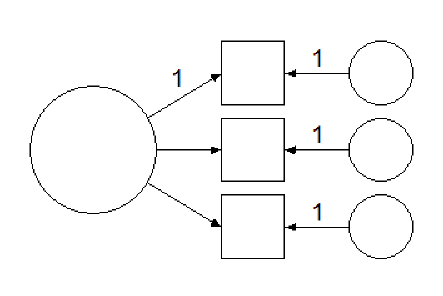
Imports Microsoft.VisualBasic Imports Amos Imports Amos.Pd Public Class CustomCode Implements IPlugin Public Function Mainsub() As Integer Implements IPlugin.Mainsub Dim E As PDElement If FileNew(PDSaveChangesEnum.pdPromptToSaveChanges) Then Return 0 End If E = DiagramDrawUnobserved(3, 3, 2, 2) DiagramDrawIndicatorVariable(E) DiagramDrawIndicatorVariable(E) DiagramDrawIndicatorVariable(E) EditRotate(E) Pd.Refresh() EditFitToPage() End Function Public Function Name() As String Implements IPlugin.Name End Function Public Function Description() As String Implements IPlugin.Description End Function End Class
###### EditSelect Method
*Help context ID: 6514*
Selects one object at a time.
Syntax
**Pd.EditSelect** ()
**Pd.EditSelect** (*theElement*)
**Pd.EditSelect** (*variableName*)
**Pd.EditSelect** (*elementNumber*)
The **EditSelect** method syntax has the following parts:
| Part | Description |
| --- | --- |
| *theElement* | An object (of type **PDElement**) to be selected. |
| *variableName* | (String) The name of a variable to be selected. |
| *elementNumber* | An integer that specifies an object to be selected. Objects are numbered starting with 1. |
Calling **EditSelect** with no arguments is equivalent to the menu selection **Edit **®** Select**.
###### EditSelectAll Method
*Help context ID: 6567*
Selects all objects in the path diagram. This method is equivalent to the menu selection **Edit **®** Select All**.
Syntax
**Pd.EditSelectAll** ()
See [Use the Amos Graphics classes to draw a path diagram](https://ai-docs.amosdevelopment.com/06-programming-with-amos-part-3.md#t_usetheamosgraphicsclassestodrawapathdiagram)
###### EditShapeOfObject Method
*Help context ID: 6524*
Allows the user to change the size and shape of variables (rectangles and ellipses). This method is equivalent to the menu selection **Edit **®** Shape Of Object**.
Syntax
**Pd.EditShapeOfObject** ()
See [Use the Amos Graphics classes to draw double-headed arrows](https://ai-docs.amosdevelopment.com/06-programming-with-amos-part-3.md#t_usetheamosgraphicsclassestodrawdoubleheadedarrows)
###### EditSpaceHorizontally Method
*Help context ID: 6520*
Arranges selected objects so that they are equally spaced horizontally. This method is equivalent to the menu selection **Edit **®** Space Horizontally**.
Syntax
**Pd.EditSpaceHorizontally** ()
###### EditSpaceVertically Method
*Help context ID: 6521*
Arranges selected objects so that they are equally spaced vertically. This method is equivalent to the menu selection **Edit **®** Space Vertically**.
Syntax
**Pd.EditSpaceVertically** ()
###### EditTouchUp Method
*Help context ID: 6566*
Rearranges the arrows in a path diagram in a way intended to be aesthetically pleasing.
Syntax
**Pd.EditTouchUp** ()
**Pd.EditTouchUp** (*theElement*)
**Pd.EditTouchUp** (*variableName*)
**Pd.EditTouchUp** (*elementNumber*)
The **EditTouchUp** method syntax has the following parts:
| Part | Description |
| --- | --- |
| *theElement* | A rectangle or ellipse (of type **PDElement**). Arrows that touch the rectangle or ellipse will be repositioned. |
| *variableName* | (String) The name of a variable. Arrows that touch the variable's rectangle or ellipse will be repositioned. |
| *elementNumber* | An integer that specifies a rectangle or ellipse. Objects in a path diagram are numbered starting with 1. Arrows that touch the rectangle or ellipse will be repositioned. |
Calling **EditTouchUp** with no arguments is equivalent to the menu selection **Edit **®** Touch Up**.
See [Use the Amos Graphics classes to draw a path diagram](https://ai-docs.amosdevelopment.com/06-programming-with-amos-part-3.md#t_usetheamosgraphicsclassestodrawapathdiagram)
###### EditUndo Method
*Help context ID: 6551*
Undoes the most recent change to the path diagram. This method is equivalent to the menu selection **Edit **®** Undo**.
Syntax
**Pd.EditUndo** ()
###### EnableUserInteraction Method
*Help context ID: 6631*
Enable or disable toolbox buttons and menus.
Syntax
**Pd.EnableUserInteraction** (*tf*)
The **EnableUserInteraction** method syntax has the following parts:
| Part | Description |
| --- | --- |
| *tf* | False to disable toolbox buttons and menus. True to enable them. |
###### EnableUserInteraction2 Method
Like EnableUserInteraction, EnableUserInteraction2 enables or disables toolbox buttons and menus. However EnableUserInteraction2 always leaves the following toolbar buttons and menu items enabled.
- [](https://ai-docs.amosdevelopment.com/02-amos-graphics-reference-guide-part-1.md#t_printapathdiagram)[Print a path diagram](https://ai-docs.amosdevelopment.com/02-amos-graphics-reference-guide-part-1.md#t_printapathdiagram)
- [](https://ai-docs.amosdevelopment.com/02-amos-graphics-reference-guide-part-1.md#t_duplicateobjects)[Duplicate objects](https://ai-docs.amosdevelopment.com/02-amos-graphics-reference-guide-part-1.md#t_duplicateobjects)
- [](https://ai-docs.amosdevelopment.com/02-amos-graphics-reference-guide-part-1.md#t_saveapathdiagram)[Save a path diagram](https://ai-docs.amosdevelopment.com/02-amos-graphics-reference-guide-part-1.md#t_saveapathdiagram)
- [](https://ai-docs.amosdevelopment.com/02-amos-graphics-reference-guide-part-1.md#t_saveapathdiagramwithanewname)[Save a path diagram with a new name](https://ai-docs.amosdevelopment.com/02-amos-graphics-reference-guide-part-1.md#t_saveapathdiagramwithanewname)
Syntax
**Pd.EnableUserInteraction2** (*tf. showHandCursorOnCanvas*)
The **EnableUserInteraction2** method syntax has the following parts:
| Part | Description |
| --- | --- |
| *tf* | True to enable toolbox buttons and menus. False to disable them. |
| *showHandCursorOnCanvas* | True to display the 'hand' cursor on the path diagram area of the Amos Graphics window and display the 'wait' cursor on the remainder of the Amos Graphics window. False to display the 'wait' cursor on the entire Amos Graphics window. |
See [example](#t_enableuserinteraction2methodexample).
###### EnableUserInteraction2 Method Example
The following plugin asks the user if it is ok to change the border colors of objects in the path diagram. If the user responds "yes", the program sets the border colors to magenta. The **EnableUserInteraction2** method is used to prevent the user from interacting with the Amos Graphics window while the program is waiting for a user response.
Imports Microsoft.VisualBasic Imports Amos Imports Amos.Pd Public Class CustomCode Implements IPlugin Public Function Mainsub() As Integer Implements IPlugin.Mainsub Dim x As PDElement Dim Result As MsgBoxResult EnableUserInteraction2(False, False) Result = MsgBox("Do you want to change the border colors?", vbYesNo) EnableUserInteraction2(True, False) If Result = vbYes Then For Each x In Pd.PDElements x.BorderColor = System.Drawing.Color.Magenta.ToArgb Pd.refresh() Next End If End Function Public Function Name() As String Implements IPlugin.Name End Function Public Function Description() As String Implements IPlugin.Description End Function End Class
###### FileDataFiles Method
*Help context ID: 6543*
Opens a dialog to allow the user to specify the database file (or files) to be analyzed. This method is equivalent to the menu selection **File **®** Data Files**.
Syntax
**Pd.FileDataFiles** ()
###### FileExit Method
*Help context ID: 6546*
Closes the Amos Graphics window. This method is equivalent to the menu selection **File **®** Exit**.
Syntax
**Pd.FileExit** ()
See [MouseDown and MouseUp Events Example](#t_mousedownandmouseupeventsexample).
###### FileNew Method
*Help context ID: 6538*
Starts a new path diagram.
Syntax
*result* = **Pd.FileNew** ()
*result* = **Pd.FileNew** (*saveOptions*)
The **FileNew** method syntax has the following parts:
| Part | Description |
| --- | --- |
| *result* | True if an error occurs. |
| *saveOptions* | Optional. A constant, as specified in Settings, that tells Amos what to do if there is currently an unsaved path diagram in the Amos window. |
If *saveOptions *is omitted, the **FileNew** method is equivalent to the menu selection **File **®** New**.
**Settings**
The settings for *saveOptions *are:
| Constant | Value | Description |
| --- | --- | --- |
| pdPromptToSaveChanges (default) | 0 | Prompt the user to save or discard the current path diagram |
| pdDoNotSaveChanges | 1 | Discard the current path diagram. |
| pdSaveChanges | 2 | Save the current path diagram. |
See [Use the Amos Graphics classes to draw a path diagram](https://ai-docs.amosdevelopment.com/06-programming-with-amos-part-3.md#t_usetheamosgraphicsclassestodrawapathdiagram)
###### FileNewWithTemplate Method
*Help context ID: 6595*
Starts a new path diagram using a template.
Syntax
*result* = **Pd.FileNewWithTemplate** ()
*result* = **Pd.FileNewWithTemplate** (*templateFileName*)
*result* = **Pd.FileNewWithTemplate** (*templateFileName*,*saveOptions*)
The **FileNewWithTemplate** method syntax has the following parts:
| Part | Description |
| --- | --- |
| *result* | True if an error occurs or if the user cancels the operation. |
| *templateFileName* | The name of a template file. |
| *saveOptions* | Optional. A constant, as specified in Settings, that tells Amos what to do if there is currently an unsaved path diagram in the Amos window. |
Calling **FileNewWithTemplate** with no arguments is equivalent to the menu selection **File **®** New With Template**.
**Settings**
The settings for *saveOptions *are:
| Constant | Value | Description |
| --- | --- | --- |
| pdPromptToSaveChanges (default) | 0 | Prompt the user to save or discard the current path diagram |
| pdDoNotSaveChanges | 1 | Discard the current path diagram. |
| pdSaveChanges | 2 | Save the current path diagram. |
###### FileOpen Method
*Help context ID: 6539*
Retrieves a path diagram that was saved previously.
Syntax
*result* = **Pd.FileOpen** ()
*result* = **Pd.FileOpen** (*fileName*)
*result* = **Pd.FileOpen** (*fileName*, *saveOptions*)
The **FileOpen** method syntax has the following parts:
| Part | Description |
| --- | --- |
| *result* | True if an error occurs or if the user cancels the operation. |
| *fileName* | The name of a path diagram file (a \*.amw file). |
| *saveOptions* | Optional. A constant, as specified in Settings, that tells Amos what to do if there is currently an unsaved path diagram in the Amos window. |
Calling **FileOpen** with no arguments is equivalent to the menu selection **File **®** Open**.
**Settings**
The settings for *saveOptions *are:
| Constant | Value | Description |
| --- | --- | --- |
| PdPromptToSaveChanges(default) | 0 | Prompt the user to save or discard the current path diagram |
| PdDoNotSaveChanges | 1 | Discard the current path diagram. |
| PdSaveChanges | 2 | Save the current path diagram. |
See [DiagramScroll Method Example](#t_diagramscrollmethodexample)
###### FilePrint Method
*Help context ID: 6544*
Opens a dialog box for printing path diagrams. This method is equivalent to the menu selection **File **®** Print**.
Syntax
**Pd.FilePrint** ()
###### FileRetrieveBackup Method
This method is equivalent to the menu selection **File **®** Retrieve Backup**.
Syntax
**Pd.FileRetrieveBackup** ()
###### FileSave Method
*Help context ID: 6540*
Saves the path diagram as a disk file. This method is equivalent to the menu selection **File **®** Save**.
Syntax
*result* = **Pd.FileSave** ()
The **FileSave** method syntax has the following parts:
| Part | Description |
| --- | --- |
| *result* | True if an error occurs or if the user cancels the operation. |
###### FileSaveAs Method
*Help context ID: 6541*
Saves a path diagram with a new name.
Syntax
*result* = **Pd.FileSaveAs** ()
*result* = **Pd.FileSaveAs** (*fileName*)
The **FileSaveAs** method syntax has the following parts:
| Part | Description |
| --- | --- |
| *result* | True if an error occurs or if the user cancels the operation. |
| *fileName* | Optional new file name. If a file with this name already exists, it is overwritten. |
Calling **FileSaveAs** with no arguments is equivalent to the menu selection **File **®** Save As**.
See [GroupSelect Method Example](#t_groupselectmethodexample)
###### FileSaveAsTemplate Method
*Help context ID: 6596*
Saves your path diagram as a template.
Syntax
*result* = **Pd.FileSaveAsTemplate** ()
*result* = **Pd.FileSaveAsTemplate** (*templateFileName*)
The **FileSaveAsTemplate** method syntax has the following parts:
| Part | Description |
| --- | --- |
| *result* | True if an error occurs or if the user cancels the operation. |
| *templateFileName* | Optional. Name for the template file. |
Calling **FileSaveAsTemplate** with no arguments is equivalent to the menu selection **File **®** Save As Template.**
###### GetButton Method
Gets a **Button** control in an Amos Graphics window.
Syntax
*result* = **Pd.GetButton** (*formName*, *controlName*)
The **GetButton**method syntax has the following parts:
| Part | Description |
| --- | --- |
| *result* | *An object of type ***System.Windows.Forms.Button**. |
| *formName* | (String) The name of an Amos Graphics form. |
| *controlName* | (String) The name of a Button on an Amos Graphics form. |
To obtain *formName* and *controlName* values for a Button, hold the mouse pointer over the Button and press F1.
###### GetCheckBox Method
Gets a **CheckBox** control in an Amos Graphics window.
Syntax
*result* = **Pd.GetCheckBox** (*formName*, *controlName*)
The **GetCheckBox**method syntax has the following parts:
| Part | Description |
| --- | --- |
| *result* | *An object of type ***System.Windows.Forms.CheckBox**. |
| *formName* | (String) The name of an Amos Graphics form. |
| *controlName* | (String) The name of a CheckBox on an Amos Graphics form. |
To obtain *formName* and *controlName* values for a CheckBox, hold the mouse pointer over the CheckBox and press F1.
###### GetCheckBox Example 1
The following plugin displays a messagebox that tells whether there is a check mark next to **Estimate means and intercepts** in the **Analysis Properties** window.
Imports Microsoft.VisualBasic
Imports Amos Imports Amos.Pd Public Class CustomCode Implements IPlugin Public Function Mainsub() As Integer Implements IPlugin.Mainsub If Pd.GetCheckBox("AnalysisPropertiesForm", "MeansInterceptsCheck").Checked Then MsgBox("The checkbox is checked.") Else MsgBox("The checkbox is not checked.") End If End Function Public Function Name() As String Implements IPlugin.Name End Function Public Function Description() As String Implements IPlugin.Description End Function End Class
###### GetCheckBox Example 2
The following plugin puts a check mark next to **Estimate means and intercepts** in the **Analysis Properties** window.
Imports Microsoft.VisualBasic
Imports Amos Public Class CustomCode Implements IPlugin Public Function Mainsub() As Integer Implements IPlugin.Mainsub Pd.GetCheckBox("AnalysisPropertiesForm", "MeansInterceptsCheck").Checked = True End Function Public Function Name() As String Implements IPlugin.Name End Function Public Function Description() As String Implements IPlugin.Description End Function End Class
###### GetComboBox Method
Gets a **ComboBox** control in an Amos Graphics window.
Syntax
*result* = **Pd.GetComboBox** (*formName*, *controlName*)
The **GetComboBox**method syntax has the following parts:
| Part | Description |
| --- | --- |
| *result* | *An object of type ***System.Windows.Forms.ComboBox**. |
| *formName* | (String) The name of an Amos Graphics form. |
| *controlName* | (String) The name of a ComboBox on an Amos Graphics form. |
To obtain *formName* and *controlName* values for a ComboBox, hold the mouse pointer over the ComboBox and press F1.
###### GetControl Method
*Help context ID: 6643*
The **GetControl** method is no longer supported. Use one of the following methods instead.
- [GetButton Method](#t_7785)
- [GetCheckBox Method](#t_7786)
- [GetComboBox Method](#t_8362)
- [GetNumericUpDown Method](#t_8363)
- [GetRadioButton Method](#t_7787)
- [GetTextBox Method](#t_7788)
###### GetDataFile Method of the Pd class
Gets information about the data file for a single group.
See [example](#t_7818).
###### GetDataFile Method Example (Pd class)
Imports System Imports Microsoft.VisualBasic Imports Amos Public Class CustomCode Implements IPlugin Public Function Mainsub() As Integer Implements IPlugin.Mainsub Dim dbformat As PXMLPersist.CDataTable.cDatabaseFormat Dim FileName As String Dim TableName As String Dim GroupingVariable As String Dim GroupingValue As Object Dim igroup As Integer Dim message As String For igroup = 1 To Pd.ngroups Pd.GetDataFile(igroup, dbformat, FileName, TableName, GroupingVariable, GroupingValue) message &= vbcrlf & "The data file for group " & igroup & " is " & FileName message &= vbcrlf & "The table name Is " & TableName & "" Next MsgBox(message,, "GetDataFile Example") End Function Public Function Name() As String Implements IPlugin.Name End Function Public Function Description() As String Implements IPlugin.Description End Function End Class
###### GetModels Method
*Help context ID: 6646*
Gets information about the models specified in Amos Graphics.
Syntax
**Pd.GetModels** (*sNames*, *sConstraints*)
The **GetModels** method syntax has the following parts:
| Part | Description |
| --- | --- |
| *sNames* | A string array that contains the model names. |
| *sConstraints* | A string array. Each element of the array contains the constraints of a single model. |
See [example](#t_getmodelsmethodexample).
###### GetModels Method Example
The following plugin displays all model names and the constraints imposed by each model.
Imports System.Diagnostics Imports Microsoft.VisualBasic Imports Amos Public Class CustomCode Implements IPlugin Public Function Mainsub() As Integer Implements IPlugin.Mainsub Dim i As Long Dim NModels As Long Dim SNames() As String Dim SConstraints() As String Pd.GetModels(SNames, SConstraints) NModels = UBound(SNames) Dim message As String Debug.WriteLine("Number of models = " & NModels) For i = 1 To NModels message &= "Name: " & SNames(i) message &= vbCrLf message &= "Constraints: " & SConstraints(i) message &= vbCrLf & vbCrLf Next MsgBox(message) End Function Public Function Name() As String Implements IPlugin.Name End Function Public Function Description() As String Implements IPlugin.Description End Function End Class
###### GetNGroups Method
*Help context ID: 6647*
Gets the number of groups.
Syntax
*result* = **Pd.GetNGroups** ()
The **GetNGroups** method syntax has the following parts:
| Part | Description |
| --- | --- |
| *result* | The number of groups. |
###### GetNumericUpDown Method
Gets a **NumericUpDown** control in an Amos Graphics window.
Syntax
*result* = **Pd.GetNumericUpDown** (*formName*, *controlName*)
The **GetNumericUpDown**method syntax has the following parts:
| Part | Description |
| --- | --- |
| *result* | *An object of type ***System.Windows.Forms.NumericUpDown**. |
| *formName* | (String) The name of an Amos Graphics form. |
| *controlName* | (String) The name of a NumericUpDown control on an Amos Graphics form. |
To obtain *formName* and *controlName* values for a NumericUpDown control, hold the mouse pointer over the NumericUpDown control and press F1.
###### GetRadioButton Method
Gets a **RadioButton** control in an Amos Graphics window.
Syntax
*result* = **Pd.GetRadioButton** (*formName*, *controlName*)
The **GetRadioButton**method syntax has the following parts:
| Part | Description |
| --- | --- |
| *result* | *An object of type ***System.Windows.Forms.RadioButton**. |
| *formName* | (String) The name of an Amos Graphics form. |
| *controlName* | (String) The name of a RadioButton on an Amos Graphics form. |
To obtain *formName* and *controlName* values for a RadioButton, hold the mouse pointer over the RadioButton and press F1.
###### GetTextBox Method
Gets a **TextBox** control in an Amos Graphics window.
Syntax
*result* = **Pd.GetTextBox** (*formName*, *controlName*)
The **GetTextBox**method syntax has the following parts:
| Part | Description |
| --- | --- |
| *result* | *An object of type ***System.Windows.Forms.TextBox**. |
| *formName* | (String) The name of an Amos Graphics form. |
| *controlName* | (String) The name of a TextBox on an Amos Graphics form. |
To obtain *formName* and *controlName* values for a TextBox, hold the mouse pointer over the TextBox and press F1.
###### GlobalShowMenu Method
*Help context ID: 6560*
This method is no longer supported.
###### GlobalShowTools Method
*Help context ID: 6561*
This method is no longer supported.
###### GroupSelect Method
*Help context ID: 6623*
Selects a group. This method is equivalent to selecting a group in the group list of the Amos Graphics window.
Syntax
**Pd.GroupSelect** (*groupNameOrNumber*)
The **GroupSelect** method syntax has the following parts:
| Part | Description |
| --- | --- |
| *groupNameOrNumber* | A group name, or a group number (where group number 1 is the first group). |
See [example](#t_groupselectmethodexample).
###### GroupSelect Method Example
The following plugin opens the file **Ex11-ab.amw**, renames the group **Girls** to **Female**, deletes the group **Boys**, and saves the result in the file **Temp.amw**. (If the file **Temp.amw** already exists in the examples directory, it is overwritten.)
Imports Microsoft.VisualBasic Imports Amos Imports Amos.Pd Public Class CustomCode Implements IPlugin Public Function Mainsub() As Integer Implements IPlugin.Mainsub If FileOpen(AmosDir & "Examples\English\Ex11-ab") Then Return 0 End If GroupSelect("Girls") ModelFitManageGroupsRename("Female") GroupSelect("Boys") ModelFitManageGroupsDelete() FileSaveAs(AmosDir & "Examples\English\Temp.amw") End Function Public Function Name() As String Implements IPlugin.Name End Function Public Function Description() As String Implements IPlugin.Description End Function End Class
###### HelpAmosOnTheWeb Method
*Help context ID: 6602*
Uses your web browser to visit the Amos website. This method is equivalent to the menu selection **Help **®** Amos on the Web**.
Syntax
**Pd.HelpAmosOnTheWeb** ()
###### HelpContents Method
*Help context ID: 6557*
Opens a help window and displays the table of contents for Amos's online help system. This method is equivalent to the menu selection **Help**®**Contents**.
Syntax
**Pd.HelpContents** ()
###### HighlightArrows Method
*Help context ID: 6640*
Makes the arrows in the path diagram change color when the mouse pointer approaches. (Other path diagram objects do not change color.) Use this method to let the user click an arrow.
Syntax
**Pd.HighlightArrows** ()
###### HighlightNothing Method
*Help context ID: 6641*
Prevents the objects in the path diagram from changing color when the mouse pointer approaches.
Syntax
**Pd.HighlightNothing** ()
###### InterfacePropertiesApplyClick Method
*Help context ID: 6657*
This method has no effect and is deprecated.
Syntax
*result* = **Pd.InterfacePropertiesApplyClick**
The **InterfacePropertiesApplyClick**method syntax has the following parts:
| Part | Description |
| --- | --- |
| *result* | (Integer) 0 if no error. |
###### InvalidateOutput Method
*Help context ID: 6639*
Disables the toolbox buttons and menu items that are used for displaying results. If an output path diagram is visible, it is replaced by the input path diagram. Use this method after your program has made a change that makes previously generated output invalid.
Syntax
**Pd.InvalidateOutput** ()
###### IsDirtyAmp Method
*Help context ID: 6637*
Gets a value that tells how much the model has changed since the last time it was fitted.
Syntax
*result* = **Pd.IsDirtyAmp** ()
The **IsDirtyAmp**method syntax has the following parts:
| Part | Description |
| --- | --- |
| *result* | 0 = No change. 1 = There have been cosmetic changes (e.g., an object has been moved). 2 = Parameter constraints have changed. 3 = The model has change structurally (e.g., an object has been added) |
###### IsDirtyAmw Method
*Help context ID: 6636*
Gets a value that tells how much the model has changed since the last time it was saved as an AMW file.
Syntax
*result* = **Pd.IsDirtyAmw** ()
The **IsDirtyAmw**method syntax has the following parts:
| Part | Description |
| --- | --- |
| *result* | 0 = No change. 1 = There have been cosmetic changes (e.g., an object has been moved). 2 = Parameter constraints have changed. 3 = The model has change structurally (e.g., an object has been added) |
###### ModelAdd Method
Adds a new model.
Syntax
**Pd.ModelAdd** (*modelName*, *modelConstraints*)
The **ModelAdd** method syntax has the following parts:
| Part | Description |
| --- | --- |
| *modelName* | A name for the new model. |
| *modelConstraints* | Equality constraints on parameters, separated by semicolons. For example, "a=b=c" or "a=1;b=0;c=d=f". |
###### ModelDelete Method
*Help context ID: 6616*
Deletes the model that is currently selected in the Amos Graphics window. This method is equivalent to pressing the **Delete** button in the **Manage Models** dialog.
Syntax
**Pd.ModelDelete** ()
See [ModelSelect Method Example](#t_modelselectmethodexample)
###### ModelRedefine Method
Changes the name and the definition of an existing model.
Syntax
**Pd.ModelRedefine** (*modelNumber, modelName*, *modelConstraints*)
The **ModelRedefine** method syntax has the following parts:
| Part | Description |
| --- | --- |
| *modelNumber* | A model number. Model number 1 is the first model. |
| *modelName* | A new name for the model specified by *modelNumber*. |
| *modelConstraints* | New parameter constraints for the model specified by *modelNumber*. For example, "a=b=c" or "a=1;b=0;c=d=f". |
###### ModelSelect Method
*Help context ID: 6624*
Selects a model in the panel at the left side of the Amos Graphics window.
Syntax
**Pd.ModelSelect** (*modelNumber*)
**Pd.ModelSelect** (*modelName*)
The **ModelSelect** method syntax has the following parts:
| Part | Description |
| --- | --- |
| *modelNumber* | A model number. Model number 1 is the first model. |
| *modelName* | A model name. |
See [example](#t_modelselectmethodexample).
###### ModelSelect Method Example
The following plugin opens the file **Ex11-ab.amw**, deletes **Model A**, and saves the result in the file **Temp.amw**. (If the file **Temp.amw** already exists in the examples directory, it is overwritten.)
Imports Amos Imports Amos.Pd Public Class CustomCode Implements IPlugin Public Function Mainsub() As Integer Implements IPlugin.Mainsub FileOpen(AmosDir & "Examples\English\Ex11-ab") ModelSelect("Model A") ModelFitManageModelsDelete() popallbuttons() FileSaveAs(AmosDir & "Examples\English\Temp.amw") End Function Public Function Name() As String Implements IPlugin.Name End Function Public Function Description() As String Implements IPlugin.Description End Function End Class
###### Observed Method
Draws a rectangle to represent an observed variable.
Syntax
*result* = **Pd.Observed** (*name*)
*result* = **Pd.Observed** (*name, meanOrInterceptValue, varianceValue*)
*result* = **Pd.Observed** (*name, meanOrInterceptName, varianceValue*)
*result* = **Pd.Observed** (*name, meanOrInterceptValue, varianceName*)
*result* = **Pd.Observed** (*name, meanOrInterceptName, varianceName*)
*result* = **Pd.Observed** (*name, x, y, width, height*)
*result* = **Pd.Observed** (*name, meanOrInterceptValue, varianceValue, x, y, width, height*)
*result* = **Pd.Observed** (*name, meanOrInterceptName, varianceValue, x, y, width, height*)
*result* = **Pd.Observed** (*name, meanOrInterceptValue, varianceName, x, y, width, height*)
*result* = **Pd.Observed** (*name, meanOrInterceptName, varianceName, x, y, width, height*)
The **Observed** method syntax has the following parts:
| Part | Description |
| --- | --- |
| *result* | (*Object of type ***PDElement**) A rectangle in the path diagram that represents an observed variable in the model. |
| *name* | (*String*) The name of the observed variable. |
| *meanOrInterceptValue* | (*Double*) The value of the variable's mean (if the variable is exogenous) or intercept (if the variable is endogenous). This argument should be supplied only when means and intercepts are explicit model parameters. |
| *meanOrInterceptName* | (*String*) The name of the variable's mean (if the variable is exogenous) or intercept (if the variable is endogenous). If means and intercepts are not explicit model parameters, *meanOrInterceptName* should be the empty string. |
| *varianceValue* | (*Double*) The value of the variable's variance. *varianceValue* should be supplied as an argument to the **Observed** method only when creating an exogenous variable. |
| *varianceName* | (*String*) A name for the variable's variance. *varianceName* should be supplied as an argument to the **Observed** method only when creating an exogenous variable. |
| *x* | (*Double*) The distance from the left edge of the path diagram to the center of the rectangle, measured in units of 1/96 inch. |
| *y* | (*Double*) The distance from the top edge of the path diagram to the center of the rectangle, measured in units of 1/96 inch. |
| *width* | (*Double*) The rectangle's width, measured in units of 1/96 inch. |
| *height* | (*Double*) The rectangle's height, measured in units of 1/96 inch. |
Remarks
If you do not specify a name or value for a parameter, the parameter will be unconstrained. If you do not specify a height, width, x-coordinate and y-coordinate, the rectangle will be assigned an arbitrary height and width and a random x-coordinate and y-coordinate.
###### Path Method
Draws a single-headed arrow.
Syntax
*result* = **Pd.Path** (*toVariable, fromVariable*)
*result* = **Pd.Path** (*toVariable, fromVariable, regressionWeightValue*)
*result* = **Pd.Path** (*toVariable, fromVariable, regressionWeightName*)
*result* = **Pd.Path** (*toVariableName, fromVariableName*)
*result* = **Pd.Path** (*toVariableName, fromVariableName, regressionWeightValue*)
*result* = **Pd.Path** (*toVariableName, fromVariableName, regressionWeightName*)
The **Path** method syntax has the following parts:
| Part | Description |
| --- | --- |
| *result* | (*Object of type ***PDElement**) The new single-headed arrow. |
| *toVariable* | (*Object of type ***PDElement**) The variable that the new single-headed arrow points to. |
| *fromVariable* | (*Object of type ***PDElement**) The variable that the new single-headed arrow points away from. |
| *toVariableName* | *(String) *The name of the variable that the new single-headed arrow points to. |
| *fromVariableName* | *(String) *The name of the variable that the new single-headed arrow points away from. |
| *regressionWeightValue* | (*Double*) The value of the regression weight represented by the new single-headed arrow. |
| *regressionWeightName* | (*String*) A name for the regression weight represented by the new single-headed arrow. |
Remarks
If you do not specify a name or value for the regression weigh trepresented by the single-headed arrow, the regression weight will be unconstrained.
###### PDE Method
*Help context ID: 6608*
Gets an element of a path diagram — a rectangle, ellipse, arrow or figure caption.
Syntax
*result* = **Pd.PDE** (*theElement*)
*result* = **Pd.PDE** (*elementNumber*)
*result* = **Pd.PDE** (*variableName*)
Syntax 2
*result* = **Pd.PDE** (*theElement1, theElement2*)
*result* = **Pd.PDE** (*elementNumber1, elementNumber2*)
*result* = **Pd.PDE** (*variableName1, variableName2*)
The **PDE** method syntax 1 has the following parts:
| Part | Description |
| --- | --- |
| *result* | An object of type **PDElement**. |
| *theElement* | An object of type **PDElement**. |
| *elementNumber* | (Integer) An object number. Objects in a path diagram are numbered starting with 1. |
| *variableName* | (String) A variable name. |
The **PDE** method syntax 2 has the following parts:
| Part | Description |
| --- | --- |
| *result* | A single-headed or double-headed arrow (an object of type **PDElement**.) If the two variables (rectangles or ellipses) specified as function arguments are connected by a double-headed arrow, *result* is set equal to that double-headed arrow. If there is a single-headed arrow that points from the first variable to the second variable, *result* is set equal to that single-headed arrow. Otherwise, *result* is set equal to nothing (null). |
| *theElement1* *theElement2* | Objects of type **PDElement** that are both variables (rectangles or ellipses). |
| *elementNumber1* *elementNumber2* | Two integers that specify variables (rectangles or ellipses). Objects in a path diagram are numbered starting with 1. |
| *variableName1* *variableName2* | The names of two variables. |
See [example](#t_pdemethodexample).
###### PDE Method Example
The following plugin opens the path diagram, Ex08.amw, and changes the color of two variables and one path to yellow. The [UndoToHere](#t_undotoheremethod) / [UndoResume](#t_undoresumemethod) method pair allows you to undo the changes by pressing [](https://ai-docs.amosdevelopment.com/02-amos-graphics-reference-guide-part-1.md#t_undothepreviouschange).
Imports Microsoft.VisualBasic Imports Amos Imports Amos.Pd Imports System.drawing Public Class CustomCode Implements IPlugin Public Function Mainsub() As Integer Implements IPlugin.Mainsub Dim V1 As PDElement Dim V2 As PDElement Dim P As PDElement If FileOpen(AmosDir & "Examples\English\Ex08") Then Return 0 End If UndoToHere() V1 = PDE("spatial") V2 = PDE("visperc") P = PDE(V1, V2) V1.BorderColor = Color.Yellow.ToArgb V2.BorderColor = Color.Yellow.ToArgb P.BorderColor = Color.Yellow.ToArgb DiagramRedrawDiagram() UndoResume() End Function Public Function Name() As String Implements IPlugin.Name End Function Public Function Description() As String Implements IPlugin.Description End Function End Class
###### PluginsPlugins Method
Opens the **Plugins** dialog for creating, running, editing and deleting plugins. This method is equivalent to the menu selection **Plugins **®** Plugins**.
Syntax
**Pd.PluginsPlugins** ()
###### PopAllButtons Method
*Help context ID: 6642*
Pops all the buttons in the Amos Graphics toolbox.
Syntax
**Pd.PopAllButtons** ()
###### PropertyGet Method
*Help context ID: 6628*
Retrieves the value of a property that was previously saved using the [PropertySave](#t_propertysavemethod) method.
Syntax
*result* = **Pd.PropertyGet** (*propertyName*, *defaultValue*)
The **PropertyGet** method syntax has the following parts:
| Part | Description |
| --- | --- |
| *result* | (String) The value of the property called *propertyName*. |
| *propertyName* | (String) The name of a property. |
| *defaultValue* | A string that is returned as the value of **PropertyGet** when no property with the name *propertyName* exists. |
###### PropertyRemove Method
*Help context ID: 6629*
Removes a property associated with a path diagram or with an element of a path diagram.
Syntax
**Pd.PropertyRemove** (*propertyName*)
The **PropertyRemove** method syntax has the following parts:
| Part | Description |
| --- | --- |
| *propertyName* | A string containing the name of a property. |
###### PropertySave Method
*Help context ID: 6627*
Saves a string that can later be retrieved by name using the [PropertyGet](#t_propertygetmethod) method.
Syntax
**Pd.PropertySave** (*propertyName*, *value*)
The **PropertySave** method syntax has the following parts:
| Part | Description |
| --- | --- |
| *propertyName* | A string. |
| *value* | A string. A subsequent use of the [PropertyGet](#t_propertygetmethod) method that specifies a property name of *propertyName* will return *value*. |
###### Refresh Method
Refreshes the Amos Graphics window. This method can be used after other methods that change the path diagram in order to make sure that the changes are made visible immediately.
Syntax
**Pd.Refresh** ()
For an example, see [DiagramDrawIndicatorVariable Method Example](#t_diagramdrawindicatorvariablemethodexample).
###### Reposition Method
The simplest overloads of the [Observed](#t_8349), [Unobserved](#t_8350) and [Caption](https://ai-docs.amosdevelopment.com/02-amos-graphics-reference-guide-part-1.md#t_caption1) methods place objects at random positions in the path diagram. The **Reposition** method attempts to improve the appearance of the path diagram by rearranging objects.
Syntax
**Pd.Reposition** ()
Remarks
The **Reposition** method does not produce path diagrams of presentation quality. Far from it, in fact. On the other hand, **Reposition** usually improves a path diagram's appearance substantially.
In order to get objects in the path diagram sized and positioned exactly the way you want, you can use one of the following approaches.
Specify a height, width and location each time you use one of the [Observed](#t_8349), [Unobserved](#t_8350) or [Caption](https://ai-docs.amosdevelopment.com/02-amos-graphics-reference-guide-part-1.md#t_caption1) methods.
or
In your plugin use the **Reposition** method to improve the positioning of objects. Then after running your plugin use the drawing tools in the Amos Graphics toolbox to interactively move and resize the objects in the path diagram.
###### SetControl Method
*Help context ID: 6644*
The **SetControl** method is no longer supported. Use one of the following methods instead.
- [GetButton Method](#t_7785)
- [GetCheckBox Method](#t_7786)
- [GetComboBox Method](#t_8362)
- [GetNumericUpDown Method](#t_8363)
- [GetRadioButton Method](#t_7787)
- [GetTextBox Method](#t_7788)
###### SetDataFile Method
*Help context ID: 5175*
Specifies the data file for a single group.
Syntax
*result* = **Pd.SetDataFile** (*groupNumber*, *dbFormat*, *fileName*, *tableName*, *groupingVariable*, *groupingValue*)
The **SetDataFile** method syntax has the following parts:
| Part | Description |
| --- | --- |
| *result* | 0 if successful. |
| *groupNumber* | Group number of the group for which the data file information is specified. The first group is group number 1. |
| *dbFormat* | (Integer) A database format specifier, as described in Settings. |
| *fileName* | (String) The name of the data file. |
| *tableName* | (String) The name of the data table within the data file (for data files that contain multiple data tables). |
| *groupingVariable* | (String) The name of the grouping variable. The empty string if there is no grouping variable. AT PRESENT, THIS ARGUMENT IS IGNORED. (Grouping variables are not currently implemented for the **SetDataFile** method.) |
| *groupingValue* | (Object) The value of the grouping variable for this group. At present, *groupingValue* is ignored. |
**Settings**
The settings for *dbFormat* are:
| Constant | Value | Description |
| --- | --- | --- |
| mmDBASE3 | 0 | Dbase III |
| mmDBASE4 | 1 | Dbase IV |
| mmDBASE5 | 2 | Dbase V |
| mmEXCEL3 | 3 | Excel 3 |
| mmEXCEL4 | 4 | Excel 4 |
| mmEXCEL5 | 5 | Excel 5, Excel 7 |
| mmEXCEL97 | 6 | Excel 97, Excel 8 |
| mmFOXPRO20 | 7 | Foxpro 2.0 |
| mmFOXPRO25 | 8 | Foxpro 2.5 |
| mmFOXPRO26 | 9 | Foxpro 2.6 |
| mmLOTUSWK1 | 11 | Lotus \*.wk1 |
| mmLOTUSWK3 | 12 | Lotus \*.wk3 |
| mmLOTUSWK4 | 13 | Lotus \*.wk4 |
| mmAccess | 14 | Microsoft Access |
| mmSPSS | 18 | SPSS Statistics |
| mmText | 19 | Text |
See [example](#t_setdatafilemethodexample).
###### SetDataFile Method Example
The following plugin specifies the data file for group number 1. First, it checks to make sure that there are no open modal dialogs that could prevent Amos Graphics from responding correctly.
Imports Microsoft.VisualBasic Imports Amos Imports PXMLPersist.CDataTable Public Class CustomCode Implements IPlugin Public Function Mainsub() As Integer Implements IPlugin.Mainsub Dim S As String 'Wait until Amos Graphics can respond Do S = Pd.CanRespond(True) If S = "" Then Exit Do End If If MsgBox(S, vbOKCancel) = vbCancel Then Exit Function End If Loop 'Change the data file for group number 1 If Pd.SetDataFile(1, cDatabaseFormat.mmEXCEL97, _ Pd.AmosDir & "Examples\English\userguide.xls", _ "grant", "", 0) = 0 Then MsgBox("Successful") Else MsgBox("Unsuccessful") End If End Function Public Function Name() As String Implements IPlugin.Name End Function Public Function Description() As String Implements IPlugin.Description End Function End Class
###### SpecifyModel Method
*Help context ID: 6634*
Obtain a model specification and data file name(s) from Amos Graphics.
Syntax
**Pd.SpecifyModel** (*sem*)
The **SpecifyModel** property syntax has the following parts:
| Part | Description |
| --- | --- |
| *sem* | An object of type **AmosEngine**. |
Use this method if you want to use Amos Graphics for model specification, but want to perform a nonstandard analysis that cannot be performed in Amos Graphics.
See [example](#t_specifymodelmethodexample).
###### SpecifyModel Method Example
The following plugin creates an AmosEngine instance (called Sem) and uses it to fit the model that is specified in Amos Graphics. Then the plugin displays the minimized value of the discrepancy function.
Imports Microsoft.VisualBasic Imports Amos Public Class CustomCode Implements IPlugin Public Function Mainsub() As Integer Implements IPlugin.Mainsub Dim Sem As New AmosEngineLib.AmosEngine Pd.SpecifyModel(Sem) 'The Amos engine now has the model specification, 'but the model has not yet been fitted. 'Fit it now using the Amos Engine (not Amos Graphics) 'and display the discrepancy function. Sem.FitModel() MsgBox(Sem.Cmin) Sem.Dispose() End Function Public Function Name() As String Implements IPlugin.Name End Function Public Function Description() As String Implements IPlugin.Description End Function End Class
###### ToolsGolden Method
*Help context ID: 6555*
Turns on or off the drawing of subsequently drawn rectangles as golden sections. This method is equivalent to the menu selection **Tools **®** Golden**.
Syntax
**Pd.ToolsGolden** ()
###### ToolsListFont Method
This method is equivalent to the menu selection **Tools **®** List Font**.
Syntax
**Pd.ToolsListFont** ()
###### ToolsOutline Method
*Help context ID: 6572*
Turns on or off the display of variable names, parameter constraints and arrow heads. This method is equivalent to the menu selection **Tools **®** Outline**.
Syntax
**Pd.ToolsOutline** ()
###### ToolsSeedManager Method
Opens the **Seed Manager** window. This method is equivalent to the menu selection **Tools **®** Seed Manager**.
Syntax
**Pd.ToolsSeedManager** ()
###### ToolsSmart Method
*Help context ID: 6574*
Turns on or off the preservation of symmetries when objects are moved and resized. This method is equivalent to the menu selection **Tools **®** Smart**.
Syntax
**Pd.ToolsSmart** ()
###### ToolsSquare Method
*Help context ID: 6554*
Turns on or off the drawing of rectangles as square. This method is equivalent to the menu selection **Tools **®** Square**.
Syntax
**ToolsSquare** ()
###### ToolsWriteAProgram Method
Converts the path diagram in the Amos Graphics window into an equivalent Visual Basic program. This method is equivalent to the menu selection **Tools **®** Write a Program**.
Syntax
**Pd.ToolsWriteAProgram** ()
###### UndoResume Method
Enables undo-ing of modifications to the path diagram. Typically, a program that modifies a path diagram begins with [UndoToHere](#t_undotoheremethod) and ends with **UndoResume**. Then all modifications made by the program can be undone with one press of the **Undo** button [](https://ai-docs.amosdevelopment.com/02-amos-graphics-reference-guide-part-1.md#t_undothepreviouschange).
Syntax
**Pd.UndoResume** ()
See [Use the Amos Graphics classes to change the appearance of latent variables](https://ai-docs.amosdevelopment.com/05-programming-with-amos-part-2.md#t_usetheamosgraphicsclassestochangetheappearanceoflatentvariables)
###### UndoToHere Method
*Help context ID: 6622*
Saves the state of the path diagram. A subsequent [Undo](https://ai-docs.amosdevelopment.com/02-amos-graphics-reference-guide-part-1.md#t_undothepreviouschange) restores this state.
After **UndoToHere**, modifications to a path diagram that are normally undo-able, such as drawing or erasing an object, cannot be undone. To restore the ability to undo such modifications use the [UndoResume](#t_undoresumemethod) method.
Typically, a program that modifies a path diagram begins with **UndoToHere** and ends with [UndoResume](#t_undoresumemethod). Then all modifications made by the program can be undone with one click of the **Undo** button [](https://ai-docs.amosdevelopment.com/02-amos-graphics-reference-guide-part-1.md#t_undothepreviouschange).
Syntax
**Pd.UndoToHere** ()
See [Use the Amos Graphics classes to change the appearance of latent variables](https://ai-docs.amosdevelopment.com/05-programming-with-amos-part-2.md#t_usetheamosgraphicsclassestochangetheappearanceoflatentvariables)
###### Unobserved Method
Draws an ellipse to represent an unobserved variable.
Syntax
*result* = **Pd.Unobserved** (*name*)
*result* = **Pd.Unobserved** (*name, meanOrInterceptValue, varianceValue*)
*result* = **Pd.Unobserved** (*name, meanOrInterceptName, varianceValue*)
*result* = **Pd.Unobserved** (*name, meanOrInterceptValue, varianceName*)
*result* = **Pd.Unobserved** (*name, meanOrInterceptName, varianceName*)
*result* = **Pd.Unobserved** (*name, x, y, width, height*)
*result* = **Pd.Unobserved** (*name, meanOrInterceptValue, varianceValue, x, y, width, height*)
*result* = **Pd.Unobserved** (*name, meanOrInterceptName, varianceValue, x, y, width, height*)
*result* = **Pd.Unobserved** (*name, meanOrInterceptValue, varianceName, x, y, width, height*)
*result* = **Pd.Unobserved** (*name, meanOrInterceptName, varianceName, x, y, width, height*)
The **Unobserved** method syntax has the following parts:
| Part | Description |
| --- | --- |
| *result* | (*Object of type ***PDElement**) An ellipse in the path diagram that represents an unobserved variable in the model. |
| *name* | (*String*) The name of the unobserved variable. |
| *meanOrInterceptValue* | (*Double*) The value of the variable's mean (if the variable is exogenous) or intercept (if the variable is endogenous). This argument should be supplied only when means and intercepts are explicit model parameters. |
| *meanOrInterceptName* | (*String*) The name of the variable's mean (if the variable is exogenous) or intercept (if the variable is endogenous). If means and intercepts are not explicit model parameters, *meanOrInterceptName* should be the empty string. |
| *varianceValue* | (*Double*) The value of the variable's variance. *varianceValue* should be supplied as an argument to the **Unobserved** method only when creating an exogenous variable. |
| *varianceName* | (*String*) A name for the variable's variance. *varianceName* should be supplied as an argument to the **Unobserved** method only when creating an exogenous variable. |
| *x* | (*Double*) The distance from the left edge of the path diagram to the center of the ellipse, measured in units of 1/96 inch. |
| *y* | (*Double*) The distance from the top edge of the path diagram to the center of the ellipse, measured in units of 1/96 inch. |
| *width* | (*Double*) The ellipse's width, measured in units of 1/96 inch. |
| *height* | (*Double*) The ellipse's height, measured in units of 1/96 inch. |
Remarks
If you do not specify a name or value for a parameter, the parameter will be unconstrained. If you do not specify a height, width, x-coordinate and y-coordinate, the ellipse will be assigned an arbitrary height and width and a random x-coordinate and y-coordinate.
###### ViewAnalysisProperties Method
*Help context ID: 6588*
Opens the **Analysis Properties** dialog. This method is equivalent to the menu selection **View **®** AnalysisProperties**.
Syntax
**Pd.ViewAnalysisProperties** ()
###### ViewFullScreen Method
Displays the Amos Graphics window maximized without a title bar, or displays it normally.
Syntax
**Pd.ViewFullScreen** (*tf*)
The **ViewFullScreen** method syntax has the following parts:
| Part | Description |
| --- | --- |
| *tf* | If *tf* is True, display the Amos Graphics window maximized without a title bar. Otherwise, display it normally. |
###### ViewInterfaceProperties Method
*Help context ID: 6587*
Opens the **Interface Properties** dialog.
Syntax
**Pd.ViewInterfaceProperties** ()
###### ViewMatrixRepresentation Method
*Help context ID: 6592*
The **ViewMatrixRepresentation** method has no effect. It is provided for compatibility with earlier versions of Amos.
Syntax
**Pd.ViewMatrixRepresentation** ()
###### ViewObjectProperties Method
*Help context ID: 6585*
Opens the **Object Properties** dialog.
Syntax
**Pd.ViewObjectProperties** ()
**Pd.ViewObjectProperties** (*theElement*)
**Pd.ViewObjectProperties** (*elementNumber*)
**Pd.ViewObjectProperties** (*variableName*)
The **ViewObjectProperties** method syntax has the following parts:
| Part | Description |
| --- | --- |
| *theElement* | When the **Object Properties** dialog opens it displays the properties of *theElement*. |
| *elementNumber* | When the **Object Properties** dialog opens it displays the properties of object number *elementNumber*. (Objects in a path diagram are numbered starting with 1.) |
| *variableName* | When the **Object Properties** dialog opens it displays the properties of the ellipse or rectangle that represents the variable called *variableName*. |
###### ViewParameters Method
*Help context ID: 6591*
Displays a list of model parameters.
Syntax
**Pd.ViewParameters** ()
###### ViewSwitchToOtherView
Toggles between the Path diagram view and the Tables view. This method is equivalent to the menu selection **View **®** Switch to Other View**.
Syntax
**Pd.ViewSwitchToOtherView **()
###### ViewTextOutput Method
*Help context ID: 6542*
Displays the text output from an analysis. This method is equivalent to the menu selection **View **®** Text Output**.
Syntax
**Pd.ViewTextOutput** ()
###### ViewVariablesInDataset Method
*Help context ID: 6590*
Displays a list of the variables in the data file.
Syntax
**Pd.ViewVariablesInDataset** ()
###### ViewVariablesInModel Method
*Help context ID: 6589*
Displays a list of all variables in the model.
Syntax
**Pd.ViewVariablesInModel** ()
###### GetWindow Method
Gets the Amos Graphics window.
Syntax
*result* = **Pd.GetWindow** ()
The **Getindow** method syntax has the following parts:
| Part | Description |
| --- | --- |
| *result* | The Amos Graphics window, of type System.Windows.Window. |
###### XYObject Method
*Help context ID: 6621*
Gets the object with coordinates (*x*, *y*).
Syntax
*result* = **Pd.XYObject** (*x, y*)
The **XYObject** method syntax has the following parts:
| Part | Description |
| --- | --- |
| *result* | The object (of type **PDElement**) with coordinates (x, y). If there is no object at (x, y), *result* = **nothing**. |
| *x*, *y* | The coordinates of a point. x is expressed in inches from the left margin. y is expressed in inches from the top margin. |
See [MouseDown and MouseUp Events Example](#t_mousedownandmouseupeventsexample)
##### Events
This section documents the events of the Pd class.
###### AboutToShowMsgBox Event
*Help context ID: 6658*
Event that occurs just before Amos Graphics displays certain message boxes.
Syntax
**Pd.AboutToShowMsgBox** (*messageID*, *prompt*, *theMessageBoxResult*)
The **AboutToShowMsgBox** method syntax has the following parts:
| Part | Description |
| --- | --- |
| *messageID* | (Integer) A number that identifies the message that is about to be displayed. At present, messageID=1 is the only value that occurs. |
| *prompt* | The text that is about to be displayed in a message box. |
| *theMessageBoxResult* | (Of type Windows.MessageBoxResult) If you set *theMessageBoxResult*=None, Amos Graphics will display the message box. If you set *theMessageBoxResult* to a value other than None, Amos Graphics will not display the message box. Instead, Amos Graphics will execute the code that would have been executed if the message box had been displayed and the user had clicked the response button corresponding to *theMessageBoxResult*. |
**Settings**
The settings for *messageID* are:
| Value | Description |
| --- | --- |
| 1 | "Do you want to save your work?..." |
See [example](#t_abouttoshowmsgboxeventexample).
###### AboutToShowMsgBox Event Example
The following plugin suppresses the **Do you want to save your work** message box. Because the **AboutToShowMsgBox** event handler sets **Handled=vbYes**, Amos Graphics does not display the message box, but instead continues as though the user had clicked the **Yes** button.
Imports Amos Imports System.Windows.Forms Public Class CustomCode Implements IPlugin Public Function Mainsub() As Integer Implements IPlugin.Mainsub AddHandler Pd.AboutToShowMsgBox, AddressOf AboutToShowMsgBox MessageBox.Show("AboutToShowMsgBox Event Example is now installed.") End Function Private Sub AboutToShowMsgBox(ByVal MessageID As Integer, ByVal Prompt As String, ByRef Handled As DialogResult) If MessageID = 1 Then 'Do you want to save your work? Handled = DialogResult.Yes End If End Sub Public Function Name() As String Implements IPlugin.Name End Function Public Function Description() As String Implements IPlugin.Description End Function End Class
###### AmwFileRead Event
*Help context ID: 6659*
Event that occurs after Amos Graphics has finished reading a path diagram (\*.amw) file.
Syntax
**Pd.AmwFileRead** (*fileName*)
The **AmwFileRead** method syntax has the following parts:
| Part | Description |
| --- | --- |
| *fileName* | (String) Name of the file that was read. |
See [example](#t_amwfilereadeventexample).
###### AmwFileRead Event Example
Running the following plugin creates an **AmwFileRead** event handler. Each time Amos Graphics reads an AMW file, the event handler displays the file's name in a message box.
Imports Microsoft.VisualBasic Imports Amos Public Class CustomCode Implements IPlugin Public Function Mainsub() As Integer Implements IPlugin.Mainsub AddHandler Pd.AmwFileRead, AddressOf AmwFileRead MsgBox("AmwFileRead Event Example is now installed.") End Function Private Sub AmwFileRead(ByVal FileName As String) MsgBox(FileName & " has just been read.") End Sub Public Function Name() As String Implements IPlugin.Name End Function Public Function Description() As String Implements IPlugin.Description End Function End Class
###### AmwFileWritten Event
*Help context ID: 6660*
Event that occurs after Amos Graphics has finished writing a path diagram (\*.amw) file.
Syntax
**Pd.AmwFileWritten** (*fileName*, *isTemplate*)
The **AmwFileWritten** method syntax has the following parts:
| Part | Description |
| --- | --- |
| *fileName* | (String) Name of the file that was written. |
| *isTemplate* | (boolean) True if the file was written as a template (\*.amt) file. False if it was written as an ordinary path diagram (\*.amw) file. |
See [example](#t_amwfilewritteneventexample).
###### AmwFileWritten Event Example
Running the following plugin creates an **AmwFileWritten** event handler. Each time Amos Graphics writes an AMW file, the event handler displays the file's name in a message box.
Imports Microsoft.VisualBasic Imports Amos Public Class CustomCode Implements IPlugin Public Function Mainsub() As Integer Implements IPlugin.Mainsub AddHandler Pd.AmwFileWritten, AddressOf AmwFileWritten MsgBox("AmwFileWritten Event Example is now installed.") End Function Private Sub AmwFileWritten(ByVal FileName As String, ByVal IsTemplate As Boolean) If IsTemplate Then MsgBox(FileName & " has just been written as a template file.") Else MsgBox(FileName & " has just been written.") End If End Sub Public Function Name() As String Implements IPlugin.Name End Function Public Function Description() As String Implements IPlugin.Description End Function End Class
###### ButtonPressed Event
*Help context ID: 6656*
Event that occurs when a toolbox button, or the equivalent menu item, is clicked.
Syntax
**Pd.ButtonPressed** (*buttonNumber*, *handled*)
The **ButtonPressed** event syntax has the following parts:
| Part | Description |
| --- | --- |
| *buttonNumber* | An integer that identifies the button that caused the event. |
| *handled* | Set *handled*=1 to cause Amos Graphics to perform normal processing of the button click after the return from the **ButtonPressed** event. Set *handled*=0 to suppress normal processing of the button click. In other words, set *handled*=1 if you want to substitute your handling of a button click in place of Amos Graphics's normal handling. Set *handled*=0 to perform your handling of a button click before Amos Graphics's normal handling. |
**Settings**
The settings for *buttonNumber* are:
| Value | Menu item |
| --- | --- |
| 38 | File->New |
| 95 | File->New with Template... |
| 39 | File->Open... |
| 70 | File->Retrieve Backup... |
| 40 | File->Save |
| 41 | File->Save As... |
| 96 | File->Save As Template... |
| 43 | File->Data Files... |
| 44 | File->Print... |
| 104 | File->Manager... |
| 46 | Exit |
| Value | Menu item |
| --- | --- |
| 51 | Edit->Undo |
| 52 | Edit->Redo |
| 53 | Edit->Copy (to clipboard) |
| 14 | Edit->Select |
| 67 | Edit->Select All |
| 68 | Edit->Deselect All |
| 80 | Edit->Link |
| 9 | Edit->Move |
| 10 | Edit->Duplicate |
| 5 | Edit->Erase |
| 23 | Edit->Move Parameter |
| 76 | Edit->Reflect |
| 75 | Edit->Rotate |
| 24 | Edit->Shape of Object |
| 20 | Edit->Space Horizontally |
| 21 | Edit->Space Vertically |
| 86 | Edit->Drag Properties... |
| 37 | Edit->Fit to Page |
| 66 | Edit->Touch Up |
| Value | Menu item |
| --- | --- |
| 87 | View->Interface Properties... |
| 88 | View->Analysis Properties... |
| 85 | View->Object Properties... |
| 89 | View->Variables in Model... |
| 90 | View->Variables in Dataset... |
| 91 | View->Parameters... |
| 92 | View->Switch to Other View |
| 42 | View->Text Output |
| 60 | View->Full Screen |
| Value | Menu item |
| --- | --- |
| 1 | Diagram->Draw Observed |
| 2 | Diagram->Draw Unobserved |
| 3 | Diagram->Draw Path |
| 4 | Diagram->Draw Covariance |
| 6 | Diagram->Figure Caption |
| 77 | Diagram->Draw Indicator Variable |
| 78 | Diagram->Draw Unique Variable |
| 8 | Diagram->Zoom |
| 31 | Diagram->Zoom In |
| 32 | Diagram->Zoom Out |
| 33 | Diagram->Zoom Page |
| 30 | Diagram->Scroll |
| 25 | Diagram->Loupe |
| 83 | Diagram->Redraw diagram |
| Value | Menu item |
| --- | --- |
| 7 | Analyze->Calculate Estimates |
| 98 | Analyze->Stop Calculating Estimates |
| 94 | Analyze->Manage Groups... |
| 93 | Analyze->Manage Models... |
| 71 | Analyze->Modeling Lab... |
| 22 | Analyze->Toggle Observed/Unobserved |
| 79 | Analyze->Degrees of freedom... |
| 107 | Analyze->Specification Search... |
| 108 | Analyze->Multiple-Group Analysis... |
| 110 | Analyze->Bayesian Estimation... |
| 111 | Analyze->Data Imputation... |
| Value | Menu item |
| --- | --- |
| 102 | Tools->List Font... |
| 74 | Tools->Smart |
| 72 | Tools->Outline |
| 54 | Tools->Square |
| 55 | Tools->Golden |
| 109 | Tools->Seed Manager... |
| 56 | Tools->Customize |
| Value | Menu item |
| --- | --- |
| 102 | Plugins->Plugins... |
| Value | Menu item |
| --- | --- |
| 57 | Help->Contents |
| 103 | Help->Amos on the Web |
| 58 | Help->About Amos |
See [example](#t_buttonpressedeventexample).
###### ButtonPressed Event Example
The following plugin prevents the user from drawing observed variables. Running the plugin creates a **ButtonPressed** event handler that is executed each time the user presses a button in the toolbox (or makes a selection from the Amos Graphics menu). If the user presses the **Draw ****Observed** button, the event handler sets** Handled = True**, preventing Amos Graphics from responding to the button press.
Imports Microsoft.VisualBasic Imports Amos Public Class CustomCode Implements IPlugin Public Function Mainsub() As Integer Implements IPlugin.Mainsub AddHandler Pd.ButtonPressed, AddressOf ButtonPressed MsgBox("ButtonPressed Event Example is now installed",, "ButtonPressed Event") End Function Private Sub ButtonPressed(ByVal ButtonNumber As Integer, ByRef Handled As Boolean) If ButtonNumber = 101 Then MsgBox("Sorry, you are not allowed to draw boxes.",, "ButtonPressed Event") 'Suppress Amos Graphics's normal response 'to the Draw Observed button. Handled = True Else 'Allow Amos Graphics to respond in the normal way 'to the button click. Handled = False End If End Sub Public Function Name() As String Implements IPlugin.Name End Function Public Function Description() As String Implements IPlugin.Description End Function End Class
###### MouseDown Event
*Help context ID: 6605*
Event that occurs when a mouse button is pressed.
Syntax
**Pd.MouseDown** (*button*, *shift*, *x*, *y*)
The **MouseDown** event syntax has the following parts:
| Part | Description |
| --- | --- |
| *button* | An enum of type System.Windows.Forms.MouseButtons that identifies the button that was pressed to cause the event. |
| *shift* | Returns an integer that corresponds to the state of the SHIFT, CTRL, and ALT keys when the button specified in the button argument is pressed. A bit is set if the key is down. The shift argument is a bit field with the least-significant bits corresponding to the SHIFT key (bit 0), the CTRL key (bit 1), and the ALT key (bit 2 ). These bits correspond to the values 1, 2, and 4, respectively. The shift argument indicates the state of these keys. Some, all, or none of the bits can be set, indicating that some, all, or none of the keys are pressed. For example, if both CTRL and ALT were pressed, the value of shift would be 6. |
| *x*, *y* | (Single) The coordinates of the mouse pointer. x is expressed in inches from the left margin. y is expressed in inches from the top margin. |
See [MouseDown and MouseUp Events Example](#t_mousedownandmouseupeventsexample)
###### MouseDown Event Example
The following plugin creates a **MouseDown** event handler that displays a message when the user presses a mouse button. If the user clicks an object such as a rectangle, the event handler displays a description of the object. If the user clicks a region of the path diagram that is not occupied by an object, the event handler displays the message "No object".
Imports Amos Imports Amos.Pd Imports System.Environment Imports Microsoft.VisualBasic Public Class CustomCode Implements IPlugin Public Function Mainsub() As Integer Implements IPlugin.Mainsub AddHandler Pd.MouseDown, AddressOf MouseDown MsgBox("MouseDown Event Example is now installed.") End Function Private Sub MouseDown(ByVal Button As Integer, ByVal Shift As Integer, ByVal X As Single, ByVal Y As Single) Dim message As String message &= "x = " & X message &= NewLine & "y = " & Y message &= NewLine & NewLine Dim pde As PDElement = XYObject(X, Y) If pde Is Nothing Then message &= "No object" ElseIf pde.IsObservedVariable Then message &= "Rectangle: " & pde.NameOrCaption ElseIf pde.IsUnobservedVariable Then message &= "Ellipse: " & pde.NameOrCaption ElseIf pde.IsPath Then message &= "Single-headed arrow" ElseIf pde.IsCovariance Then message &= "Double-headed arrow" ElseIf pde.IsCaption Then message &= "Caption: " message &= vbCrLf & pde.NameOrCaption End If MsgBox(message, MsgBoxStyle.MsgBoxSetForeground) End Sub Public Function Name() As String Implements IPlugin.Name End Function Public Function Description() As String Implements IPlugin.Description End Function End Class
###### MouseUp Event
*Help context ID: 6606*
Event that occurs when a mouse button is released.
Syntax
**Pd.MouseUp** (*button*, *shift*, *x*, *y*)
The **MouseUp** event syntax has the following parts:
| Part | Description |
| --- | --- |
| *button* | An enum of type System.Windows.Forms.MouseButtons that identifies the button that was pressed to cause the event. |
| *shift* | Returns an integer that corresponds to the state of the SHIFT, CTRL, and ALT keys when the button specified in the *button* argument is released. A bit is set if the key is down. The *shift* argument is a bit field with the least-significant bits corresponding to the SHIFT key (bit 0), the CTRL key (bit 1), and the ALT key (bit 2 ). These bits correspond to the values 1, 2, and 4, respectively. The *shift* argument indicates the state of these keys. Some, all, or none of the bits can be set, indicating that some, all, or none of the keys are pressed. For example, if both CTRL and ALT were pressed, the value of *shift* would be 6. |
| *x, y* | (Single) The coordinates of the mouse pointer. x is expressed in inches from the left margin. y is expressed in inches from the top margin. |
See [example](#t_mousedownandmouseupeventsexample).
###### MouseUp Event Example
The following plugin creates a **MouseUp** event handler that displays a message when the user releases a mouse button. If the user clicks an object such as a rectangle, the event handler displays a description of the object. If the user clicks a region of the path diagram that is not occupied by an object, the event handler displays the message "No object".
Imports Amos Imports Amos.Pd Imports System.Environment Imports Microsoft.VisualBasic Public Class CustomCode Implements IPlugin Public Function Mainsub() As Integer Implements IPlugin.Mainsub AddHandler Pd.MouseUp, AddressOf MouseUp MsgBox("MouseUp Event Example is now installed.") End Function Private Sub MouseUp(ByVal Button As Integer, ByVal Shift As Integer, ByVal X As Single, ByVal Y As Single) Dim message As String message &= "x = " & X message &= NewLine & "y = " & Y message &= NewLine & NewLine Dim pde As PDElement = XYObject(X, Y) If pde Is Nothing Then message &= "No object" ElseIf pde.IsObservedVariable Then message &= "Rectangle: " & pde.NameOrCaption ElseIf pde.IsUnobservedVariable Then message &= "Ellipse: " & pde.NameOrCaption ElseIf pde.IsPath Then message &= "Single-headed arrow" ElseIf pde.IsCovariance Then message &= "Double-headed arrow" ElseIf pde.IsCaption Then message &= "Caption: " message &= vbCrLf & pde.NameOrCaption End If MsgBox(message, MsgBoxStyle.MsgBoxSetForeground) End Sub Public Function Name() As String Implements IPlugin.Name End Function Public Function Description() As String Implements IPlugin.Description End Function End Class
###### NewObjectCreated Event
*Help context ID: 6649*
Event that occurs after a new object is added to the path diagram.
Syntax
**Pd.NewObjectCreated** (*nObjects*)
The **NewObjectCreated**event syntax has the following parts:
| Part | Description |
| --- | --- |
| *nObjects* | The number of objects in the path diagram, including the one that was just added. |
###### ObjectEntered Event
*Help context ID: 6661*
Event that occurs when the mouse pointer comes close to an object and the object changes color.
Syntax
**Pd.ObjectEntered**(*button*, *shift*, *objectNumber*)
The **ObjectEntered**event syntax has the following parts:
| Part | Description |
| --- | --- |
| *button* | An enum of type System.Windows.Forms.MouseButtons that gives the state of the mouse buttons when the event occurred. |
| *shift* | An integer that corresponds to the state of the SHIFT, CTRL, and ALT keys. A bit is set if the key is down. The *shift* argument is a bit field with the least-significant bits corresponding to the SHIFT key (bit 0), the CTRL key (bit 1), and the ALT key (bit 2 ). These bits correspond to the values 1, 2, and 4, respectively. The *shift* argument indicates the state of these keys. Some, all, or none of the bits can be set, indicating that some, all, or none of the keys are pressed. For example, if both CTRL and ALT were pressed, the value of *shift* would be 6. |
| *objectNumber* | A number identifying the object that changed color when the mouse pointer came near. |
###### OpenWindowsUpdated Event
*Help context ID: 6651*
Event that occurs when a change in the model or the data requires an update of the following windows.
- Variables in Model
- Variables in Dataset
- Parameters
- Object Properties
These windows are updated automatically. The event is raised so that you can update your own windows at the same time if necessary.
Syntax
**Pd.OpenWindowsUpdated** ()
###### OutputIsInvalid Event
*Help context ID: 6652*
Event that occurs when Amos Graphics disables the toolbox buttons and the menu items that are used for displaying results.
Syntax
**Pd.OutputIsInvalid** ()
###### PDChanged Event
*Help context ID: 6653*
Event that occurs when Amos Graphics starts a new path diagram or opens an existing path diagram.
Syntax
**Pd.PDChanged** ()
###### PostFitResults Event
*Help context ID: 6604*
Event that occurs after model fitting is complete.
Syntax
**Pd.PostFitResults** (*sem*, *modelName*, *status*)
The **PostFitResults** event syntax has the following parts:
| Part | Description |
| --- | --- |
| *sem* | An object of type **AmosEngine**. *sem* is the **AmosEngine** instance used by Amos Graphics. The "Group 3" methods of the *sem* object can be used in the **PostFitResults** event to obtain the results of the analysis (see [Timing is Everything](#t_timingiseverything) and [Group 3: Methods for retrieving results](#t_group3methodsforretrievingresults)). |
| *modelName* | A string containing the name of the model that has just been fitted. |
| *status* | Zero if the model was successfully fitted. Nonzero otherwise. |
See [Use the Amos Graphics classes to calculate a new fit measure](https://ai-docs.amosdevelopment.com/05-programming-with-amos-part-2.md#t_usetheamosgraphicsclassestocalculateanewfitmeasure)
###### PreFitOptions Event
*Help context ID: 6603*
Event that occurs before model fitting.
Syntax
**Pd.PreFitOptions** (*sem*)
The **PreFitOptions** event syntax has the following parts:
| Part | Description |
| --- | --- |
| *sem* | An object of type **AmosEngine**. *sem* is the **AmosEngine** instance used by Amos Graphics. The "Group 1" methods of the *sem* object can be used in the **PreFitOptions** event to specify options that affect model fitting (see [Timing is Everything](#t_timingiseverything) and [Group 1: Declarative methods](#t_group1declarativemethods)). |
See [Use the Amos Graphics classes to calculate a new fit measure](https://ai-docs.amosdevelopment.com/05-programming-with-amos-part-2.md#t_usetheamosgraphicsclassestocalculateanewfitmeasure)
###### QueryUnload Event Method
*Help context ID: 6654*
Event that occurs before the Amos Graphics window is closed. If you need to be sure that the Amos Graphics window stays open during some operation, you can trap this event in order to keep the window from closing.
Syntax
**Pd.QueryUnload**(*cancel*)
The **QueryUnload**event syntax has the following parts:
| Part | Description |
| --- | --- |
| *cancel* | (Boolean) Set cancel to True in order to prevent the Amos Graphics window from closing. Otherwise, the window will close. |
###### Quitting Event
*Help context ID: 6607*
Event that occurs when the Amos Graphics window is closed.
Syntax
**Pd.Quitting** ()
See [MouseDown and MouseUp Events Example](#t_mousedownandmouseupeventsexample)
#### PDElement Class Members
A **PDElement** object is an element of a path diagram — a rectangle, ellipse, arrow or figure caption.
##### Properties
This section documents the properties of the PDElement class.
###### BorderColor Property
*Help context ID: 6721*
Gets or sets the color of lines used to draw arrows and to draw the outlines of rectangles and ellipses.
Syntax
*object*.**borderColor** [= *color*]
The **borderColor** property syntax has the following parts:
| Part | Description |
| --- | --- |
| *object* | A rectangle, ellipse or arrow (an object of type **PDElement).** |
| *color* | A 32-bit ARGB value corresponding to a **System.Drawing.Color** structure. |
See [Use the Amos Graphics classes to change the appearance of latent variables](https://ai-docs.amosdevelopment.com/05-programming-with-amos-part-2.md#t_usetheamosgraphicsclassestochangetheappearanceoflatentvariables)
###### Estimate1 Property
*Help context ID: 6711*
Gets a parameter estimate — either a regression weight, a covariance or a variance.
Syntax
*result* = *object*.**estimate1**
The **estimate1** property syntax has the following parts:
| Part | Description |
| --- | --- |
| *result* | When parameter estimates are displayed on the path diagram in the Amos window, *result* is a parameter estimate associated with object. *result* is a regression weight if object is a single-headed arrow. *result* is a covariance if object is a double-headed arrow. *result* is a variance if object is an exogenous variable. |
| *object* | A rectangle, ellipse or arrow (an object of type **PDElement**.) |
###### Estimate2 Property
*Help context ID: 6712*
Gets a parameter estimate — either a mean or an intercept.
Syntax
*result* = *object*.**estimate2**
The **estimate2** property syntax has the following parts:
| Part | Description |
| --- | --- |
| *result* | When parameter estimates are displayed on the path diagram in the Amos window, and when means and intercepts are explicit model parameters (see [To estimate means and intercepts](https://ai-docs.amosdevelopment.com/03-amos-graphics-reference-guide-part-2.md#t_toestimatemeansandintercepts1)), *result* is a parameter estimate associated with object. *result* is an intercept if object is an endogenous variable. *result* is a mean if object is an exogenous variable. |
| *object* | A rectangle or ellipse (an object of type **PDElement**.) |
###### FillColor Property
*Help context ID: 6720*
Gets or sets the color of the interior of rectangles and ellipses. The **FillColor** property is ignored if [FillStyle](#t_fillstyleproperty)=0.
Syntax
*object*.**FillColor** [= *color*]
The **FillColor** property syntax has the following parts:
| Part | Description |
| --- | --- |
| *object* | An object of type **PDElement**. |
| *color* | A 32-bit ARGB value corresponding to a System.Drawing.Color structure. |
See [Use the Amos Graphics classes to change the appearance of latent variables](https://ai-docs.amosdevelopment.com/05-programming-with-amos-part-2.md#t_usetheamosgraphicsclassestochangetheappearanceoflatentvariables)
###### FillStyle Property
*Help context ID: 6724*
The **FillStyle **property is ignored. It is retained for syntactic compatibility with previous versions of Amos.
Syntax
*object*.**fillStyle** [= *value*]
The **fillStyle** property syntax has the following parts:
| Part | Description |
| --- | --- |
| *object* | A rectangle or ellipse (an object of type **PDElement**.) |
| *value* | 0 if object is to be filled with the solid color specified by the [fillColor](#t_fillcolorproperty) property. 1 if object is to be transparent. |
###### Height Property
*Help context ID: 6738*
Gets or sets the height of a rectangle, ellipse or title.
Syntax
*object*.**Height** *[= value]*
The **Height** property syntax has the following parts:
| Part | Description |
| --- | --- |
| *object* | An object of type **PDElement**. |
| *value* | The height of *object* in logical pixel units if *object* is a rectangle, ellipse or title. Zero if *object* is an arrow. |
See [Use the Amos Graphics classes to resize all rectangles](https://ai-docs.amosdevelopment.com/06-programming-with-amos-part-3.md#t_usetheamosgraphicsclassestoresizeallrectanglesinamosgraphics)
###### InvisibleName Property
*Help context ID: 6748*
Gets or sets a value that is True for a variable whose name is invisible. The value of this property has no effect on the display of parameters, rectangles, ellipses or arrows.
Setting an object's **InvisibleName** property to True has the effect of unchecking **Show name** on the **Visibility** tab of the **Object Properties dialog.**
The **InvisibleName** property is ignored if **Use visibility settings** is unchecked on the **Visibility** tab of the **Object Properties** dialog.
Syntax
*object*.**InvisibleName** *[= value]*
The **InvisibleName** property syntax has the following parts:
| Part | Description |
| --- | --- |
| *object* | A rectangle or ellipse (an object of type **PDElement**.) |
| *value* | True if *object*'s name is invisible. |
See [InvisiblePicture Property Example](#t_invisiblepicturepropertyexample)
###### InvisibleParameters Property
*Help context ID: 6749*
Gets or sets a value that is True for a rectangle, ellipse or arrow whose parameters are invisible. The value of this property has no effect on the display of rectangles, ellipses, arrows or variable names.
Setting an object's **InvisibleParameters **property to True has the effect of unchecking **Show parameters** on the **Visibility** tab of the **Object Properties** dialog.
The **InvisibleParameters** property is ignored if **Use visibility settings** is unchecked on the **Visibility** tab of the **Object Properties** dialog.
Syntax
*object*.**InvisibleParameters** *[= value]*
The **InvisibleParameters** property syntax has the following parts:
| Part | Description |
| --- | --- |
| *object* | An object of type **PDElement**. |
| *value* | True if *object*'s parameters are invisible. |
See [InvisiblePicture Property Example](#t_invisiblepicturepropertyexample)
###### InvisiblePicture Property
*Help context ID: 6747*
Gets or sets a value that is True for a rectangle, ellipse or arrow that is invisible. The value of this property has no effect on the display of parameters or variable names.
Setting an object's **InvisiblePicture** property to True has the effect of unchecking **Show picture** on the **Visibility** tab of the **Object Properties dialog.**
The **InvisiblePicture** property is ignored if **Use visibility settings** is unchecked on the **Visibility** tab of the **Object Properties** dialog.
Syntax
*object*.**InvisiblePicture** *[= value]*
The **InvisiblePicture** property syntax has the following parts:
| Part | Description |
| --- | --- |
| *object* | An object of type **PDElement**. |
| *value* | True if *object*'s rectangle, ellipse or arrow is invisible. |
See [example](#t_invisiblepicturepropertyexample).
###### InvisiblePicture Property Example
The following plugin makes residual variables invisible. Their variances and their variable names are also made invisible. Furthermore, regression weights for paths leading from residual variables are made invisible. The [UndoToHere](#t_undotoheremethod) / [UndoResume](#t_undoresumemethod) method pair allows you to undo the changes by pressing [](https://ai-docs.amosdevelopment.com/02-amos-graphics-reference-guide-part-1.md#t_undothepreviouschange).
Imports Microsoft.VisualBasic Imports Amos Public Class CustomCode Implements IPlugin Public Function Mainsub() As Integer Implements IPlugin.Mainsub Dim e As PDElement Pd.UndoToHere() For Each e In Pd.PDElements If e.IsUniqueVariable Then e.InvisibleName = True e.InvisibleParameters = True e.InvisiblePicture = True ElseIf e.IsPath Then If e.Variable1.IsUniqueVariable Then e.InvisibleParameters = True End If End If Next Pd.DiagramRedrawDiagram() Pd.UndoResume() End Function Public Function Name() As String Implements IPlugin.Name End Function Public Function Description() As String Implements IPlugin.Description End Function End Class
###### IsHighlighted Property
*Help context ID: 6707*
Gets or sets a value that is True for the object that is highlighted and False for other objects. (By default, the "highlighted" object is colored red.)
Syntax
*object*.**IsHighlighted** [= *value*]
The **IsHighlighted** property syntax has the following parts:
| Part | Description |
| --- | --- |
| *object* | An object of type **PDElement**. |
| *value* | True if object is highlighted. |
###### IsSelected Property
*Help context ID: 6708*
Gets or sets a value that determines whether a path diagram element has been "selected". Typically, path diagram elements are selected by using the [EditSelect](#t_editselectmethod) method or the [EditSelectAll](#t_editselectallmethod) method.
Syntax
*object.***IsSelected** [= *value*]
The **IsSelected** property syntax has the following parts:
| Part | Description |
| --- | --- |
| *object* | An object of type **PDElement**. |
| *value* | True if object is a selected path diagram object. |
See [Use the Amos Graphics classes to draw double-headed arrows](https://ai-docs.amosdevelopment.com/06-programming-with-amos-part-3.md#t_usetheamosgraphicsclassestodrawdoubleheadedarrows)
###### LongLabel Property
*Help context ID: 6706*
Gets or sets a character string used (instead of a variable's name) to label a rectangle or ellipse.
Syntax
*object*.**LongLabel** [= *value*]
The **LongLabel** property syntax has the following parts:
| Part | Description |
| --- | --- |
| *object* | A rectangle or ellipse (an object of type **PDElement**.) |
| *value* | A character string used as a label for *object*. |
###### NameColor Property
*Help context ID: 6722*
Gets or sets the color of variable names and figure captions.
Syntax
*object.***NameColor** [= *Color*]
The **NameColor** property syntax has the following parts:
| Part | Description |
| --- | --- |
| *object* | An object of type **PDElement**. |
| *color* | A 32-bit ARGB value corresponding to a System.Drawing.Color structure. |
See [Use the Amos Graphics classes to change the appearance of latent variables](https://ai-docs.amosdevelopment.com/05-programming-with-amos-part-2.md#t_usetheamosgraphicsclassestochangetheappearanceoflatentvariables)
###### NameFontBold Property
*Help context ID: 6713*
Gets or sets a value that determines whether a variable name or figure caption is displayed in a bold font.
Syntax
*object.***NameFontBold** [= *value*]
The **NameFontBold** property syntax has the following parts:
| Part | Description |
| --- | --- |
| *object* | A rectangle, ellipse or figure caption (an object of type **PDElement**.) |
| *value* | (Integer) -1 if object's name is displayed in a bold font. 0 otherwise. |
See [example](#t_namefontboldpropertyexample).
###### NameFontBold Property Example
The following plugin changes the font used for latent variable names to bold italic. The [Undraw](#t_undrawmethod) and [Draw](#t_drawmethod) methods make the changes immediately visible. The [UndoToHere](#t_undotoheremethod) / [UndoResume](#t_undoresumemethod) method pair allows you to undo the changes by pressing [](https://ai-docs.amosdevelopment.com/02-amos-graphics-reference-guide-part-1.md#t_undothepreviouschange).
Imports Amos Imports Amos.Pd Public Class CustomCode Implements IPlugin Public Function Mainsub() As Integer Implements IPlugin.Mainsub Dim x As PDElement UndoToHere() For Each x In PDElements If x.IsLatentVariable Then x.Undraw() x.NameFontBold = True x.NameFontItalic = True x.Draw() End If Next UndoResume() End Function Public Function Name() As String Implements IPlugin.Name End Function Public Function Description() As String Implements IPlugin.Description End Function End Class
###### NameFontItalic Property
*Help context ID: 6714*
Gets or sets a value that determines whether a variable name or figure caption is displayed in an italic font.
Syntax
*object*.**NameFontItalic** *[= value]*
The **NameFontItalic** property syntax has the following parts:
| Part | Description |
| --- | --- |
| *object* | A rectangle, ellipse or figure caption (an object of type **PDElement**.) |
| *value* | (Integer) -1 if object's name is displayed in an italic font. 0 otherwise. |
See [NameFontBold Property Example](#t_namefontboldpropertyexample)
###### NameFontSize Property
*Help context ID: 6736*
Gets or sets the font size used to display a variable name or figure caption.
Syntax
*object.***NameFontSize** [= *value*]
The **NameFontSize** property syntax has the following parts:
| Part | Description |
| --- | --- |
| *object* | A rectangle, ellipse or figure caption (an object of type **PDElement**.) |
| *value* | (Single) The font size used to display object's name. |
See [Use the Amos Graphics classes to draw a path diagram](https://ai-docs.amosdevelopment.com/06-programming-with-amos-part-3.md#t_usetheamosgraphicsclassestodrawapathdiagram)
###### NameHeight Property
*Help context ID: 6743*
Gets the height of a variable name or figure caption.
Syntax
*result* = *object*.**NameHeight**
The **NameHeight** property syntax has the following parts:
| Part | Description |
| --- | --- |
| *result* | The height, in inches, of object's variable name or figure caption |
| *object* | A rectangle, ellipse or figure caption (an object of type **PDElement**.) |
See [Use the Amos Graphics classes to resize all rectangles](https://ai-docs.amosdevelopment.com/06-programming-with-amos-part-3.md#t_usetheamosgraphicsclassestoresizeallrectanglesinamosgraphics)
###### NameOrCaption Property
*Help context ID: 6705*
Gets or sets a figure caption or a variable name.
Syntax
*object*.**NameOrCaption** [= *value*]
The **NameOrCaption** property syntax has the following parts:
| Part | Description |
| --- | --- |
| *object* | A rectangle, ellipse or figure caption (an object of type **PDElement**.) |
| *value* | A figure caption or variable name. |
See [Use the Amos Graphics classes to draw a path diagram](https://ai-docs.amosdevelopment.com/06-programming-with-amos-part-3.md#t_usetheamosgraphicsclassestodrawapathdiagram)
###### NameWidth Property
*Help context ID: 6742*
Gets the width of a variable name or figure caption.
Syntax
*result* = *object*.**NameWidth**
The **NameWidth** property syntax has the following parts:
| Part | Description |
| --- | --- |
| *result* | The width, in inches, of *object*'s variable name or figure caption |
| *object* | A rectangle, ellipse or figure caption (an object of type **PDElement**.) |
See [Use the Amos Graphics classes to resize all rectangles](https://ai-docs.amosdevelopment.com/06-programming-with-amos-part-3.md#t_usetheamosgraphicsclassestoresizeallrectanglesinamosgraphics)
###### OriginX Property
*Help context ID: 6701*
Gets or sets the *X* coordinate of the center of a rectangle or ellipse.
Syntax
*object.***OriginX** [= *value*]
The **OriginX** property syntax has the following parts:
| Part | Description |
| --- | --- |
| *object* | A rectangle or ellipse (an object of type **PDElement**.) |
| *value* | (Single) The distance, in inches, of object's center from the left margin. |
See [DiagramZoom Method Example](#t_diagramzoommethodexample)
###### OriginY Property
*Help context ID: 6702*
Gets or sets the *Y* coordinate of the center of a rectangle or ellipse.
Syntax
*object.***OriginY** [= *value*]
The **OriginY** property syntax has the following parts:
| Part | Description |
| --- | --- |
| *object* | A rectangle or ellipse (an object of type **PDElement**.) |
| *value* | (Single) The distance, in inches, of object's center from the top margin. |
See [DiagramZoom Method Example](#t_diagramzoommethodexample)
###### ParameterColor Property
*Help context ID: 6723*
Gets or sets the color of parameter constraints and parameter estimates.
Syntax
*object*.**ParameterColor** [= *color*]
The **ParameterColor** property syntax has the following parts:
| Part | Description |
| --- | --- |
| *object* | An object of type **PDElement**. |
| *color* | A 32-bit ARGB value corresponding to a System.Drawing.Color structure. |
See [Use the Amos Graphics classes to change the appearance of latent variables](https://ai-docs.amosdevelopment.com/05-programming-with-amos-part-2.md#t_usetheamosgraphicsclassestochangetheappearanceoflatentvariables)
###### ParameterFontBold Property
*Help context ID: 6715*
Gets or sets a value that determines whether a variable's parameter constraints and parameter estimates are displayed in a bold font.
Syntax
*object*.**ParameterFontBold** *[= value]*
The **ParameterFontBold** property syntax has the following parts:
| Part | Description |
| --- | --- |
| *object* | A rectangle, ellipse or arrow (an object of type **PDElement**.) |
| *value* | (Integer) -1 if parameter constraints and parameter estimates associated with object are displayed in a bold font. 0 otherwise. |
See [example](#t_parameterfontboldpropertyexample).
###### ParameterFontBold Property Example
The following plugin changes the font used for regression weights to bold italic. The [Undraw](#t_undrawmethod) and [Draw](#t_drawmethod) methods make the changes immediately visible. The [UndoToHere](#t_undotoheremethod) / [UndoResume](#t_undoresumemethod) method pair allows you to undo the changes by pressing [](https://ai-docs.amosdevelopment.com/02-amos-graphics-reference-guide-part-1.md#t_undothepreviouschange).
Imports Microsoft.VisualBasic Imports Amos Imports Amos.Pd Public Class CustomCode Implements IPlugin Public Function Mainsub() As Integer Implements IPlugin.Mainsub Dim e As PDElement UndoToHere() For Each e In PDElements If e.IsPath Then e.ParameterFontBold = True e.ParameterFontItalic = True End If Next Pd.Refresh() UndoResume() End Function Public Function Name() As String Implements IPlugin.Name End Function Public Function Description() As String Implements IPlugin.Description End Function End Class
###### ParameterFontItalic Property
*Help context ID: 6716*
Gets or sets a value that determines whether a variable's parameter constraints and parameter estimates are displayed in an italic font.
Syntax
*object*.**ParameterFontItalic** *[= value]*
The **ParameterFontItalic** property syntax has the following parts:
| Part | Description |
| --- | --- |
| *object* | A rectangle, ellipse or arrow (an object of type **PDElement**.) |
| *value* | (Integer) -1 if parameter constraints and parameter estimates associated with object are displayed in an italic font. 0 otherwise. |
See [ParameterFontBold Property Example](#t_parameterfontboldpropertyexample)
###### ParameterFontSize Property
*Help context ID: 6737*
Gets or sets the font size used to display a variable's parameter constraints and parameter estimates.
Syntax
*object*.**ParameterFontSize** *[= value]*
The **ParameterFontSize** property syntax has the following parts:
| Part | Description |
| --- | --- |
| *object* | A rectangle, ellipse or arrow (an object of type **PDElement**.) |
| *value* | (Single) The font size used to display parameter constraints and parameter estimates associated with object. |
See [Use the Amos Graphics classes to draw a path diagram](https://ai-docs.amosdevelopment.com/06-programming-with-amos-part-3.md#t_usetheamosgraphicsclassestodrawapathdiagram)
###### ParameterFormat Property
*Help context ID: 6719*
Gets or sets the parameter formats for this object. These formats override those specified with in the **View Interface Properties** dialog. The **ParameterFormat** property can be modified interactively using the **Format** tab of the **Object Properties** dialog.
Syntax
*object.***ParameterFormat** (*formatName*, *formatType*)[= *value*]
The **ParameterFormat** property syntax has the following parts:
| Part | Description |
| --- | --- |
| *object* | A rectangle, ellipse or arrow (an object of type **PDElement.**). |
| *formatName* | A string containing the name of a parameter format — either "Unstandardized estimates", "Standardized estimates" or the name of a user-defined format as defined on the Amos Graphics **View** ® **Interface Properties** ® **Formats** tab. See [To create a new format](https://ai-docs.amosdevelopment.com/02-amos-graphics-reference-guide-part-1.md#t_tocreateanewformat1). |
| *formatType* | A constant, as described in Settings, specifying a parameter type. |
| *value* | A parameter format containing the format descriptors x.xx, y.yy and z.zz, in addition to any labels. Use x.xx for unstandardized regression weights, variances and covariances, y.yy for mean and intercept parameters, and z.zz for standardized regression weights, correlations and squared multiple correlations. To increase the number of decimal digits on the display, use format descriptors with additional trailing characters, e.g., x.xxx for 3-digit precision. A detailed description of parameter formats can be found in the Amos Graphics online help, under To create a new format. |
**Settings**
The settings for *formatType *are:
| Constant | Value | Description |
| --- | --- | --- |
| pdExogenousNoMeans | 0 | When means are not estimated, *value* is the format for the variance of an exogenous variable. |
| pdExogenousMeans | 1 | When means are estimated, *value* is the format for the mean and variance of an exogenous variable. |
| pdEndogenousNoMeans | 2 | When means are not estimated, *value* is the format for an endogenous variable. (An endogenous variable has no parameters associated with it when means are not estimated. However, *value* is displayed on the path diagram as a constant string.) |
| pdEndogenousMeans | 3 | When means and intercepts are estimated, *value* is the format for the intercept associated with an endogenous variable. |
| pdPaths | 4 | *value* is the format for a regression weight. |
| pdCovariances | 5 | *value* is the format for a covariance. |
See [example](#t_parameterformatpropertyexample).
###### ParameterFormat Property Example
The following plugin modifies the format for displaying estimates of means and variances of unique variables. When means are not estimated, variances are displayed with three decimal places of precision. When means are estimated, both means and variances are displayed with three decimal places of precision.
Imports Microsoft.VisualBasic Imports Amos Imports Amos.PDElement.PDFormatType Public Class CustomCode Implements IPlugin Public Function Mainsub() As Integer Implements IPlugin.Mainsub Dim x As PDElement For Each x In Pd.PDElements If x.IsUniqueVariable Then x.ParameterFormat("Unstandardized Estimates", pdExogenousMeans) = _ "y.yyy, x.xxx" x.ParameterFormat("Unstandardized Estimates", pdExogenousNoMeans) = "x.xxx" End If Next End Function Public Function Name() As String Implements IPlugin.Name End Function Public Function Description() As String Implements IPlugin.Description End Function End Class
###### ParameterOrientation Property
*Help context ID: 6717*
Gets or sets a value that determines the orientation of parameter constraints and estimates.
Syntax
*object*.**ParameterOrientation** *[= value]*
The **ParameterOrientation** property syntax has the following parts:
| Part | Description |
| --- | --- |
| *object* | A rectangle, ellipse or arrow (an object of type **PDElement**.) |
| *value* | 0=Horizontal; 1=Oblique; 2=Oblique, Inverted. |
See [example](#t_parameterorientationpropertyexample).
###### ParameterOrientation Property Example
The following plugin changes the orientation of regression weights to oblique. The [UndoToHere](#t_undotoheremethod) / [UndoResume](#t_undoresumemethod) method pair allows you to undo the changes by pressing [](https://ai-docs.amosdevelopment.com/02-amos-graphics-reference-guide-part-1.md#t_undothepreviouschange).
Imports Microsoft.VisualBasic Imports Amos Imports Amos.Pd Public Class CustomCode Implements IPlugin Public Function Mainsub() As Integer Implements IPlugin.Mainsub Dim E As PDElement UndoToHere() For Each E In PDElements If E.IsPath Then E.ParameterOrientation = 1 End If Next DiagramRedrawDiagram() UndoResume() End Function Public Function Name() As String Implements IPlugin.Name End Function Public Function Description() As String Implements IPlugin.Description End Function End Class
###### Penwidth Property
*Help context ID: 6718*
Gets or sets the width of lines used to draw rectangles, ellipses and arrows.
Syntax
*object.***Penwidth** [= *value*]
The **Penwidth** property syntax has the following parts:
| Part | Description |
| --- | --- |
| *object* | A rectangle, ellipse or arrow (an object of type **PDElement**.) |
| *value* | Of type integer, the width (in units of 1/96 inch) of lines used to draw rectangles, ellipses and arrows. |
See [Use the Amos Graphics classes to change the appearance of latent variables](https://ai-docs.amosdevelopment.com/05-programming-with-amos-part-2.md#t_usetheamosgraphicsclassestochangetheappearanceoflatentvariables)
###### TermX Property
*Help context ID: 6703*
For rectangles, gets or sets the *X* coordinate of the lower right corner. For ellipses, gets or sets the *X* coordinate of the lower right corner of the bounding rectangle.
Syntax
*object.***TermX** [= *value*]
The **TermX** property syntax has the following parts:
| Part | Description |
| --- | --- |
| *object* | A rectangle or ellipse (an object of type **PDElement**.) |
| *value* | If object is a rectangle, *value* is the X coordinate of its lower right corner. If object is an ellipse, *value* is the X coordinate of the lower right corner of its bounding rectangle. |
###### TermY Property
*Help context ID: 6704*
For rectangles, gets or sets the *Y* coordinate of the lower right corner. For ellipses, gets or sets the *Y* coordinate of the lower right corner of the bounding rectangle.
Syntax
*object.***TermY** [= *value*]
The **TermY** property syntax has the following parts:
| Part | Description |
| --- | --- |
| *object* | A rectangle or ellipse (an object of type **PDElement**.) |
| *value* | If object is a rectangle, *value* is the Y coordinate of its lower right corner. If object is an ellipse, *value* is the Y coordinate of the lower right corner of its bounding rectangle. |
###### Value1 Property
*Help context ID: 6709*
Gets or sets a parameter name or fixed parameter value for a regression weight, covariance or variance.
Syntax
*object.***Value1** [= *value*]
The **Value1** property syntax has the following parts:
| Part | Description |
| --- | --- |
| *object* | A rectangle, ellipse or arrow (an object of type **PDElement**.) |
| *value* | (String) A parameter name or a string representation of a numeric constant. |
See [Use the Amos Graphics classes to draw a path diagram](https://ai-docs.amosdevelopment.com/06-programming-with-amos-part-3.md#t_usetheamosgraphicsclassestodrawapathdiagram)
###### Value2 Property
*Help context ID: 6710*
Gets or sets a parameter name or fixed parameter value for a mean or intercept.
Syntax
*object.***Value2** [= *value*]
The **Value2** property syntax has the following parts:
| Part | Description |
| --- | --- |
| *object* | A rectangle or ellipse (an object of type **PDElement**.) |
| *value* | (String) A parameter name or a string representation of a numeric constant. |
###### Variable1 Property
*Help context ID: 6725*
Gets a rectangle or an ellipse (an object of type **PDElement**.) For a single-headed arrow, **Variable1** is the object that the arrow points away from. For a double-headed arrow, **Variable1** is one of the objects that the arrow points to.
Syntax
*result* = *object.***Variable1**
The **Variable1** property syntax has the following parts:
| Part | Description |
| --- | --- |
| *result* | A rectangle or an ellipse (an object of type **PDElement**.) If object is a single-headed arrow, *result* is the variable that it points away from. If object is a double-headed arrow, *result* is one of the variables that it points to. |
| *object* | A single-headed arrow or a double-headed arrow (an object of type **PDElement**.) |
###### Variable2 Property
*Help context ID: 6726*
Gets a rectangle or an ellipse (an object of type **PDElement**.) For a single-headed arrow, **Variable2** is the object that the arrow points to. For a double-headed arrow, **Variable2** is one of the objects that the arrow points to.
Syntax
*result* = *object*.**Variable2**
The **Variable2** property syntax has the following parts:
| Part | Description |
| --- | --- |
| *result* | A rectangle or an ellipse (an object of type **PDElement**.) If object is a single-headed arrow, *result* is the variable that it points to. If object is a double-headed arrow, *result* is one of the variables that it points to. |
| *object* | A single-headed arrow or a double-headed arrow (an object of type **PDElement**.) |
###### Width Property
*Help context ID: 6739*
Gets or sets the width of rectangle, ellipse or title.
Syntax
*object.***Width** [= *value*]
The **Width** property syntax has the following parts:
| Part | Description |
| --- | --- |
| *object* | An object of type **PDElement**. |
| *value* | The width of *object* in logical pixel units if *object* is a rectangle, ellipse or title. Zero if *object* is an arrow. |
See [Use the Amos Graphics classes to resize all rectangles](https://ai-docs.amosdevelopment.com/06-programming-with-amos-part-3.md#t_usetheamosgraphicsclassestoresizeallrectanglesinamosgraphics)
##### Methods
This section documents the methods of the PDElement class.
###### Draw Method
*Help context ID: 6740*
Draws an object.
Syntax
*object*.**Draw** ()
The **Draw** method syntax has the following parts:
| Part | Description |
| --- | --- |
| *object* | An object of type **PDElement**. |
See [Use the Amos Graphics classes to change the appearance of latent variables](https://ai-docs.amosdevelopment.com/05-programming-with-amos-part-2.md#t_usetheamosgraphicsclassestochangetheappearanceoflatentvariables)
###### IsCaption Method
*Help context ID: 6735*
Returns True for figure captions.
Syntax
*result* = *object*.**IsCaption** ()
The **IsCaption** method syntax has the following parts:
| Part | Description |
| --- | --- |
| *result* | True if *object* is a figure caption. |
| *object* | An object of type **PDElement**. |
See [MouseDown and MouseUp Events Example](#t_mousedownandmouseupeventsexample)
###### IsCovariance Method
*Help context ID: 6734*
Returns True for double-headed arrows (covariances).
Syntax
*result* = *object*.**IsCovariance** ()
The **IsCovariance** method syntax has the following parts:
| Part | Description |
| --- | --- |
| *result* | True if *object* is a double-headed arrow. |
| *object* | An object of type **PDElement**. |
See [example](#t_iscovariancepropertyexample).
###### IsCovariance Method Example
When you run this plugin, double-headed arrows in the path diagram are redrawn using a pen that is 3/96 inch wide. All other objects are redrawn using a pen that is 1/96 inch wide. The [UndoToHere](#t_undotoheremethod) / [UndoResume](#t_undoresumemethod) method pair allows you to undo the changes by pressing [](https://ai-docs.amosdevelopment.com/02-amos-graphics-reference-guide-part-1.md#t_undothepreviouschange).
Imports Microsoft.VisualBasic Imports Amos Imports Amos.Pd Public Class CustomCode Implements IPlugin Public Function Mainsub() As Integer Implements IPlugin.Mainsub Dim E As PDElement UndoToHere() For Each E In PDElements If E.IsCovariance Then E.Penwidth = 3 Else E.Penwidth = 1 End If Next DiagramRedrawDiagram() UndoResume() End Function Public Function Name() As String Implements IPlugin.Name End Function Public Function Description() As String Implements IPlugin.Description End Function End Class
###### IsEndogenousVariable Method
*Help context ID: 6728*
Returns True for endogenous variables.
Syntax
*result* = *object*.**IsEndogenousVariable** ()
The **IsEndogenousVariable** method syntax has the following parts:
| Part | Description |
| --- | --- |
| *result* | True if *object* is an endogenous variable. |
| *object* | An object of type **PDElement**. |
See [example](#t_isendogenousvariablepropertyexample).
###### IsEndogenousVariable Method Example
When you run this plugin, endogenous variables in the path diagram are redrawn using a pen that is 3/96 inch wide. All other objects are redrawn using a pen that is 1/96 inch wide. The [UndoToHere](#t_undotoheremethod) / [UndoResume](#t_undoresumemethod) method pair allows you to undo the changes by pressing [](https://ai-docs.amosdevelopment.com/02-amos-graphics-reference-guide-part-1.md#t_undothepreviouschange).
Imports Microsoft.VisualBasic Imports Amos Imports Amos.Pd Public Class CustomCode Implements IPlugin Public Function Mainsub() As Integer Implements IPlugin.Mainsub Dim E As PDElement UndoToHere() For Each E In PDElements If E.IsEndogenousVariable Then E.Penwidth = 3 Else E.Penwidth = 1 End If Next DiagramRedrawDiagram() UndoResume() End Function Public Function Name() As String Implements IPlugin.Name End Function Public Function Description() As String Implements IPlugin.Description End Function End Class
###### IsExogenousVariable Method
*Help context ID: 6741*
Returns True for exogenous variables.
Syntax
*result* = *object*.**IsExogenousVariable** ()
The **IsExogenousVariable** method syntax has the following parts:
| Part | Description |
| --- | --- |
| *result* | True if *object* is an exogenous variable. |
| *object* | An object of type **PDElement**. |
See [example](#t_isexogenousvariablepropertyexample).
###### IsExogenousVariable Method Example
When you run this plugin, exogenous variables are redrawn using a pen that is 3/96 inch wide. All other objects are redrawn using a pen that is 1/96 inch wide. The [UndoToHere](#t_undotoheremethod) / [UndoResume](#t_undoresumemethod) method pair allows you to undo the changes by pressing [](https://ai-docs.amosdevelopment.com/02-amos-graphics-reference-guide-part-1.md#t_undothepreviouschange).
Imports Amos Imports Amos.Pd Public Class CustomCode Implements IPlugin Public Function Mainsub() As Integer Implements IPlugin.Mainsub Dim E As PDElement UndoToHere() For Each E In PDElements If E.IsExogenousVariable Then E.Penwidth = 3 Else E.Penwidth = 1 End If Next DiagramRedrawDiagram() UndoResume() End Function Public Function Name() As String Implements IPlugin.Name End Function Public Function Description() As String Implements IPlugin.Description End Function End Class
###### IsLatentVariable Method
*Help context ID: 6729*
Returns True for latent variables.
Syntax
*result* = *object*.**IsLatentVariable** ()
The **IsLatentVariable** method syntax has the following parts:
| Part | Description |
| --- | --- |
| result | True if *object* is a latent variable. |
| *object* | An object of type **PDElement**. |
See [Use the Amos Graphics classes to change the appearance of latent variables](https://ai-docs.amosdevelopment.com/05-programming-with-amos-part-2.md#t_usetheamosgraphicsclassestochangetheappearanceoflatentvariables)
###### IsObservedVariable Method
*Help context ID: 6731*
Returns True for observed variables.
Syntax
*result* = *object*.**IsObservedVariable** ()
The **IsObservedVariable** method syntax has the following parts:
| Part | Description |
| --- | --- |
| result | True if *object* is an observed variable. |
| *object* | An object of type **PDElement**. |
See [example](#t_isobservedvariablepropertyexample).
###### IsObservedVariable Method Example
When you run this plugin, rectangles are redrawn using a pen that is 3/96 inch wide. All other objects are redrawn using a pen that is 1/96 inch wide. The [UndoToHere](#t_undotoheremethod) / [UndoResume](#t_undoresumemethod) method pair allows you to undo the changes by pressing [](https://ai-docs.amosdevelopment.com/02-amos-graphics-reference-guide-part-1.md#t_undothepreviouschange).
Imports Amos Imports Amos.Pd Public Class CustomCode Implements IPlugin Public Function Mainsub() As Integer Implements IPlugin.Mainsub Dim E As PDElement UndoToHere() For Each E In PDElements If E.IsObservedVariable Then E.Penwidth = 3 Else E.Penwidth = 1 End If Next DiagramRedrawDiagram() UndoResume() End Function Public Function Name() As String Implements IPlugin.Name End Function Public Function Description() As String Implements IPlugin.Description End Function End Class
###### IsPath Method
*Help context ID: 6733*
Returns True for single-headed arrows (regression weights).
Syntax
*result* = *object*.**IsPath** ()
The **IsPath** method syntax has the following parts:
| Part | Description |
| --- | --- |
| *result* | True if *object* is a single-headed arrow. |
| *object* | An object of type **PDElement**. |
See [example](#t_ispathpropertyexample).
###### IsPath Method Example
When you run this plugin, single-headed arrows are redrawn using a pen that is 3/96 inch wide. All other objects are redrawn using a pen that is 1/96 inch wide. The [UndoToHere](#t_undotoheremethod) / [UndoResume](#t_undoresumemethod) method pair allows you to undo the changes by pressing [](https://ai-docs.amosdevelopment.com/02-amos-graphics-reference-guide-part-1.md#t_undothepreviouschange).
Imports Amos Imports Amos.Pd Public Class CustomCode Implements IPlugin Public Function Mainsub() As Integer Implements IPlugin.Mainsub Dim E As PDElement UndoToHere() For Each E In PDElements If E.IsPath Then E.Penwidth = 3 Else E.Penwidth = 1 End If Next DiagramRedrawDiagram() UndoResume() End Function Public Function Name() As String Implements IPlugin.Name End Function Public Function Description() As String Implements IPlugin.Description End Function End Class
###### IsUniqueVariable Method
*Help context ID: 6730*
Returns True for unique variables — *i.e.*, for variables that are unobserved and exogenous, and that affect only one other variable.
Syntax
*result* = *object*.**IsUniqueVariable** ()
The **IsUniqueVariable** method syntax has the following parts:
| Part | Description |
| --- | --- |
| *result* | True if *object* is a unique variable. |
| *object* | An object of type **PDElement**. |
See [example](#t_isuniquevariablepropertyexample).
###### IsUniqueVariable Method Example
When you run this plugin, unique variables are redrawn using a pen that is 3/96 inch wide. All other objects are redrawn using a pen that is 1/96 inch wide. The [UndoToHere](#t_undotoheremethod) / [UndoResume](#t_undoresumemethod) method pair allows you to undo the changes by pressing [](https://ai-docs.amosdevelopment.com/02-amos-graphics-reference-guide-part-1.md#t_undothepreviouschange).
Imports Amos Imports Amos.Pd Public Class CustomCode Implements IPlugin Public Function Mainsub() As Integer Implements IPlugin.Mainsub Dim E As PDElement UndoToHere() For Each E In PDElements If E.IsUniqueVariable Then E.Penwidth = 3 Else E.Penwidth = 1 End If Next DiagramRedrawDiagram() UndoResume() End Function Public Function Name() As String Implements IPlugin.Name End Function Public Function Description() As String Implements IPlugin.Description End Function End Class
###### IsUnobservedVariable Method
*Help context ID: 6732*
Returns True for ellipses (unobserved variables).
Syntax
*result* = *object*.**IsUnobservedVariable** ()
The **IsUnobservedVariable** method syntax has the following parts:
| Part | Description |
| --- | --- |
| *result* | True if *object* is an unobserved variable. |
| *object* | An object of type **PDElement**. |
See [example](#t_isunobservedvariablepropertyexample).
###### IsUnobservedVariable Method Example
When you run this plugin, ellipses are redrawn using a pen that is 3/96 inch wide. All other objects are redrawn using a pen that is 1/96 inch wide. The [UndoToHere](#t_undotoheremethod) / [UndoResume](#t_undoresumemethod) method pair allows you to undo the changes by pressing [](https://ai-docs.amosdevelopment.com/02-amos-graphics-reference-guide-part-1.md#t_undothepreviouschange).
Imports Amos Imports Amos.Pd Public Class CustomCode Implements IPlugin Public Function Mainsub() As Integer Implements IPlugin.Mainsub Dim E As PDElement UndoToHere() For Each E In PDElements If E.IsUnobservedVariable Then E.Penwidth = 3 Else E.Penwidth = 1 End If Next DiagramRedrawDiagram() UndoResume() End Function Public Function Name() As String Implements IPlugin.Name End Function Public Function Description() As String Implements IPlugin.Description End Function End Class
###### IsVariable Method
*Help context ID: 6727*
Returns True for rectangles and ellipses (*i.e.*, for variables).
Syntax
*result* = *object*.**IsVariable** ()
The **IsVariable** method syntax has the following parts:
| Part | Description |
| --- | --- |
| *result* | True if *object* is a rectangle or ellipse. |
| *object* | An object of type **PDElement**. |
See [example](#t_isvariablepropertyexample).
###### IsVariable Method Example
When you run this plugin, rectangles and ellipses are redrawn using a pen that is 3/96 inch wide. All other objects are redrawn using a pen that is 1/96 inch wide. The [UndoToHere](#t_undotoheremethod) / [UndoResume](#t_undoresumemethod) method pair allows you to undo the changes by pressing [](https://ai-docs.amosdevelopment.com/02-amos-graphics-reference-guide-part-1.md#t_undothepreviouschange).
Imports Amos Imports Amos.Pd Public Class CustomCode Implements IPlugin Public Function Mainsub() As Integer Implements IPlugin.Mainsub Dim E As PDElement UndoToHere() For Each E In PDElements If E.IsVariable Then E.Penwidth = 3 Else E.Penwidth = 1 End If Next DiagramRedrawDiagram() UndoResume() End Function Public Function Name() As String Implements IPlugin.Name End Function Public Function Description() As String Implements IPlugin.Description End Function End Class
###### PropertyGet Method
Retrieves the value of a property that was previously saved using the [PropertySave](#t_7802) method.
Syntax
*result* = *object.***PropertyGet** (*propertyName*, *defaultValue*)
The **PropertyGet** method syntax has the following parts:
| Part | Description |
| --- | --- |
| *result* | (String) The value of the property called *propertyName*. |
| *object* | An object of type **PDElement**. |
| *propertyName* | (String) The name of a property. |
| *defaultValue* | A string that is returned as the value of **PropertyGet** when no property with the name *propertyName* exists. |
See [Use the Amos Graphics classes to create user-defined properties](https://ai-docs.amosdevelopment.com/05-programming-with-amos-part-2.md#t_usetheamosgraphicsclassestocreateuserdefinedproperties)
###### PropertyRemove Method
Removes a property associated with a path diagram or with an element of a path diagram.
Syntax
*object*.**PropertyRemove** (*propertyName*)
The **PropertyRemove** method syntax has the following parts:
| Part | Description |
| --- | --- |
| *object* | An object of type **PDElement**. |
| *propertyName* | A string containing the name of a property. |
See [example](#t_propertyremovemethodexample).
###### PropertyRemove Method Example
When the path diagram of Example 4 (which includes a variable called **Performance**) is in the Amos Graphics window, the following plugin creates a property called **Reliability** associated with the **Performance** variable. **Reliability** is assigned the value ".8230". The [PropertyGet](#t_propertygetmethod) method is then used to retrieve and display the value. After the property is removed with **PropertyRemove**, an attempt to retrieve the property with [PropertyGet](#t_propertygetmethod) returns the value "Undefined".
Imports Microsoft.VisualBasic Imports Amos Public Class CustomCode Implements IPlugin Public Function Mainsub() As Integer Implements IPlugin.Mainsub Dim E As PDElement E = Pd.PDE("Performance") E.PropertySave("Reliability", ".8230") 'The following statement displays ".8230" MsgBox(E.PropertyGet("Reliability", "Undefined")) E.PropertyRemove("Reliability") 'The following statement displays "Undefined" MsgBox(E.PropertyGet("Reliability", "Undefined")) End Function Public Function Name() As String Implements IPlugin.Name End Function Public Function Description() As String Implements IPlugin.Description End Function End Class
###### PropertySave Method
Saves a string that can later be retrieved by name using the [PropertyGet](#t_7800) method.
Syntax
*object*.**PropertySave** (*propertyName*, *value*)
The **PropertySave** method syntax has the following parts:
| Part | Description |
| --- | --- |
| *object* | An object of type **PDElement**. |
| *propertyName* | A string. |
| *value* | A string. A subsequent use of the [PropertyGet](#t_propertygetmethod) method that specifies a property name of *propertyName* will return *value*. |
See [Use the Amos Graphics classes to create user-defined properties](https://ai-docs.amosdevelopment.com/05-programming-with-amos-part-2.md#t_usetheamosgraphicsclassestocreateuserdefinedproperties)
###### Undraw Method
*Help context ID: 6744*
Temporarily erases an object.
Syntax
*object*.**Undraw** ()
The **Undraw** method syntax has the following parts:
| Part | Description |
| --- | --- |
| *object* | An object of type **PDElement**. |
See [Use the Amos Graphics classes to change the appearance of latent variables](https://ai-docs.amosdevelopment.com/05-programming-with-amos-part-2.md#t_usetheamosgraphicsclassestochangetheappearanceoflatentvariables)
### AmosEngine Class Reference
###### An Amos Engine object is a structural equation model complete with references to data files, computational options, structural declarations and output features. An Amos Engine object also performs the calculations for structural equation modeling, but has no graphical user interface.
If you are not using Amos's built-in program editor, you need to provide a reference to **AmosEngineLib.dll** in order to use the **AmosEngine** class. In Visual Studio 2003:
- Click **Project -> Add Reference**.
- In the **Add Reference** dialog, click **Browse**.
- When the **Select Component** dialog opens, select AmosEngineLib.dll from the Amos program directory and click **Open**.
- In the **Add Reference** dialog, click **OK**.
#### Timing is Everything
When writing an Amos program, you have to pay attention to the order in which the Amos engine's methods are called. Amos methods are divided into three general groups.
**Group 1 — Declarative Methods**
These are computational and output options that apply to the entire analysis. These methods tell the Amos Engine which statistics to compute and how to compute them.
**Group 2 — Data and Model Specification Methods**
This group consists of data description and model specification commands for a sample of data with multigroup or multisample analyses. These commands may vary among samples.
**Group 3 — Methods for Retrieving Results**
These are commands to…well, retrieve results.
**The rule is that groups must appear in order: Group 1, then Group 2, and finally Group 3.**
There is also a special group that consists only of the [Initialize method](https://ai-docs.amosdevelopment.com/05-programming-with-amos-part-2.md#t_initializemethodamosengine). If the optional [Initialize method](https://ai-docs.amosdevelopment.com/05-programming-with-amos-part-2.md#t_initializemethodamosengine) is used, it must come even before the Group 1 methods. Some methods can be placed in more than one group.
##### Group 1: Declarative methods
[Adf Method](#t_adfmethod)
[AllImpliedMoments Method](#t_allimpliedmomentsmethod)
[AllowUnidentified Method](#t_allowunidentifiedmethod)
[AmosDir Property](#t_dirproperty)
[BootAdf Method](#t_bootadfmethod)
[BootBS Method](#t_bootbsmethod)
[BootFactor Method](#t_bootfactormethod)
[BootGls Method](#t_bootglsmethod)
[BootMl Method](#t_bootmlmethod)
[BootSls Method](#t_bootslsmethod)
[Bootstrap Method](#t_bootstrapmethod)
[BootUls Method](#t_bootulsmethod)
[BootVerify Method](#t_bootverifymethod)
[ChiSquareProbability Method](#t_chisquareprobabilitymethod)
[ChiCorrect Method](#t_chicorrectmethod)
[ConfidenceBC Method](#t_confidencebcmethod)
[ConfidencePC Method](#t_confidencepcmethod)
[Corest Method](#t_corestmethod)
[Covest Method](#t_covestmethod)
[Crdiff Method](#t_crdiffmethod)
[Crit1 Method](#t_crit1method)
[Crit2 Method](#t_crit2method)
[Emulisrel6 Method](#t_emulisrel6method)
[EnableDisplay Method](#t_enabledisplaymethod)
[FactorScoreWeights Method](#t_factorscoreweightsmethod)
[Fisher Method](#t_fishermethod)
[FitMLMoments Method](#t_fitmlmomentsmethod)
[FitUnbiasedMoments Method](#t_fitunbiasedmomentsmethod)
[GenerateDefaultCovariances Method](#t_generatedefaultcovariancesmethod)
[Gls Method](https://ai-docs.amosdevelopment.com/05-programming-with-amos-part-2.md#t_glsmethod)
[ImpliedMoments Method](https://ai-docs.amosdevelopment.com/05-programming-with-amos-part-2.md#t_impliedmomentsmethod)
[InputMLMoments Method](https://ai-docs.amosdevelopment.com/05-programming-with-amos-part-2.md#t_inputmlmomentsmethod)
[InputUnbiasedMoments Method](https://ai-docs.amosdevelopment.com/05-programming-with-amos-part-2.md#t_inputunbiasedmomentsmethod)
[Iterations Method](https://ai-docs.amosdevelopment.com/05-programming-with-amos-part-2.md#t_iterationsmethod)
[LineLength Method](https://ai-docs.amosdevelopment.com/05-programming-with-amos-part-2.md#t_linelengthmethod)
[MaxDecimalPlaces Method](https://ai-docs.amosdevelopment.com/05-programming-with-amos-part-2.md#t_maxdecimalplacesmethod)
[MinDecimalPlaces Method](https://ai-docs.amosdevelopment.com/05-programming-with-amos-part-2.md#t_mindecimalplacesmethod)
[Ml Method](https://ai-docs.amosdevelopment.com/05-programming-with-amos-part-2.md#t_mlmethod)
[ModelMeansAndIntercepts Method](https://ai-docs.amosdevelopment.com/05-programming-with-amos-part-2.md#t_modelmeansandinterceptsmethod)
[Mods Method](https://ai-docs.amosdevelopment.com/05-programming-with-amos-part-2.md#t_modsmethod)
[MonteCarlo Method](https://ai-docs.amosdevelopment.com/05-programming-with-amos-part-2.md#t_montecarlomethod)
[NeedBCLowerBounds, NeedBCUpperBounds Methods](https://ai-docs.amosdevelopment.com/05-programming-with-amos-part-2.md#t_needbclowerboundsneedbcupperboundsmethods)
[NeedBootSampleEstimates Method](https://ai-docs.amosdevelopment.com/05-programming-with-amos-part-2.md#t_needbootsampleestimatesmethod)
[NeedEstimates Method](https://ai-docs.amosdevelopment.com/05-programming-with-amos-part-2.md#t_needestimatesmethod)
[NeedPCLowerBounds, NeedPCUpperBounds Methods](https://ai-docs.amosdevelopment.com/05-programming-with-amos-part-2.md#t_needpclowerboundsneedpcupperboundsmethods)
[NeedStandardErrors Method](https://ai-docs.amosdevelopment.com/05-programming-with-amos-part-2.md#t_needstandarderrorsmethod)
[NonPositive Method](https://ai-docs.amosdevelopment.com/05-programming-with-amos-part-2.md#t_nonpositivemethod)
[NormalityCheck Method](https://ai-docs.amosdevelopment.com/05-programming-with-amos-part-2.md#t_normalitycheckmethod)
[ObservedInfo Method](https://ai-docs.amosdevelopment.com/05-programming-with-amos-part-2.md#t_observedinfomethod)
[PackSymmetricEstimates Method](https://ai-docs.amosdevelopment.com/05-programming-with-amos-part-2.md#t_packsymmetricestimatesmethod)
[PageLength Method](https://ai-docs.amosdevelopment.com/05-programming-with-amos-part-2.md#t_pagelengthmethod)
[Paginate Method](https://ai-docs.amosdevelopment.com/05-programming-with-amos-part-2.md#t_paginatemethod)
[Permute Method](https://ai-docs.amosdevelopment.com/05-programming-with-amos-part-2.md#t_permutemethod)
[PermuteDetail Method](https://ai-docs.amosdevelopment.com/05-programming-with-amos-part-2.md#t_permutedetailmethod)
[ResidualMoments Method](https://ai-docs.amosdevelopment.com/05-programming-with-amos-part-2.md#t_residualmomentsmethod)
[SampleMoments Method](https://ai-docs.amosdevelopment.com/05-programming-with-amos-part-2.md#t_samplemomentsmethod)
[Seed Method](https://ai-docs.amosdevelopment.com/05-programming-with-amos-part-2.md#t_seedmethod)
[SignificantFigures Method](https://ai-docs.amosdevelopment.com/05-programming-with-amos-part-2.md#t_significantfiguresmethod)
[Sls Method](https://ai-docs.amosdevelopment.com/05-programming-with-amos-part-2.md#t_slsmethod)
[Smc Method](https://ai-docs.amosdevelopment.com/05-programming-with-amos-part-2.md#t_smcmethod)
[Specran Method](https://ai-docs.amosdevelopment.com/05-programming-with-amos-part-2.md#t_specranmethod)
[Standardized Method](https://ai-docs.amosdevelopment.com/05-programming-with-amos-part-2.md#t_standardizedmethod)
[TableOutput Method](https://ai-docs.amosdevelopment.com/05-programming-with-amos-part-2.md#t_tableoutputmethod)
[Technical Method](https://ai-docs.amosdevelopment.com/05-programming-with-amos-part-2.md#t_technicalmethod)
[TextOutput Method](https://ai-docs.amosdevelopment.com/05-programming-with-amos-part-2.md#t_textoutputmethod)
[TextOutputFileName Method](https://ai-docs.amosdevelopment.com/05-programming-with-amos-part-2.md#t_textoutputfilenamemethod)
[Time Method](https://ai-docs.amosdevelopment.com/05-programming-with-amos-part-2.md#t_timemethod)
[Title Method](https://ai-docs.amosdevelopment.com/05-programming-with-amos-part-2.md#t_titlemethod)
[TotalEffects Method](https://ai-docs.amosdevelopment.com/05-programming-with-amos-part-2.md#t_totaleffectsmethod)
[Uls Method](https://ai-docs.amosdevelopment.com/05-programming-with-amos-part-2.md#t_ulsmethod)
##### Group 2: Data and model specification methods
[AmosDir Property](#t_dirproperty)
[AStructure Method](#t_structuremethod)
[BeginGroup Method](#t_begingroupmethod)
[BeginGroupEx Method](#t_begingroupexmethod)
[ChiSquareProbability Method](#t_chisquareprobabilitymethod)
[Cov Method](#t_covmethod)
[GetDataFile Method](#t_getdatafilemethod1)
[DataFileNCases Method](#t_datafilencasesmethod)
[DataFileNVariables Method](#t_datafilenvariablesmethod)
[GetGroupName Method](https://ai-docs.amosdevelopment.com/05-programming-with-amos-part-2.md#t_getgroupnamemethod)
[GroupName Method](https://ai-docs.amosdevelopment.com/05-programming-with-amos-part-2.md#t_groupnamemethod)
[InputVariableHasMissingValues Method](https://ai-docs.amosdevelopment.com/05-programming-with-amos-part-2.md#t_inputvariablehasmissingvaluesmethod)
[InputVariableIsNumeric Method](https://ai-docs.amosdevelopment.com/05-programming-with-amos-part-2.md#t_inputvariableisnumericmethod)
[InputVariableLabel Method](https://ai-docs.amosdevelopment.com/05-programming-with-amos-part-2.md#t_inputvariablelabelmethod)
[InputVariableName Method](https://ai-docs.amosdevelopment.com/05-programming-with-amos-part-2.md#t_inputvariablenamemethod)
[Intercept Method](https://ai-docs.amosdevelopment.com/05-programming-with-amos-part-2.md#t_interceptmethod)
[Mean Method](https://ai-docs.amosdevelopment.com/05-programming-with-amos-part-2.md#t_meanmethod)
[Model Method](https://ai-docs.amosdevelopment.com/05-programming-with-amos-part-2.md#t_modelmethod)
[MStructure Method](https://ai-docs.amosdevelopment.com/05-programming-with-amos-part-2.md#t_mstructuremethod)
[OVariableCount Method](https://ai-docs.amosdevelopment.com/05-programming-with-amos-part-2.md#t_ovariablecountmethod)
[Path Method](https://ai-docs.amosdevelopment.com/05-programming-with-amos-part-2.md#t_pathmethod)
[TextOutput Method](https://ai-docs.amosdevelopment.com/05-programming-with-amos-part-2.md#t_textoutputmethod)
[UVariableCount Method](https://ai-docs.amosdevelopment.com/05-programming-with-amos-part-2.md#t_uvariablecountmethod)
[Var Method](https://ai-docs.amosdevelopment.com/05-programming-with-amos-part-2.md#t_varmethod)
[VariableCount Method](https://ai-docs.amosdevelopment.com/05-programming-with-amos-part-2.md#t_variablecountmethod)
##### Group 3: Methods for retrieving results
[Admissible Method](#t_admissiblemethod)
[AmosDir Property](#t_dirproperty)
[AnyMissingValues Method](#t_anymissingvaluesmethod)
[ChiSquareProbability Method](#t_chisquareprobabilitymethod)
[Cmin Method](#t_cminmethod)
[ColumnNames Method](#t_columnnamesmethod)
[ColumnNumbers Method](#t_columnnumbersmethod)
[Df Method](#t_dfmethod)
[Dispose Method](#t_7907)
[Evaluate0 and EvaluateEx0 Methods](#t_evaluate0andevaluateex0methods)
[Evaluate1 and EvaluateEx1 Methods](#t_evaluate1andevaluateex1methods)
[Evaluate2a and EvaluateEx2a Methods](#t_evaluate2aandevaluateex2amethods)
[Evaluate2e and EvaluateEx2e Methods](#t_evaluate2eandevaluateex2emethods)
[FitAllModels Method](#t_fitallmodelsmethod)
[FitModel Method](#t_fitmodelmethod)
[GetBCLowerBounds, GetBCUpperBounds Methods](#t_getbclowerboundsgetbcupperboundsmethods)
[GetBCLowerBoundsEx, GetBCUpperBoundsEx Methods](#t_getbclowerboundsexgetbcupperboundsexmethods)
[GetBootSampleEstimates Method](#t_getbootsampleestimatesmethod)
[GetEstimates Method](#t_getestimatesmethod)
[GetEstimatesEx Method](https://ai-docs.amosdevelopment.com/05-programming-with-amos-part-2.md#t_getestimatesexmethod)
[GetGroupName Method](https://ai-docs.amosdevelopment.com/05-programming-with-amos-part-2.md#t_getgroupnamemethod)
[GetPCLowerBounds, GetPCUpperBounds Methods](https://ai-docs.amosdevelopment.com/05-programming-with-amos-part-2.md#t_getpclowerboundsgetpcupperboundsmethods)
[GetPCLowerBoundsEx, GetPCUpperBoundsEx Methods](https://ai-docs.amosdevelopment.com/05-programming-with-amos-part-2.md#t_getpclowerboundsexgetpcupperboundsexmethods)
[GetStandardErrors Method](https://ai-docs.amosdevelopment.com/05-programming-with-amos-part-2.md#t_getstandarderrorsmethod)
[GetStandardErrorsEx Method](https://ai-docs.amosdevelopment.com/05-programming-with-amos-part-2.md#t_getstandarderrorsexmethod)
[Interrupt Method](https://ai-docs.amosdevelopment.com/05-programming-with-amos-part-2.md#t_interruptmethod)
[IsModelingMeansAndIntercepts Method](https://ai-docs.amosdevelopment.com/05-programming-with-amos-part-2.md#t_ismodelingmeansandinterceptsmethod)
[Ncp, NcpLo, NcpHi Methods](https://ai-docs.amosdevelopment.com/05-programming-with-amos-part-2.md#t_ncpncploncphimethods)
[Npar Method](https://ai-docs.amosdevelopment.com/05-programming-with-amos-part-2.md#t_nparmethod)
[NumberOfGroups Method](https://ai-docs.amosdevelopment.com/05-programming-with-amos-part-2.md#t_numberofgroupsmethod)
[NumberOfParameters Method](https://ai-docs.amosdevelopment.com/05-programming-with-amos-part-2.md#t_numberofparametersmethod)
[NumberOfVariables Method](https://ai-docs.amosdevelopment.com/05-programming-with-amos-part-2.md#t_numberofvariablesmethod)
[P Method](https://ai-docs.amosdevelopment.com/05-programming-with-amos-part-2.md#t_pmethod)
[ParameterCovariance Method](https://ai-docs.amosdevelopment.com/05-programming-with-amos-part-2.md#t_parametercovariancemethod)
[ParameterInfo Method](https://ai-docs.amosdevelopment.com/05-programming-with-amos-part-2.md#t_parameterinfomethod)
[ParameterName Method](https://ai-docs.amosdevelopment.com/05-programming-with-amos-part-2.md#t_parameternamemethod)
[ParameterNumber Method](https://ai-docs.amosdevelopment.com/05-programming-with-amos-part-2.md#t_parameternumbermethod)
[ParameterValue Method](https://ai-docs.amosdevelopment.com/05-programming-with-amos-part-2.md#t_parametervaluemethod)
[ParameterVector Method](https://ai-docs.amosdevelopment.com/05-programming-with-amos-part-2.md#t_parametervectormethod)
[Pclose Method](https://ai-docs.amosdevelopment.com/05-programming-with-amos-part-2.md#t_pclosemethod)
[PutParameterValue Method](https://ai-docs.amosdevelopment.com/05-programming-with-amos-part-2.md#t_putparametervaluemethod)
[PutParameterVector Method](https://ai-docs.amosdevelopment.com/05-programming-with-amos-part-2.md#t_putparametervectormethod)
[PutSampleCovariances Method](https://ai-docs.amosdevelopment.com/05-programming-with-amos-part-2.md#t_putsamplecovariancesmethod)
[PutSampleCovariancesPacked Method](https://ai-docs.amosdevelopment.com/05-programming-with-amos-part-2.md#t_putsamplecovariancespackedmethod)
[PutSampleMoments Method](https://ai-docs.amosdevelopment.com/05-programming-with-amos-part-2.md#t_putsamplemomentsmethod)
[PutSampleMomentsPacked Method](https://ai-docs.amosdevelopment.com/05-programming-with-amos-part-2.md#t_putsamplemomentspackedmethod)
[ReviseModel Method](https://ai-docs.amosdevelopment.com/05-programming-with-amos-part-2.md#t_revisemodelmethod)
[Rmsea, RmseaLo, RmseaHi Methods](https://ai-docs.amosdevelopment.com/05-programming-with-amos-part-2.md#t_rmsearmsealormseahimethods)
[RowNames Method](https://ai-docs.amosdevelopment.com/05-programming-with-amos-part-2.md#t_rownamesmethod)
[RowNumbers Method](https://ai-docs.amosdevelopment.com/05-programming-with-amos-part-2.md#t_rownumbersmethod)
[Shutdown Method](https://ai-docs.amosdevelopment.com/05-programming-with-amos-part-2.md#t_shutdownmethod)
[Stable Method](https://ai-docs.amosdevelopment.com/05-programming-with-amos-part-2.md#t_stablemethod)
[TextOutput Method](https://ai-docs.amosdevelopment.com/05-programming-with-amos-part-2.md#t_textoutputmethod)
[VariableName Method](https://ai-docs.amosdevelopment.com/05-programming-with-amos-part-2.md#t_variablenamemethod)
[VariableNumber Method](https://ai-docs.amosdevelopment.com/05-programming-with-amos-part-2.md#t_variablenumbermethod)
[WasInverted Method](https://ai-docs.amosdevelopment.com/05-programming-with-amos-part-2.md#t_wasinvertedmethod)
##### Special Case
If the following optional method is used, it must be used before any other method.
[Initialize Method (AmosEngine)](https://ai-docs.amosdevelopment.com/05-programming-with-amos-part-2.md#t_initializemethodamosengine)
#### AmosEngine Class Members
This section documents the members of the **AmosEngine** class.
##### Properties
This section documents the properties of the **AmosEngine** class.
###### AmosDir Property
*Help context ID: 5165*
The Amos program directory.
Syntax
*result = ***AmosEngine.AmosDir**
The **AmosDir** property syntax has the following parts:
| Part | Description |
| --- | --- |
| *result* | The Amos program directory. *result* is a character string ending with a backslash character, for example, "C:\Program Files\IBM\SPSS\Amos\\". |
[Placement](#t_timingiseverything): [1], [2] or [3]
###### AmosDir Property Example
The following program fits the model of Example 8.
Module MainModule ' AmosDir Property Example Sub Main() Dim Sem As New AmosEngineLib.AmosEngine Sem.TextOutput() Sem.BeginGroup(AmosEngine.AmosDir & "Examples\English\UserGuide.xls", "Grnt_fem") Sem.AStructure("visperc = (1) spatial + (1) err_v") Sem.AStructure("cubes = (a) spatial + (1) err_c") Sem.AStructure("lozenges = (b) spatial + (1) err_l") Sem.AStructure("paragraph = (1) verbal + (1) err_p") Sem.AStructure("sentence = (c) verbal + (1) err_s") Sem.AStructure("wordmean = (d) verbal + (1) err_w") Sem.Dispose() End Sub End Module
##### Methods
This section documents the methods of the **AmosEngine** class.
###### Adf Method
*Help context ID: 5002*
Specifies estimation by [Browne's (1982)](https://ai-docs.amosdevelopment.com/08-references.md#t_browne_1982) asymptotically distribution-free criterion, minimizing (D1) together with (D4) in [Appendix B](https://ai-docs.amosdevelopment.com/07-appendices.md#t_appendixbdiscrepancyfunctions1).
Syntax
*object.***Adf** ()
The **Adf** method syntax has the following parts:
| Part | Description |
| --- | --- |
| *object* | An object of type **AmosEngine**. |
[Placement](#t_timingiseverything): [1].
Default
When you do not specify an estimation criterion, the maximum likelihood criterion (see [Ml Method](https://ai-docs.amosdevelopment.com/05-programming-with-amos-part-2.md#t_mlmethod)) is used.
See Also
[BootAdf Method](#t_bootadfmethod)
[Gls Method](https://ai-docs.amosdevelopment.com/05-programming-with-amos-part-2.md#t_glsmethod)
[Ml Method](https://ai-docs.amosdevelopment.com/05-programming-with-amos-part-2.md#t_mlmethod)
[Sls Method](https://ai-docs.amosdevelopment.com/05-programming-with-amos-part-2.md#t_slsmethod)
[Uls Method](https://ai-docs.amosdevelopment.com/05-programming-with-amos-part-2.md#t_ulsmethod)
###### Adf Method Example
The following program uses the ADF estimation criterion to fit the model of Example 8.
Module MainModule ' Adf Method Example Public Sub Main() Dim Sem As AmosEngineLib.AmosEngine = New AmosEngineLib.AmosEngine Sem.Adf() Sem.TextOutput() Sem.BeginGroup(AmosEngine.AmosDir & "Examples\English\UserGuide.xls", "Grnt_fem") Sem.AStructure("visperc = (1) spatial + (1) err_v") Sem.AStructure("cubes = spatial + (1) err_c") Sem.AStructure("lozenges = spatial + (1) err_l") Sem.AStructure("paragraph = (1) verbal + (1) err_p") Sem.AStructure("sentence = verbal + (1) err_s") Sem.AStructure("wordmean = verbal + (1) err_w") Sem.Dispose() End Sub End Module
###### Admissible Method
*Help context ID: 5141*
Returns True if parameter estimates are admissible in all groups.
Syntax
*object*.**Admissible** ()
The **Admissible** method syntax has the following parts:
| Part | Description |
| --- | --- |
| *object* | An object of type **AmosEngine**. |
[Placement](#t_timingiseverything): [3].
See Also
[Stable Method](https://ai-docs.amosdevelopment.com/05-programming-with-amos-part-2.md#t_stablemethod)
###### Admissible Method Example
The following example demonstrates the Admissible method
Module MainModule ' Admissible Method Example Public Sub Main() Dim Sem As New AmosEngineLib.AmosEngine Sem.TextOutput() Sem.BeginGroup(AmosEngine.AmosDir & "Examples\English\UserGuide.xls", "Fels_fem") Sem.GroupName("girls") Sem.AStructure("academic = GPA + attract + e1 (1)") Sem.AStructure("attract = height + weight + rating + academic + e2 (1)") Sem.AStructure("e2 <--> e1") Sem.BeginGroup(AmosEngine.AmosDir & "Examples\English\UserGuide.xls", "Fels_mal") Sem.GroupName("boys") Sem.AStructure("academic = GPA + attract + e1 (1)") Sem.AStructure("attract = height + weight + rating + academic + e2 (1)") Sem.AStructure("e2 <--> e1") If Sem.Admissible Then System.Diagnostics.Debug.WriteLine("Admissible") Else System.Diagnostics.Debug.WriteLine("Inadmissible") End If If Sem.Stable Then System.Diagnostics.Debug.WriteLine("Stable") Else System.Diagnostics.Debug.WriteLine("Unstable") End If Sem.Dispose() End Sub End Module
###### AllImpliedMoments Method
*Help context ID: 5003*
Controls whether the implied covariance matrix for all variables is reported. When means and intercepts are explicitly modeled, **AllImpliedMoments** also controls the reporting of implied means.
Syntax
*object*.**AllImpliedMoments** ()
*object*.**AllImpliedMoments** (*tf*)
The **AllImpliedMoments** method syntax has the following parts:
| Part | Description |
| --- | --- |
| *object* | An object of type **AmosEngine**. |
| *tf* | Optional. A boolean value that controls the reporting of implied moments. True (default) requests the output. False suppresses it. |
[Placement](#t_timingiseverything): [1].
Default
The implied moments for all variables are not reported.
Remarks
The 'implied' variances, covariances and means are estimates of the corresponding population values under the assumption that the specified model is correct.
If you use both the [Standardized](https://ai-docs.amosdevelopment.com/05-programming-with-amos-part-2.md#t_standardizedmethod) and the **AllImpliedMoments** methods, the implied correlation matrix will be reported, in addition to the implied covariance matrix.
AllImpliedMoments is identical to ImpliedMoments, except that AllImpliedMoments displays implied variances, covariances and means for all variables in the model, not just for the observed variables.
See Also
[ImpliedMoments Method](https://ai-docs.amosdevelopment.com/05-programming-with-amos-part-2.md#t_impliedmomentsmethod)
[ResidualMoments Method](https://ai-docs.amosdevelopment.com/05-programming-with-amos-part-2.md#t_residualmomentsmethod)
[SampleMoments Method](https://ai-docs.amosdevelopment.com/05-programming-with-amos-part-2.md#t_samplemomentsmethod)
[TextOutput Method](https://ai-docs.amosdevelopment.com/05-programming-with-amos-part-2.md#t_textoutputmethod)
###### AllImpliedMoments Method Example
The following program fits the model of Example 8 and displays implied covariances for 8 variables (6 measured variables and 2 latent variables).
Module MainModule ' AllImpliedMoments Method Example Public Sub Main() Dim Sem As New AmosEngineLib.AmosEngine Sem.AllImpliedMoments() Sem.TextOutput() Sem.BeginGroup(AmosEngine.AmosDir & "Examples\English\UserGuide.xls", "Grnt_fem") Sem.AStructure("visperc = (1) spatial + (1) err_v") Sem.AStructure("cubes = spatial + (1) err_c") Sem.AStructure("lozenges = spatial + (1) err_l") Sem.AStructure("paragraph = (1) verbal + (1) err_p") Sem.AStructure("sentence = verbal + (1) err_s") Sem.AStructure("wordmean = verbal + (1) err_w") Sem.Dispose() End Sub End Module
###### AllowUnidentified Method
*Help context ID: 5130*
Controls whether Amos tries to fit a model that appears to be unidentified.
Syntax
*object*.**AllowUnidentified** ()
*object*.**AllowUnidentified** (*tf*)
The **AllowUnidentified** method syntax has the following parts:
| Part | Description |
| --- | --- |
| *object* | An object of type **AmosEngine**. |
| *tf* | (Boolean) Optional. If *tf* is True (the default), Amos tries to fit a model even if it appears to be unidentified. |
[Placement](#t_timingiseverything): [1].
Default
When a model appears to be unidentified, Amos displays an error message, and quits.
Remarks
Attempting to fit an unidentified model is generally a bad idea for the following reasons: It uses more memory, and usually takes more time. It prevents Amos from using one of its most important tests for a correct solution, namely, that the matrix of second derivatives be positive definite. For hypothesis testing purposes, it requires Amos to make a correction to degrees of freedom based on the number of additional parameter constraints needed to achieve identifiability. The difficulty of numerically recognizing and diagnosing nonidentifiability is discussed in [Appendix D](https://ai-docs.amosdevelopment.com/07-appendices.md#t_appendixdnumericaldiagnosisofnonidentifiability1).
See Also
[NonPositive Method](https://ai-docs.amosdevelopment.com/05-programming-with-amos-part-2.md#t_nonpositivemethod)
###### AllowUnidentified Method Example
The following program fits a model that is the same as Example 8, except that the model is not identified.
Module MainModule ' AllowUnidentified Method Example Public Sub Main() Dim Sem As New AmosEngineLib.AmosEngine Sem.AllowUnidentified() Sem.TextOutput() Sem.BeginGroup(AmosEngine.AmosDir & "Examples\English\UserGuide.xls", "Grnt_fem") Sem.AStructure("visperc = spatial + (1) err_v") Sem.AStructure("cubes = spatial + (1) err_c") Sem.AStructure("lozenges = spatial + (1) err_l") Sem.AStructure("paragraph = verbal + (1) err_p") Sem.AStructure("sentence = verbal + (1) err_s") Sem.AStructure("wordmean = verbal + (1) err_w") Sem.Dispose() End Sub End Module
###### AnyMissingValues Method
*Help context ID: 5004*
Returns True if any group has data with missing values.
Syntax
*object*.**AnyMissingValues**
The **AnyMissingValues** method syntax has the following parts:
| Part | Description |
| --- | --- |
| *object* | An object of type **AmosEngine**. |
[Placement](#t_timingiseverything): [3].
Remarks
The **AnyMissingValues** method should be used after one of the following methods: [FitModel](#t_fitmodelmethod), [FitAllModels](#t_fitallmodelsmethod).
See Also
[InputVariableHasMissingValues Method](https://ai-docs.amosdevelopment.com/05-programming-with-amos-part-2.md#t_inputvariablehasmissingvaluesmethod)
###### AnyMissingValues Method Example
The following program displays the message "There are missing values." because the **Attg_yng** data contains a missing value for **age**.
Module MainModule ' AnyMissingValues Method Example Public Sub Main() Dim Sem As New AmosEngineLib.AmosEngine Sem.ModelMeansAndIntercepts() Sem.BeginGroup(AmosEngine.AmosDir & "Examples\English\UserGuide.xls", "Attg_yng") Sem.AStructure("age <--> vocabulary (0)") Sem.BeginGroup(AmosEngine.AmosDir & "Examples\English\UserGuide.xls", "Attg_old") Sem.AStructure("age <--> vocabulary (0)") Sem.FitAllModels() If Sem.AnyMissingValues Then System.Diagnostics.Debug.WriteLine("There are missing values.") Else System.Diagnostics.Debug.WriteLine("There are no missing values.") End If Sem.Dispose() End Sub End Module
###### AStructure Method
*Help context ID: 5119*
The **AStructure** method is used to specify a model. It can be used to:
- Name the variables and parameters in the model.
- Specify linear dependencies among the variables.
- Place equality constraints on parameters.
- Specify start values for parameters.
Syntax
*object*.**AStructure** (*s*)
The **AStructure** method syntax has the following parts:
| Part | Description |
| --- | --- |
| *object* | An object of type **AmosEngine**. |
| *s* | A string that refers to one of the following: • a regression weight • a regression equation • the covariance between two exogenous variables • the variance of a single exogenous variable *s* is discussed more fully under [Extended explanation of the AStructure method](#t_extendedexplanationofthestructuremethod). |
[Placement](#t_timingiseverything): [2].
Remarks
Use the [MStructure](https://ai-docs.amosdevelopment.com/05-programming-with-amos-part-2.md#t_mstructuremethod) method to constrain the means of exogenous variables.
The **AStructure** and [MStructure](https://ai-docs.amosdevelopment.com/05-programming-with-amos-part-2.md#t_mstructuremethod) methods are provided for compatibility with the obsolete **$structure** and **$mstructure** commands. Consider using the newer [Path](https://ai-docs.amosdevelopment.com/05-programming-with-amos-part-2.md#t_pathmethod), [Cov](#t_covmethod), [Var](https://ai-docs.amosdevelopment.com/05-programming-with-amos-part-2.md#t_varmethod), [Mean](https://ai-docs.amosdevelopment.com/05-programming-with-amos-part-2.md#t_meanmethod) and [Intercept](https://ai-docs.amosdevelopment.com/05-programming-with-amos-part-2.md#t_interceptmethod) methods for model specification.
See Also
[MStructure Method](https://ai-docs.amosdevelopment.com/05-programming-with-amos-part-2.md#t_mstructuremethod)
###### AStructure Method Example
The following program fits the model of Example 8.
Module MainModule ' AStructure Method Example Sub Main() Dim Sem As New AmosEngineLib.AmosEngine Sem.TextOutput() Sem.BeginGroup(AmosEngine.AmosDir & "Examples\English\UserGuide.xls", "Grnt_fem") Sem.AStructure("visperc = (1) spatial + (1) err_v") Sem.AStructure("cubes = spatial + (1) err_c") Sem.AStructure("lozenges = spatial + (1) err_l") Sem.AStructure("paragraph = (1) verbal + (1) err_p") Sem.AStructure("sentence = verbal + (1) err_s") Sem.AStructure("wordmean = verbal + (1) err_w") Sem.Dispose() End Sub End Module
###### Extended explanation of the AStructure method
###### Regression weights
There are two ways to use the **AStructure** method to specify linear relationships among variables. The first way uses the symbol '**<**' or the symbol '**>**' to represent a linear dependency. For example, the following lines specify that **variable1** depends directly on **variable2**.
Dim Sem as New AmosEngine . . . Sem.AStructure("variable1 < variable2")
The following lines have the same effect.
Dim Sem as New AmosEngine . . . Sem.AStructure("variable2 > variable1")
That is, in the path diagram there is an arrow pointing from **variable2** to **variable1**. Amos estimates the corresponding regression weight.
The **AStructure** method ignores dashes, so that the following four lines are equivalent.
Sem.AStructure("variable1 variable1")
By default, Amos assumes that the regression weights are unconstrained. However, you can set the value of any regression weight to a constant, and you can require any number of regression weights to be equal to each other. The following example shows how to impose such constraints:
Dim Sem as New AmosEngine . . . Sem.AStructure("variable1 <--- variable2 (red)") Sem.AStructure("variable1 <--- variable3 (red)") Sem.AStructure("variable1 <--- variable4 (1)") Sem.AStructure("variable1 <--- variable5") Sem.AStructure("variable1 <--- variable6 (blue)") Sem.AStructure("variable1 <--- variable7 (blue)") Sem.AStructure("variable1 <--- variable8 (blue)") . . .
In this example, the first two regression weights are required to be equal because they are both labeled red. Similarly, the last three regression weights are required to be equal because they are both labeled blue. The regression weight for the regression of **variable1** on **variable4** is fixed at 1. (Amos will not attempt to estimate this regression weight.) The regression weight for predicting **variable1** from **variable5** is not constrained.
###### Regression equations
A linear relationship can also be described by an equation, as in the following lines.
Dim Sem as New AmosEngine . . . Sem.AStructure("variable1 = () variable2 + () variable3 + () variable4")
Here, **variable1** is specified to be a linear function of **variable2**, **variable3** and **variable4**. The empty parentheses represent unknown regression weights that Amos will estimate. Actually, the empty parentheses can be left out, as in the following lines, which are equivalent to the ones just previous.
Dim Sem as New AmosEngine . . . Sem.AStructure("variable1 = variable2 + variable3 + variable4")
Amos takes it for granted that it is supposed to estimate a regression weight for each variable on the right hand side of this equation. The parentheses sometimes contribute to readability, and, as will be shown below, provide the means for placing constraints on regression weights.
In using this method for specifying linear relationships, it is possible to specify one or more intercepts in a regression equation. For example:
Dim Sem as New AmosEngine . . . Sem.AStructure("var1 = () var2 + ()") Sem.AStructure("var3 = () var4 + () + ()") . . .
Here, **var1** is specified to be a multiple of **var2**, except for an intercept term. **var3** is specified to be a multiple of **var4**, except for two intercept terms. The five sets of empty parentheses represent five parameters that Amos is supposed to estimate - two regression weights and three intercepts. Again, the empty parentheses can be left out if desired.
Constraints can be placed on regression weights and intercepts as in the following example:
Dim Sem as New AmosEngine . . . Sem.AStructure("var1 = (alpha) var2 + (charlie)") Sem.AStructure("var3 = (alpha) var4 + (charlie) + (50)") . . .
Here, Amos is required to estimate two parameters. The two regression weights labeled alpha are required to be equal. Their common value constitutes one parameter. The two intercepts labeled charlie are required to be equal. Their common value constitutes the second parameter. The remaining intercept is fixed at 50, so it doesn't have to be estimated.
###### Covariances
With one exception, Amos assumes that the *exogenous variables in a model are correlated*, and it estimates the covariance between every pair of exogenous variables. The exception to this default assumption concerns unique variables — exogenous variables that are unobserved and have a direct effect on only one variable. Amos assumes that *unique variables are uncorrelated* with each other, and with every other exogenous variable in the model.
You may explicitly permit two variables to be correlated by using the string, **<>**, as illustrated in the following example:
Dim Sem as New AmosEngine . . . Sem.AStructure("variable2 <> variable3")
where Amos is told that **variable2** and **variable3** may be correlated, and is asked to estimate their covariance.
Since the **AStructure** method ignores dashes, the following three lines are equivalent:
Sem.AStructure("variable2<>variable3") Sem.AStructure("variable2 <---> variable3") Sem.AStructure("variable2 <----------> variable3")
You can place constraints on the covariances of exogenous variables, as in the following example:
Dim Sem as New AmosEngine . . . Sem.AStructure("variable1 <---> variable2 (alpha)") Sem.AStructure("variable2 <---> variable3 (alpha)") Sem.AStructure("variable3 <---> variable4 (alpha)") Sem.AStructure("variable1 <---> variable3 (beta)") Sem.AStructure("variable2 <---> variable4 (beta)") Sem.AStructure("variable1 <---> variable2 (0)") . . .
In this example, the first three covariances listed are required to be equal because they are all labeled alpha. Similarly, the two covariances labeled beta are required to be equal to each other. **variable1** and **variable2** are declared to be uncorrelated, so that Amos will not attempt to estimate their covariance. (It is also possible to fix a covariance to a nonzero value, although reasons for doing so are rare.)
###### Variances
By default, Amos assumes that there are no constraints on the variances of the exogenous variables in the model. However, you can constrain the variances, as in the following example:
Dim Sem as New AmosEngine . . . Sem.AStructure("variable1 (gamma)") Sem.AStructure("variable2 (gamma)") Sem.AStructure("variable3 (gamma)") Sem.AStructure("variable4 (1)") Sem.AStructure("variable5 (2)") Sem.AStructure("variable6 (delta)") Sem.AStructure("variable7 (delta)") . . .
In this example, the variance of **variable4** is fixed at 1, and the variance of **variable5** is fixed at 2. Amos does not attempt to estimate these fixed parameters. **variable1**, **variable2** and **variable3** are required to have the same variance because they are all labeled gamma. Similarly, **variable6** and **variable7** are required to have the same variance because they are both labeled delta.
###### Providing initial values
To provide an initial value for a parameter, type the initial value followed by question mark. In the following example the variances of **variable4** and **variable5** are given initial values of 15 and 16:
Dim Sem as New AmosEngine . . . Sem.AStructure("variable1 (gamma)") Sem.AStructure("variable2 (gamma)") Sem.AStructure("variable3 (gamma)") Sem.AStructure("variable4 (15?)") Sem.AStructure("variable5 (16?)") Sem.AStructure("variable6 (delta)") Sem.AStructure("variable7 (delta)") . . .
To give a parameter a non-numeric label as well as an initial value, type the non-numeric label, followed by a colon, followed by the initial value. In the following example the variances of **variable1**, **variable2** and **variable3** are constrained to be equal and given an initial value of 8, while the variances of **variable6** and **variable7** are constrained to be equal and given an initial value of 9:
Dim Sem as New AmosEngine . . . Sem.AStructure("variable1 (gamma : 8)") Sem.AStructure("variable2 (gamma : 8)") Sem.AStructure("variable3 (gamma : 8)") Sem.AStructure("variable4 (1)") Sem.AStructure("variable5 (2)") Sem.AStructure("variable6 (delta : 9)") Sem.AStructure("variable7 (delta : 9)") . . .
###### BeginGroup Method
*Help context ID: 5142*
Specifies the data file, and begins the model specification for a single group. **BeginGroup** is a simplified form of the [BeginGroupEx](#t_begingroupexmethod) method. The database format is inferred from the data file name.
Syntax
*object*.**BeginGroup** (*fileName*)
*object*.**BeginGroup** (*fileName*, *tableName*)
*object*.**BeginGroup** (*fileName*, *groupingVariable, groupingValue*)
*object*.**BeginGroup** (*fileName*, *tableName, groupingVariable, groupingValue*)
The **BeginGroup** method syntax has the following parts:
| Part | Description |
| --- | --- |
| *object* | An object of type **AmosEngine**. |
| *fileName* | Name of a data file. |
| *tableName* | Name of a data table within the data file. Required for database formats, such as Excel 5, Excel 97 and Access, in which a file can contain multiple data tables. Must be omitted for database formats, such as Excel 4, dbase and SPSS Statistics, for which a file can contain only a single data table. |
| *groupingVariable* | groupingVariable and groupingValue are optional. Together they select a subset of cases from the data file for analysis. The analysis includes those cases for which the variable named groupingVariable takes on the value groupingValue. |
| *groupingValue* | See GroupingVariable above. |
[Placement](#t_timingiseverything): [2].
See Also
[GroupName Method](https://ai-docs.amosdevelopment.com/05-programming-with-amos-part-2.md#t_groupnamemethod)
###### BeginGroup Method Example
The following program fits the model of Example 11-a.
Module MainModule ' BeginGroup Method Example Sub Main() Dim Sem As New AmosEngineLib.AmosEngine Sem.TextOutput() Sem.BeginGroup(AmosEngine.AmosDir & "Examples\English\UserGuide.xls", "Fels_fem") Sem.GroupName("girls") Sem.AStructure("academic = GPA + attract + e1 (1)") Sem.AStructure("attract = height + weight + rating + academic + e2 (1)") Sem.AStructure("e2 <--> e1") Sem.BeginGroup(AmosEngine.AmosDir & "Examples\English\UserGuide.xls", "Fels_mal") Sem.GroupName("boys") Sem.AStructure("academic = GPA + attract + e1 (1)") Sem.AStructure("attract = height + weight + rating + academic + e2 (1)") Sem.AStructure("e2 <--> e1") Sem.Dispose() End Sub End Module
###### BeginGroupEx Method
*Help context ID: 5005*
Specifies the data file, and begins the model specification for a single group.
Syntax
*object*.**BeginGroupEx** (*dbFormat*, *fileName*, *tableName*)
*object*.**BeginGroupEx** (*dbFormat*, *fileName*, *tableName, groupingVariable, groupingValue*)
The **BeginGroupEx** method syntax has the following parts:
| Part | Description |
| --- | --- |
| *object* | An object of type **AmosEngine**. |
| *dbFormat* | A database format specifier. |
| *fileName* | Name of a data file. |
| *tableName* | Name of a data table within the data file. Required for database formats, such as Excel 5, Excel 97 and Access, in which a file can contain multiple data tables. Must be the empty string ("") for database formats, such as Excel 4, dbase and SPSS Statistics, for which a file can contain only a single data table. |
| *groupingVariable* | *GroupingVariable* and GroupingValue are optional. Together they select a subset of cases from the data file for analysis. The analysis includes those cases for which the variable named VariableName takes on the value GroupingValue. |
| *groupingValue* | See GroupingVariable above. |
[Placement](#t_timingiseverything): [2].
**Settings**
The settings for *DbFormat* are:
| Constant | Value | Description |
| --- | --- | --- |
| mmDBASE3 | 0 | Dbase III |
| mmDBASE4 | 1 | Dbase IV |
| mmDBASE5 | 2 | Dbase V |
| mmEXCEL3 | 3 | Excel 3 |
| mmEXCEL4 | 4 | Excel 4 |
| mmEXCEL5 | 5 | Excel 5, Excel 7 |
| mmEXCEL97 | 6 | Excel 97, Excel 8 |
| mmFOXPRO20 | 7 | Foxpro 2.0 |
| mmFOXPRO25 | 8 | Foxpro 2.5 |
| mmFOXPRO26 | 9 | Foxpro 2.6 |
| mmLOTUSWK1 | 11 | Lotus \*.wk1 |
| mmLOTUSWK3 | 12 | Lotus \*.wk3 |
| mmLOTUSWK4 | 13 | Lotus \*.wk4 |
| mmAccess | 14 | Microsoft Access |
| mmSPSS | 18 | SPSS Statistics |
| mmText | 19 | Text |
See Also
[BeginGroup Method](#t_begingroupmethod)
[GroupName Method](https://ai-docs.amosdevelopment.com/05-programming-with-amos-part-2.md#t_groupnamemethod)
###### BeginGroupEx Method Example
The following program fits the model of Example 11-a.
Imports PXMLPersist.CDataTable.cDatabaseFormat Module MainModule ' BeginGroupEx Method Example Sub Main() Dim Sem As New AmosEngineLib.AmosEngine Sem.TextOutput() Sem.BeginGroupEx(mmEXCEL97, AmosEngine.AmosDir & "Examples\English\UserGuide.xls", "Fels_fem") Sem.GroupName("girls") Sem.AStructure("academic = GPA + attract + e1 (1)") Sem.AStructure("attract = height + weight + rating + academic + e2 (1)") Sem.AStructure("e2 <--> e1") Sem.BeginGroupEx(mmEXCEL97, AmosEngine.AmosDir & "Examples\English\UserGuide.xls", "Fels_mal") Sem.GroupName("boys") Sem.AStructure("academic = GPA + attract + e1 (1)") Sem.AStructure("attract = height + weight + rating + academic + e2 (1)") Sem.AStructure("e2 <--> e1") Sem.Dispose() End Sub End Module
###### BootAdf Method
*Help context ID: 5007*
Controls display of the histogram of discrepancies,
$$
C_{A D F}\left(\hat{\alpha}_{1}, \mathbf{a}\right), C_{A D F}\left(\hat{\alpha}_{2}, \mathbf{a}\right), \ldots, C_{A D F}\left(\hat{\alpha}_{B}, \mathbf{a}\right)
$$
In the above formula, $\mathbf{a}$ is the vector of sample moments, *B* is the number of bootstrap samples and $\hat{\alpha}_{b}$ is the vector of implied moments obtained by fitting the model to the *b*-th bootstrap sample. The mean and standard deviation of the distribution are also reported.
Syntax
*object*.**BootAdf** ()
*object*.**BootAdf** (*tf*)
The **BootAdf** method syntax has the following parts:
| Part | Description |
| --- | --- |
| *object* | An object of type **AmosEngine**. |
| *tf* | Optional. If *tf* is True (the default), the histogram is displayed. Otherwise, not |
[Placement](#t_timingiseverything): [1].
Default
The distribution of
$$
C_{A D F}\left(\hat{\alpha}_{1}, \mathbf{a}\right), C_{A D F}\left(\hat{\alpha}_{2}, \mathbf{a}\right), \ldots, C_{A D F}\left(\hat{\alpha}_{B}, \mathbf{a}\right)
$$
is reported only when a bootstrap is performed using the **Adf** method.
Remarks
When a bootstrap is not performed, **BootAdf** is ignored. See Example 21 in the *User's Guide* for a demonstration of the **BootAdf** method.
See Also
[Adf Method](#t_adfmethod)
[BootGls Method](#t_bootglsmethod)
[BootMl Method](#t_bootmlmethod)
[BootSls Method](#t_bootslsmethod)
[Bootstrap Method](#t_bootstrapmethod)
[BootUls Method](#t_bootulsmethod)
[BootVerify Method](#t_bootverifymethod)
[Seed Method](https://ai-docs.amosdevelopment.com/05-programming-with-amos-part-2.md#t_seedmethod)
###### BootAdf Method Example
The following example demonstrates the BootAdf method.
Module MainModule *' BootAdf Method Example* Sub Main() Dim Sem As New AmosEngineLib.AmosEngine Sem.Bootstrap(200) Sem.BootAdf() Sem.TextOutput() Sem.BeginGroup(AmosEngine.AmosDir & "Examples\English\UserGuide.xls", "Grnt_fem") Sem.AStructure("visperc = (1) spatial + (1) err_v") Sem.AStructure("cubes = spatial + (1) err_c") Sem.AStructure("lozenges = spatial + (1) err_l") Sem.AStructure("paragraph = (1) verbal + (1) err_p") Sem.AStructure("sentence = verbal + (1) err_s") Sem.AStructure("wordmean = verbal + (1) err_w") Sem.Dispose() End Sub End Module
###### BootBS Method
*Help context ID: 5008*
Carries out the bootstrap procedure of [Bollen and Stine (1992)](https://ai-docs.amosdevelopment.com/08-references.md#t_bollen__stine_1992) for testing the hypothesis that the specified model is correct.
Syntax
*object*.**BootBS** ()
*object*.**BootBS** (*tf*)
The **BootBS** method syntax has the following parts:
| Part | Description |
| --- | --- |
| *object* | An object of type **AmosEngine**. |
| *tf* | Optional. True (default) specifies that a Bollen-Stine test is to be carried out. |
[Placement](#t_timingiseverything): [1].
Default
The Bollen-Stine test is not carried out.
Remarks
If you use **BootBS**, you must also use [Bootstrap](#t_bootstrapmethod) to specify the number of bootstrap samples. However, when **BootBS** is used, bootstrapped standard errors are not reported. To obtain bootstrapped standard errors, run the problem without the **BootBS** Method. The **BootBS** Method is only for testing *model fit* under non-normality.
See Also
[Bootstrap Method](#t_bootstrapmethod)
[BootVerify Method](#t_bootverifymethod)
[Seed Method](https://ai-docs.amosdevelopment.com/05-programming-with-amos-part-2.md#t_seedmethod)
###### BootBS Method Example
The following example demonstrates the BootBS method.
Module MainModule *' BootBS Method Example* Sub Main() Dim Sem As New AmosEngineLib.AmosEngine Sem.BootBS() Sem.Bootstrap(2000) Sem.TextOutput() Sem.BeginGroup(AmosEngine.AmosDir & "Examples\English\UserGuide.xls", "Grnt_fem") Sem.AStructure("visperc = (1) spatial + (1) err_v") Sem.AStructure("cubes = spatial + (1) err_c") Sem.AStructure("lozenges = spatial + (1) err_l") Sem.AStructure("paragraph = (1) verbal + (1) err_p") Sem.AStructure("sentence = verbal + (1) err_s") Sem.AStructure("wordmean = verbal + (1) err_w") Sem.Dispose() End Sub End Module
###### Discussion of the example
In this example, **BootBS** requests a Bollen-Stine bootstrap analysis, and **Bootstrap 2000** requests 2000 bootstrap samples.
The Bollen-Stine procedure provides a test of the hypothesis that the model is correct. This is the same null hypothesis that is tested by the conventional chi-square test of fit in maximum likelihood, generalized least squares and asymptotically distribution-free estimation. The objective of the procedure is to ascertain the probability that the discrepancy function would be as large as it actually turned out to be in the current sample, under the hypothesis that your model is correct.
In the Bollen-Stine approach, a transformation of the sample data is carried out so as to make your model fit the transformed data exactly. Bootstrap samples are drawn from the transformed sample data. The distribution of the discrepancy function across bootstrap samples is then taken as an estimate of its distribution under the hypothesis that the model is correct.
Using maximum likelihood estimation (Amos's default), the likelihood ratio chi-square statistic is 7.853 with 8 degrees of freedom (*p* = .448). The following output indicates that 46.2% of the 2000 bootstrap samples had a likelihood ratio chi-square statistic greater than 7.853.
Testing the null hypothesis that the specified model is correct: Bollen-Stine bootstrapped p = 0.462
Thus, the departure of the data from the model is significant at the .462 level. In other words, the data do not depart significantly from the model at any conventional significance level. The distribution of 2000 likelihood ratio chi-square statistics obtained from the 2000 bootstrap samples is as follows.

This distribution resembles the chi-square distribution with eight degrees of freedom insofar as it is positively skewed and has a mean of about eight (actually 8.327). Unfortunately, Amos does not provide the information needed to do a more detailed comparison with the chi-square distribution.
###### BootFactor Method
*Help context ID: 5009*
Speeds up the [bootstrap](#t_bootstrapmethod) algorithm and makes it more reliable under the assumption that standard errors are inversely proportional to the square root of sample size.
Syntax
*object*.**BootFactor** (*M*)
The **BootFactor** method syntax has the following parts:
| Part | Description |
| --- | --- |
| *object* | An object of type **AmosEngine**. |
| *M* | A positive integer. In the [BootFactor example](#t_bootfactormethodexample), *M*=5. Suppose that your data consist of *G* independent samples (groups) with sample sizes $N_{1}, N_{2}, \ldots, N_{G}$. Each bootstrap sample will be obtained from the original sample by drawing $M N_{1}$ observations at random (with replacement) from the first original sample, $\mathrm{MN}_{2}$ observations from the second original sample, and so on. As an example, suppose you have two independent groups with 200 cases in the first group and 250 cases in the second group, and that *M* = 5. Then each bootstrap sample will consist of 1000 cases drawn from the first group and 1250 cases drawn from the second group. The bootstrapped standard error displayed by Amos for any parameter estimate will be the standard deviation of that estimate across bootstrap replications, multiplied by $\sqrt{M}$. |
[Placement](#t_timingiseverything): [1].
Default
*M* = 1.
Remarks
Using a value for *M* other than 1 requires the assumption that the standard error of each estimate is inversely proportional to the square root of sample size.
The use of *M > *1 can substantially reduce computation time, and reduces the probability of encountering a bootstrap sample for which parameter estimation is impossible. The larger *M* is, the larger the bootstrap samples will be, the more closely their sample moments will resemble the moments of the original sample, and the more closely the parameter estimates for the bootstrap samples will resemble the parameter estimates from the original sample. Since the parameter estimates from the original sample are used as initial values in the analysis of each bootstrap sample, a large value for *M* reduces the amount of computation required to estimate parameters for a bootstrap sample. Of course, if *M* is set to a very large value, generating the bootstrap samples will become the dominant cost factor. A very large *M* may also create numerical problems.
The use of *M > 1* solves a problem described in a special case by [Dolker, Halperin and Divgi (1982)](https://ai-docs.amosdevelopment.com/08-references.md#t_dolker__halperin__divgi_1982). With small samples and *M=1*, the sample covariance matrix in a bootstrap sample may be singular even though the covariance matrix in the original sample is nonsingular. The occurrence of a singular covariance matrix in a bootstrap sample prohibits estimation by the [Gls](https://ai-docs.amosdevelopment.com/05-programming-with-amos-part-2.md#t_glsmethod) or [Adf](#t_adfmethod) methods. The larger *M* is, the smaller are the chances of finding a singular sample covariance matrix in a bootstrap sample.
It is not possible to perform a Bollen-Stine bootstrap test of fit or to obtain bootstrap confidence intervals ([ConfidenceBC](#t_confidencebcmethod) or [ConfidencePC](#t_confidencepcmethod)) if *M >*1.
See Also
[Bootstrap Method](#t_bootstrapmethod)
[BootVerify Method](#t_bootverifymethod)
[Seed Method](https://ai-docs.amosdevelopment.com/05-programming-with-amos-part-2.md#t_seedmethod)
###### BootFactor Method Example
This example demonstrates the BootFactor method.
Module MainModule ' BootFactor Method Example Sub Main() Dim Sem As New AmosEngineLib.AmosEngine Sem.Bootstrap(200) Sem.BootFactor(5) Sem.TextOutput() Sem.BeginGroup(AmosEngine.AmosDir & "Examples\English\UserGuide.xls", "Grnt_fem") Sem.AStructure("visperc = (1) spatial + (1) err_v") Sem.AStructure("cubes = spatial + (1) err_c") Sem.AStructure("lozenges = spatial + (1) err_l") Sem.AStructure("paragraph = (1) verbal + (1) err_p") Sem.AStructure("sentence = verbal + (1) err_s") Sem.AStructure("wordmean = verbal + (1) err_w") Sem.Dispose() End Sub End Module
###### BootGls Method
*Help context ID: 5010*
Controls display of the histogram of discrepancies,
$C_{G L S}\left(\hat{\alpha}_{1}, \mathbf{a}\right), C_{G L S}\left(\hat{\alpha}_{2}, \mathbf{a}\right), \ldots, C_{G L S}\left(\hat{\alpha}_{B}, \mathbf{a}\right)$.
In the above formula, $\mathbf{a}$ is the vector of sample moments, *B* is the number of bootstrap samples and $\hat{\alpha}_{b}$ is the vector of implied moments obtained by fitting the model to the *b*-th bootstrap sample. The mean and standard deviation of the distribution are also reported.
Syntax
*object*.**BootGls** ()
*object*.**BootGls** (*tf*)
The **BootGls** method syntax has the following parts:
| Part | Description |
| --- | --- |
| *object* | An object of type **AmosEngine**. |
| *tf* | Optional. If *tf* is True (the default), the histogram is displayed. Otherwise, not. |
[Placement](#t_timingiseverything): [1].
Default
The distribution of
$C_{G L S}\left(\hat{\alpha}_{1}, \mathbf{a}\right), C_{G L S}\left(\hat{\alpha}_{2}, \mathbf{a}\right), \ldots, C_{G L S}\left(\hat{\alpha}_{B}, \mathbf{a}\right)$ is reported only when a bootstrap is performed using the **Gls** method.
Remarks
When a bootstrap is not performed, **BootGls** is ignored. For a demonstration of the **BootGls** method, see the files Ex21-adf.vb, Ex21-gls.vb, Ex21-ml.vb and Ex21- uls.vb in the Examples subdirectory.
See Also
[BootAdf Method](#t_bootadfmethod)
[BootMl Method](#t_bootmlmethod)
[Bootstrap Method](#t_bootstrapmethod)
[BootSls Method](#t_bootslsmethod)
[BootUls Method](#t_bootulsmethod)
[BootVerify Method](#t_bootverifymethod)
[Gls Method](https://ai-docs.amosdevelopment.com/05-programming-with-amos-part-2.md#t_glsmethod)
[Seed Method](https://ai-docs.amosdevelopment.com/05-programming-with-amos-part-2.md#t_seedmethod)
###### BootGls Method Example
This example demonstrates the BootGls method.
Module MainModule ' BootGls Method Example Sub Main() Dim Sem As New AmosEngineLib.AmosEngine Sem.Bootstrap(200) Sem.BootGls() Sem.TextOutput() Sem.BeginGroup(AmosEngine.AmosDir & "Examples\English\UserGuide.xls", "Grnt_fem") Sem.AStructure("visperc = (1) spatial + (1) err_v") Sem.AStructure("cubes = spatial + (1) err_c") Sem.AStructure("lozenges = spatial + (1) err_l") Sem.AStructure("paragraph = (1) verbal + (1) err_p") Sem.AStructure("sentence = verbal + (1) err_s") Sem.AStructure("wordmean = verbal + (1) err_w") Sem.Dispose() End Sub End Module
###### BootMl Method
*Help context ID: 5011*
Controls display of the histogram of discrepancies,
$C_{K I}\left(\hat{\alpha}_{b}, \mathbf{a}_{b}\right)-C_{K I}(\mathbf{a}, \mathbf{a}), \quad b=1, \ldots, B$.
In the above formula, $\mathbf{a}$ is the vector of sample moments, *B* is the number of bootstrap samples and $\hat{\alpha}_{b}$ is the vector of implied moments obtained by fitting the model to the *b*-th bootstrap sample. The mean and standard deviation of the distribution are also reported.
Syntax
*object*.**BootMl** ()
*object*.**BootMl** (*tf*)
The **BootMl** method syntax has the following parts:
| Part | Description |
| --- | --- |
| *object* | An object of type **AmosEngine**. |
| *tf* | Optional. If *tf* is True (the default), the histogram is displayed. Otherwise, not. |
[Placement](#t_timingiseverything): [1].
Default
The distribution of
$C_{K I}\left(\hat{\alpha}_{b}, \mathbf{a}_{b}\right)-C_{K I}(\mathbf{a}, \mathbf{a}), \quad b=1, \ldots, B$, is reported only when a bootstrap is performed using the **Ml** method.
Remarks
When no bootstrap is performed, **BootMl** is ignored. For a demonstration of the **BootMl** method, see the files Ex21-adf.vb, Ex21-gls.vb, Ex21-ml.vb and Ex21- uls.vb in the Examples subdirectory.
See Also
[BootAdf Method](#t_bootadfmethod)
[BootGls Method](#t_bootglsmethod)
[BootSls Method](#t_bootslsmethod)
[Bootstrap Method](#t_bootstrapmethod)
[BootUls Method](#t_bootulsmethod)
[BootVerify Method](#t_bootverifymethod)
[Ml Method](https://ai-docs.amosdevelopment.com/05-programming-with-amos-part-2.md#t_mlmethod)
[Seed Method](https://ai-docs.amosdevelopment.com/05-programming-with-amos-part-2.md#t_seedmethod)
###### BootMl Method Example
This example demonstrates the BootMl method.
Module MainModule ' BootMl Method Example Sub Main() Dim Sem As New AmosEngineLib.AmosEngine Sem.Bootstrap(200) Sem.Gls() Sem.BootMl() Sem.TextOutput() Sem.BeginGroup(AmosEngine.AmosDir & "Examples\English\UserGuide.xls", "Grnt_fem") Sem.AStructure("visperc = (1) spatial + (1) err_v") Sem.AStructure("cubes = spatial + (1) err_c") Sem.AStructure("lozenges = spatial + (1) err_l") Sem.AStructure("paragraph = (1) verbal + (1) err_p") Sem.AStructure("sentence = verbal + (1) err_s") Sem.AStructure("wordmean = verbal + (1) err_w") Sem.Dispose() End Sub End Module
###### BootSls Method
*Help context ID: 5014*
Controls display of the histogram of discrepancies,
$C_{S L S}\left(\hat{\alpha}_{1}, \mathbf{a}\right), C_{S L S}\left(\hat{\alpha}_{2}, \mathbf{a}\right), \ldots, C_{S L S}\left(\hat{\alpha}_{B}, \mathbf{a}\right)$.
In the above formula, $\mathbf{a}$ is the vector of sample moments, *B* is the number of bootstrap samples and $\hat{\alpha}_{b}$ is the vector of implied moments obtained by fitting the model to the *b*-th bootstrap sample. The mean and standard deviation of the distribution are also reported.
Syntax
*object*.**BootSls** ()
*object*.**BootSls** (*tf*)
The **BootSls** method syntax has the following parts:
| Part | Description |
| --- | --- |
| *object* | An object of type **AmosEngine**. |
| *tf* | Optional. If *tf* is True (the default), the histogram is displayed. Otherwise, not. |
[Placement](#t_timingiseverything): [1].
Default
The distribution of
$C_{S L S}\left(\hat{\alpha}_{1}, \mathbf{a}\right), C_{S L S}\left(\hat{\alpha}_{2}, \mathbf{a}\right), \ldots, C_{S L S}\left(\hat{\alpha}_{B}, \mathbf{a}\right)$ is reported only when a bootstrap is performed using the [Sls](https://ai-docs.amosdevelopment.com/05-programming-with-amos-part-2.md#t_slsmethod) method.
Remarks
When a bootstrap is not performed, **BootSls** is ignored. For a demonstration of the **BootSls** method, see the files Ex21-adf.vb, Ex21-gls.vb, Ex21-ml.vb and Ex21- uls.vb in the Examples subdirectory.
See Also
[BootAdf Method](#t_bootadfmethod)
[BootGls Method](#t_bootglsmethod)
[BootMl Method](#t_bootmlmethod)
[Bootstrap Method](#t_bootstrapmethod)
[BootUls Method](#t_bootulsmethod)
[BootVerify Method](#t_bootverifymethod)
[Seed Method](https://ai-docs.amosdevelopment.com/05-programming-with-amos-part-2.md#t_seedmethod)
[BootFactor Method Example](#t_bootfactormethodexample)
###### BootSls Method Example
This example demonstrates the BootSls method.
Module MainModule ' BootSls Method Example Sub Main() Dim Sem As New AmosEngineLib.AmosEngine Sem.Bootstrap(200) Sem.BootSls() Sem.TextOutput() Sem.BeginGroup(AmosEngine.AmosDir & "Examples\English\UserGuide.xls", "Grnt_fem") Sem.AStructure("visperc = (1) spatial + (1) err_v") Sem.AStructure("cubes = spatial + (1) err_c") Sem.AStructure("lozenges = spatial + (1) err_l") Sem.AStructure("paragraph = (1) verbal + (1) err_p") Sem.AStructure("sentence = verbal + (1) err_s") Sem.AStructure("wordmean = verbal + (1) err_w") Sem.Dispose() End Sub End Module
###### Bootstrap Method
*Help context ID: 5015*
Requests bootstrap *standard errors* for parameter estimates using the bootstrap algorithm of [Efron (1982)](https://ai-docs.amosdevelopment.com/08-references.md#t_efron_1982) and specifies the number of bootstrap samples.
Syntax
*object*.**Bootstrap** (*nSamples*)
The **Bootstrap** method syntax has the following parts:
| Part | Description |
| --- | --- |
| *object* | An object of type **AmosEngine**. |
| *nSamples* | The number of bootstrap samples. If the value of *nSamples* is zero, no bootstrap is performed. |
[Placement](#t_timingiseverything): [1].
Default
No bootstrap is performed.
Remarks
Amos displays bootstrap standard errors for the estimates displayed by the methods: [Standardized](https://ai-docs.amosdevelopment.com/05-programming-with-amos-part-2.md#t_standardizedmethod), [Smc](https://ai-docs.amosdevelopment.com/05-programming-with-amos-part-2.md#t_smcmethod), [FactorScoreWeights](#t_factorscoreweightsmethod), [TotalEffects](https://ai-docs.amosdevelopment.com/05-programming-with-amos-part-2.md#t_totaleffectsmethod), [SampleMoments](https://ai-docs.amosdevelopment.com/05-programming-with-amos-part-2.md#t_samplemomentsmethod), [ImpliedMoments](https://ai-docs.amosdevelopment.com/05-programming-with-amos-part-2.md#t_impliedmomentsmethod) and [AllImpliedMoments](#t_allimpliedmomentsmethod).
Bootstrap standard errors are reported only for those quantities that are estimated. For example, to obtain bootstrapped standard errors for squared multiple correlations, you need to use the [Smc](https://ai-docs.amosdevelopment.com/05-programming-with-amos-part-2.md#t_smcmethod) method**. **Similarly, to obtain bootstrapped standard errors for sample correlations, you must use both [SampleMoments](https://ai-docs.amosdevelopment.com/05-programming-with-amos-part-2.md#t_samplemomentsmethod) and [Standardized](https://ai-docs.amosdevelopment.com/05-programming-with-amos-part-2.md#t_standardizedmethod). Note that standard errors for estimated indirect effects are provided along with the bootstrapped standard errors of the [TotalEffects](https://ai-docs.amosdevelopment.com/05-programming-with-amos-part-2.md#t_totaleffectsmethod) method.
Bootstrap requires raw data unless you use [MonteCarlo](https://ai-docs.amosdevelopment.com/05-programming-with-amos-part-2.md#t_montecarlomethod).
See Also
[BootAdf Method](#t_bootadfmethod)
[BootBS Method](#t_bootbsmethod)
[BootFactor Method](#t_bootfactormethod)
[BootGls Method](#t_bootglsmethod)
[BootMl Method](#t_bootmlmethod)
[BootUls Method](#t_bootulsmethod)
[BootVerify Method](#t_bootverifymethod)
[ConfidenceBC Method](#t_confidencebcmethod)
[ConfidencePC Method](#t_confidencepcmethod)
[GetBCLowerBounds, GetBCUpperBounds Methods](#t_getbclowerboundsgetbcupperboundsmethods)
[GetBootSampleEstimates Method](#t_getbootsampleestimatesmethod)
[GetPCLowerBounds, GetPCUpperBounds Methods](https://ai-docs.amosdevelopment.com/05-programming-with-amos-part-2.md#t_getpclowerboundsgetpcupperboundsmethods)
[GetStandardErrors Method](https://ai-docs.amosdevelopment.com/05-programming-with-amos-part-2.md#t_getstandarderrorsmethod)
[MonteCarlo Method](https://ai-docs.amosdevelopment.com/05-programming-with-amos-part-2.md#t_montecarlomethod)
[Seed Method](https://ai-docs.amosdevelopment.com/05-programming-with-amos-part-2.md#t_seedmethod)
###### Bootstrap Method Example
This example demonstrates the Bootstrap method.
Module MainModule ' Bootstrap Method Example Sub Main() Dim Sem As New AmosEngineLib.AmosEngine Sem.Bootstrap(2000) Sem.TextOutput() Sem.BeginGroup(AmosEngine.AmosDir & "Examples\English\UserGuide.xls", "Grnt_fem") Sem.AStructure("visperc = (1) spatial + (1) err_v") Sem.AStructure("cubes = spatial + (1) err_c") Sem.AStructure("lozenges = spatial + (1) err_l") Sem.AStructure("paragraph = (1) verbal + (1) err_p") Sem.AStructure("sentence = verbal + (1) err_s") Sem.AStructure("wordmean = verbal + (1) err_w") Sem.Dispose() End Sub End Module
###### Bootstrap Method Specifics
###### Accuracy of the bootstrap
The accuracy of bootstrap estimates of standard error increases with sample size and with the number of bootstrap replications. Unfortunately, there are no guidelines regarding adequate sample size for the broad range of models allowed by Amos. As for the required number of bootstrap replications, [Efron (1982)](https://ai-docs.amosdevelopment.com/08-references.md#t_efron_1982) gives some suggestions.
###### Advantages of the bootstrap
Subject to the limitations in the topic [Accuracy of the bootstrap](#t_accuracyofthebootstrap), bootstrapping offers the following advantages within Amos: Bootstrapping does not require distributional assumptions (although it does require independent observations). Bootstrapped standard errors are available for most of the statistics produced by Amos (not just for model parameters). Bootstrapping works for any estimation criterion, including [Uls](https://ai-docs.amosdevelopment.com/05-programming-with-amos-part-2.md#t_ulsmethod) and [Sls](https://ai-docs.amosdevelopment.com/05-programming-with-amos-part-2.md#t_slsmethod). Bootstrapping works even if the specified model is wrong.
###### Initial values for the bootstrap
Amos uses the parameter estimates from the original sample as initial estimates in the iterative estimation procedure for each bootstrap sample. An alternative procedure, not implemented in Amos, would be to repeat for each bootstrap sample the same procedure for choosing initial values that was used in the analysis of the original sample. In principle, this approach would provide the most faithful replication of the analysis of the original sample.
The correctness of Amos's strategy for choosing initial values depends on whether the initial values affect the final values, and there are two issues here. One issue concerns the possible existence of multiple local minima of the discrepancy function. If there are multiple local minima, the choice of initial values will determine which local minimum appears as the final solution. For this reason, it may be that using the same initial values for every bootstrap replication would tend to produce unusually small estimated standard errors. Amos's choice of initial values in bootstrap replications is thus problematical in the presence of multiple local minima. On the other hand, it is not clear that computing fresh initial estimates for each bootstrap replication would be worth the trouble. If multiple local minima are suspected, the dependability of the entire estimation procedure is open to question, so that it would be cold comfort in any case to have estimates of standard errors even if they could be had.
A second issue in the choice of initial values for bootstrap replications concerns the numerical accuracy of Amos estimates. Neglecting the possibility of multiple local minima, it remains true that the choice of initial values will have at least a marginal effect on the final parameter estimates in each bootstrap replication. This is partly due to round-off error and partly due to the fact that Amos uses an iterative procedure that terminates at a more or less arbitrary point (see the documentation of the [Crit1](#t_crit1method) and [Crit2](#t_crit2method) methods).
There is thus the possibility that using the same initial estimates for each bootstrap replication will systematically influence the parameter estimates in each replication in such a way as to affect the bootstrapped standard errors. Numerical experiments have shown, however, that variability in parameter estimates resulting from the manipulation of initial values is negligible compared to variability from one bootstrap sample to another. Of course, for a statistic with a very small standard error, numerical inaccuracies may be the primary source of variability from one bootstrap sample to another. The behavior of Amos in such extreme cases has not been investigated.
###### Identifiability constraints and the bootstrap
In fitting a structural equation model, you have to impose constraints on the model so as to fix the unit of measurement of each unobserved variable. If you are planning to use the [Bootstrap](#t_bootstrapmethod) method, you should fix the scales of the unobserved variables by placing appropriate constraints on the *regression weights*, and not by constraining the variances of the unobserved variables. This method for fixing units of measurement is necessary for the following reason: If the scales of measurement of the unobserved variables are fixed by constraining their variances, the criterion of minimizing the discrepancy function will determine some of the regression weights only up to a sign change. That is, given one set of parameter estimates, it will be possible to change the signs of some of the regression weights without affecting the fit of the model. This is actually an example of nonidentifiability and also an example of multiple local minima, but it is a benign example unless you are bootstrapping. In bootstrapping, if the signs of some regression weights are arbitrary, their estimates will tend to 'jump around' from one bootstrap replication to another, and the reported bootstrap standard errors will be artificially inflated as a result.
###### Bootstrap error messages
Amos discards a bootstrap sample if it cannot estimate parameters for that sample. (The chances of this happening increase with the number of bootstrap replications and decrease with sample size.) The number of discarded bootstrap samples is reported. Inadmissible solutions and unstable systems encountered during bootstrap replications are not reported.
###### Computational cost of the bootstrap
The amount of computation required for bootstrapping is highly variable. In general, computational cost increases with the number of bootstrap replications, the number of variables and the number of parameters, and decreases (up to a point) with sample size. For a large problem, you can request two or three bootstrap replications (**Bootstrap 2** or **Bootstrap 3**) to get a time estimate.
###### BootUls Method
*Help context ID: 5016*
Controls the display of the histogram of discrepancies,
$C_{U L S}\left(\hat{\alpha}_{1}, \mathbf{a}\right), C_{U L S}\left(\hat{\alpha}_{2}, \mathbf{a}\right), \ldots, C_{U L S}\left(\hat{\alpha}_{B}, \mathbf{a}\right)$.
In the above formula, $\mathbf{a}$ is the vector of sample moments, *B* is the number of bootstrap samples and $\hat{\alpha}_{b}$ is the vector of implied moments obtained by fitting the model to the *b*-th bootstrap sample. The mean and standard deviation of the distribution are also reported.
Syntax
*object*.**BootUls** ()
*object*.**BootUls** (*tf*)
The **BootUls** method syntax has the following parts:
| Part | Description |
| --- | --- |
| *object* | An object of type **AmosEngine**. |
| *tf* | Optional. If *tf* is True (the default), the histogram is displayed. Otherwise, not. |
[Placement](#t_timingiseverything): [1].
Default
The distribution of
$C_{U L S}\left(\hat{\alpha}_{1}, \mathbf{a}\right), C_{U L S}\left(\hat{\alpha}_{2}, \mathbf{a}\right), \ldots, C_{U L S}\left(\hat{\alpha}_{B}, \mathbf{a}\right)$ is reported only when a bootstrap is performed using the [Uls](https://ai-docs.amosdevelopment.com/05-programming-with-amos-part-2.md#t_ulsmethod) method.
Remarks
When a bootstrap is not performed, **BootUls** is ignored. For a demonstration of the **BootUls** method, see the files Ex21-adf.vb, Ex21-gls.vb, Ex21-ml.vb and Ex21-uls.vb in the Examples subdirectory.
See Also
[BootAdf Method](#t_bootadfmethod)
[BootGls Method](#t_bootglsmethod)
[BootMl Method](#t_bootmlmethod)
[BootSls Method](#t_bootslsmethod)
[Bootstrap Method](#t_bootstrapmethod)
[BootVerify Method](#t_bootverifymethod)
[Uls Method](https://ai-docs.amosdevelopment.com/05-programming-with-amos-part-2.md#t_ulsmethod)
[Seed Method](https://ai-docs.amosdevelopment.com/05-programming-with-amos-part-2.md#t_seedmethod)
###### BootUls Method Example
This example demonstrates the BootUls method.
Module MainModule *' BootUls Method Example* Sub Main() Dim Sem As New AmosEngineLib.AmosEngine Sem.Bootstrap(200) Sem.BootUls() Sem.TextOutput() Sem.BeginGroup(AmosEngine.AmosDir & "Examples\English\UserGuide.xls", "Grnt_fem") Sem.AStructure("visperc = (1) spatial + (1) err_v") Sem.AStructure("cubes = spatial + (1) err_c") Sem.AStructure("lozenges = spatial + (1) err_l") Sem.AStructure("paragraph = (1) verbal + (1) err_p") Sem.AStructure("sentence = verbal + (1) err_s") Sem.astructure("wordmean = verbal + (1) err_w") Sem.Dispose() End Sub End Module
###### BootVerify Method
*Help context ID: 5017*
Controls the reporting of detailed information about individual bootstrap samples.
Syntax
*object*.**BootVerify** ()
*object*.**BootVerify** (*tf*)
The **BootVerify** method syntax has the following parts:
| Part | Description |
| --- | --- |
| *object* | An object of type **AmosEngine**. |
| *tf* | Optional. True (default) requests the reporting of detailed information. False suppresses it. |
[Placement](#t_timingiseverything): [1].
Default
Detailed information is not reported.
Remarks
Detailed information consists of the frequency with which each observation from the original sample appears in each bootstrap sample.
See Also
[Bootstrap Method](#t_bootstrapmethod)
[GetBootSampleEstimates Method](#t_getbootsampleestimatesmethod)
[NeedBootSampleEstimates Method](https://ai-docs.amosdevelopment.com/05-programming-with-amos-part-2.md#t_needbootsampleestimatesmethod)
[Seed Method](https://ai-docs.amosdevelopment.com/05-programming-with-amos-part-2.md#t_seedmethod)
###### BootVerify Method Example
This example demonstrates the BootVerify method.
Module MainModule ' BootVerify Method Example Sub Main() Dim Sem As New AmosEngineLib.AmosEngine Sem.Bootstrap(2000) Sem.BootVerify() Sem.TextOutput() Sem.BeginGroup(AmosEngine.AmosDir & "Examples\English\UserGuide.xls", "Grnt_fem") Sem.AStructure("visperc = (1) spatial + (1) err_v") Sem.AStructure("cubes = spatial + (1) err_c") Sem.AStructure("lozenges = spatial + (1) err_l") Sem.AStructure("paragraph = (1) verbal + (1) err_p") Sem.AStructure("sentence = verbal + (1) err_s") Sem.AStructure("wordmean = verbal + (1) err_w") Sem.Dispose() End Sub End Module
###### ChiCorrect Method
*Help context ID: 5018*
Specifies the value of the constant, *r*, in [Appendix A](https://ai-docs.amosdevelopment.com/07-appendices.md#t_appendixanotation1) of the *User's Guide*.
Syntax
*object*.**ChiCorrect** (*r*)
The **ChiCorrect** method syntax has the following parts:
| Part | Description |
| --- | --- |
| *object* | An object of type **AmosEngine**. |
| *r* | The constant r in [Appendix A](https://ai-docs.amosdevelopment.com/07-appendices.md#t_appendixanotation1) of the User's Guide. |
[Placement](#t_timingiseverything): [1].
Default
*r* is the number of groups.
Remarks
When the [EmuLisrel6](#t_emulisrel6method) method is used, the default value for *r* cannot be changed.
The choice of *r* affects only the discrepancy function and standard errors. It does not affect parameter estimates.
There are few guidelines for departing from Amos's default value for *r*. [Browne (1982, p. 98)](https://ai-docs.amosdevelopment.com/08-references.md#t_browne_1982), mentions favorably a formula due to [Swain (1975)](https://ai-docs.amosdevelopment.com/08-references.md#t_swain_1975):
$$
r=\frac{p\left(2 p^{2}+3 p-1\right)-y\left(2 y^{2}+3 y-1\right)}{12 d}
$$
where
$y=\frac{1}{2}\left[(1+8 q)^{1 / 2}-1\right]$,
using the notation in [Appendix A](https://ai-docs.amosdevelopment.com/07-appendices.md#t_appendixanotation1) of the *User's Guide*.
The Swain formula is intended for the case of a single group with unconstrained means and intercepts, where the model is invariant under a constant scaling factor. A one-group model in which means and intercepts are unconstrained was called "invariant under a constant scaling factor" by [Browne (1982, p. 77)](https://ai-docs.amosdevelopment.com/08-references.md#t_browne_1982) if, given any parameter vector, , and a positive number, *c*, there exists **\*** such that $\Sigma^{(1)}\left(\boldsymbol{\gamma}^{*}\right)=d \Sigma^{(1)}(\boldsymbol{\gamma})$ .
When means and intercepts are highly constrained, some consideration should be given to using the **ChiCorrect** method to specify *r = 0*.
See Also
[Cmin Method](#t_cminmethod)
###### ChiCorrect Method Example
This example demonstrates the ChiCorrect method.
Module MainModule ' ChiCorrect Method Example Sub Main() Dim Sem As New AmosEngineLib.AmosEngine Sem.ChiCorrect(0) Sem.TextOutput() Sem.BeginGroup(AmosEngine.AmosDir & "Examples\English\UserGuide.xls", "Grnt_fem") Sem.AStructure("visperc = (1) spatial + (1) err_v") Sem.AStructure("cubes = spatial + (1) err_c") Sem.AStructure("lozenges = spatial + (1) err_l") Sem.AStructure("paragraph = (1) verbal + (1) err_p") Sem.AStructure("sentence = verbal + (1) err_s") Sem.AStructure("wordmean = verbal + (1) err_w") Sem.Dispose() End Sub End Module
###### ChiSquareProbability Method
*Help context ID: 5143*
Gets the "p value" for a chi square statistic.
Syntax
*result* = *object*.**ChiSquareProbability** (*chiSquare*, *df*)
The **ChiSquareProbability** method syntax has the following parts:
| Part | Description |
| --- | --- |
| *result* | The probability that a chi square statistic with *df* degrees of freedom will exceed *chiSquare*. |
| *object* | An object of type **AmosEngine**. |
| *chiSquare* | a chi square value |
| *df* | degrees of freedom |
[Placement](#t_timingiseverything): [1], [2] or [3].
See Also
[P Method](https://ai-docs.amosdevelopment.com/05-programming-with-amos-part-2.md#t_pmethod)
###### ChiSquareProbability Method Example
The following program displays the probability that a chi square variable with one degree of freedom will exceed 3.841.
Imports System.Diagnostics Imports AmosEngineLib Module MainModule ' ChiSquareProbability Method Example Sub Main() Debug.WriteLine(AmosEngine.ChiSquareProbability(3.841, 1)) End Sub End Module
###### Cmin Method
*Help context ID: 5144*
Gets the minimized value of the discrepancy function.
Syntax
*result* = *object*.**Cmin** ()
The **Cmin** method syntax has the following parts:
| Part | Description |
| --- | --- |
| *result* | The minimized value of the discrepancy function. |
| *object* | An object of type **AmosEngine**. |
[Placement](#t_timingiseverything): [3].
Remarks
If you have used the [Model](https://ai-docs.amosdevelopment.com/05-programming-with-amos-part-2.md#t_modelmethod) method to define more than one model, the **Cmin** method gets the minimized discrepancy function for the most recently fitted model. The second example shows how to obtain the minimized discrepancy for multiple models.
###### Cmin Method Example 1
The following program shows how to display various fit measures when only one model is defined (i.e., when the [Model](https://ai-docs.amosdevelopment.com/05-programming-with-amos-part-2.md#t_modelmethod) method has been used only once or not at all).
Imports System.Diagnostics Module MainModule ' Cmin Method Example 1 Sub Main() Dim Sem As New AmosEngineLib.AmosEngine Sem.BeginGroup(AmosEngine.AmosDir & "Examples\English\UserGuide.xls", "Grnt_fem") Sem.AStructure("visperc = (1) spatial + (1) err_v") Sem.AStructure("cubes = spatial + (1) err_c") Sem.AStructure("lozenges = spatial + (1) err_l") Sem.AStructure("paragraph = (1) verbal + (1) err_p") Sem.AStructure("sentence = verbal + (1) err_s") Sem.AStructure("wordmean = verbal + (1) err_w") Debug.WriteLine("Chi Square = " & Sem.Cmin) Debug.WriteLine("Degrees of Freedom = " & Sem.df) Debug.WriteLine("p = " & Sem.p) Debug.WriteLine("Number of parameters = " & Sem.npar) Debug.WriteLine("Noncentrality parameter = " & Sem.Ncp & " (" & Sem.NcpLo & _ ", " & Sem.NcpHi & ")") Debug.WriteLine("Rmsea = " & Sem.Rmsea & " (" & Sem.RmseaLo & ", " & Sem.RmseaHi & ")") Debug.WriteLine("Test of close fit, p = " & Sem.Pclose) Sem.Dispose() End Sub End Module
###### Cmin Method Example 2
The following program shows how to display various fit measures for multiple models (i.e., when the [Model](https://ai-docs.amosdevelopment.com/05-programming-with-amos-part-2.md#t_modelmethod) method has been used more than once).
Imports System.Diagnostics Module MainModule ' Cmin Method Example 2 Sub Main() Dim Sem As New AmosEngineLib.AmosEngine Dim i As Integer Sem.BeginGroup(AmosEngine.AmosDir & "Examples\English\UserGuide.xls", "Grnt_fem") Sem.AStructure("visperc = (a) spatial + (1) err_v") Sem.AStructure("cubes = (b) spatial + (1) err_c") Sem.AStructure("lozenges = (c) spatial + (1) err_l") Sem.AStructure("paragraph = (d) verbal + (1) err_p") Sem.AStructure("sentence = (e) verbal + (1) err_s") Sem.AStructure("wordmean = (f) verbal + (1) err_w") Sem.Var("spatial", 1) Sem.Var("verbal", 1) Sem.Model("Congeneric") Sem.Model("tau-equivalent", "a = b = c", "d = e = f") For i = 1 To 2 Debug.WriteLine("") Debug.WriteLine("Model number " & i) Sem.FitModel(i) Debug.WriteLine("Chi Square = " & Sem.Cmin) Debug.WriteLine("Degrees of Freedom = " & Sem.df) Debug.WriteLine("p = " & Sem.p) Debug.WriteLine("Number of parameters = " & Sem.npar) Debug.WriteLine("Noncentrality parameter = " & Sem.Ncp & " (" & _ Sem.NcpLo & ", " & Sem.NcpHi & ")") Debug.WriteLine("Rmsea = " & Sem.Rmsea & " (" & Sem.RmseaLo & ", " & Sem.RmseaHi & ")") Debug.WriteLine("Test of close fit, p = " & Sem.Pclose) Next Sem.Dispose() End Sub End Module
###### ColumnNames Method
*Help context ID: 5020*
Obtains the variable names associated with the columns of a matrix of estimates.
Syntax
*object*.**ColumnNames** (*matrixID, theColumnNames*)
*object*.**ColumnNames** (*matrixID, theColumnNames, groupNumber*)
The **ColumnNames** method syntax has the following parts:
| Part | Description |
| --- | --- |
| *object* | An object of type **AmosEngine**. |
| *matrixID* | An integer that specifies a matrix of estimates, as described in Settings. |
| *theColumnNames* | A string array declared as Dim theColumnNames() as String in the calling program. The Amos Engine will redimension the array so that theColumnNames(1) is the first column name in the array. |
| *groupNumber* | Optional. A group number. The first group is group number 1. If *groupNumber* is omitted, the first group is used. |
[Placement](#t_timingiseverything): [3].
**Settings**
The settings for *MatrixID* are:
| Constant | Value | Description |
| --- | --- | --- |
| SampleCovariances | 13 | Sample covariances. |
| SampleCorrelations | 14 | Sample correlations. |
| SampleMeans | 15 | Sample means. |
| ImpliedCovariances | 10 | The implied covariances among the observed variables in the model. |
| ImpliedCorrelations | 11 | The implied correlations among the observed variables in the model. |
| ImpliedMeans | 12 | The implied means of the observed variables in the model. |
| AllImpliedCovariances | 7 | The implied covariances among all variables in the model, with the exception of residual variables. |
| AllImpliedCorrelations | 8 | The implied correlations among all variables in the model, with the exception of residual variables. |
| AllImpliedMeans | 9 | The implied means of all variables in the model, with the exception of residual variables. |
| DirectEffects | 19 | Direct effects. |
| IndirectEffects | 20 | Indirect effects. |
| TotalEffects | 5 | Total effects. |
| StandardizedDirectEffects | 22 | Standardized direct effects. |
| StandardizedIndirectEffects | 23 | Standardized indirect effects. |
| StandardizedTotalEffects | 21 | Standardized total effects. |
| FactorScoreWeights | 6 | Factor score weights. |
Remarks
The [NeedEstimates](https://ai-docs.amosdevelopment.com/05-programming-with-amos-part-2.md#t_needestimatesmethod) method must be used to warn that a particular matrix of estimates will be needed before the **ColumnNames** method can be used to obtain the column names for that matrix. For example, you have to use
*object*.**NeedEstimates** (ImpliedMeans)
before using
*object*.**ColumnNames** (ImpliedMeans, …)
See Also
[ColumnNumbers Method](#t_columnnumbersmethod)
[RowNames Method](https://ai-docs.amosdevelopment.com/05-programming-with-amos-part-2.md#t_rownamesmethod)
[RowNumbers Method](https://ai-docs.amosdevelopment.com/05-programming-with-amos-part-2.md#t_rownumbersmethod)
###### ColumnNames Method Example
The following program fits Models A and B of Example 11. The matrix of total effects is displayed for each group and model.
Imports AmosEngineLib Imports AmosEngineLib.AmosEngine.TMatrixID Imports Microsoft.VisualBasic Imports System.Diagnostics Module MainModule ' ColumnNames Method Example Sub Main() Dim CNames() As String, RNames() As String, X(,) As Double Dim Sem As New AmosEngineLib.AmosEngine Sem.NeedEstimates(TotalEffects) Sem.BeginGroup(AmosEngine.AmosDir & "Examples\English\UserGuide.xls", "Fels_fem") Sem.GroupName("girls") Sem.AStructure("academic = (g1) GPA + (g2) attract + (1) e1") Sem.AStructure( _ "attract = (g3) height + (g4) weight + (g5) rating + (g6) academic + (1) e2 ") Sem.AStructure("e2 <--> e1") Sem.BeginGroup(AmosEngine.AmosDir & "Examples\English\UserGuide.xls", "Fels_mal") Sem.GroupName("boys") Sem.AStructure("academic = (b1) GPA + (b2) attract + (1) e1") Sem.AStructure( _ "attract = (b3) height + (b4) weight + (b5) rating + (b6) academic + (1) e2 ") Sem.AStructure("e2 <--> e1") Sem.Model("Model_A") Sem.Model("Model_B", "g1=b1", "g2=b2", "g3=b3", "g4=b4", "g5=b5", "g6=b6") 'Print total effects for each model and each group Dim ModelNumber As Integer Dim GroupNumber As Integer For ModelNumber = 1 To 2 Sem.FitModel(ModelNumber) For GroupNumber = 1 To 2 Sem.GetEstimates(TotalEffects, X, GroupNumber) Sem.ColumnNames(TotalEffects, CNames, GroupNumber) Sem.RowNames(TotalEffects, RNames, GroupNumber) Debug.WriteLine(vbCrLf & "Group " & GroupNumber & ", Model " & ModelNumber) PrintMatrix(X, CNames, RNames) Next Next Sem.Dispose() End Sub 'Print a matrix in the debug window Sub PrintMatrix(ByVal TheMatrix(,) As Double, ByVal CNames$(), ByVal RNames$()) Dim NRows1 As Integer, NColumns1 As Integer Dim i As Integer, j As Integer NRows1 = UBound(RNames) NColumns1 = UBound(CNames) Debug.Write(" ") For j = 0 To NColumns1 Debug.Write(CNames(j).PadLeft(10)) Next Debug.WriteLine("") For i = 0 To NRows1 Debug.Write(RNames(i).PadRight(8)) For j = 0 To NColumns1 Debug.Write(TheMatrix(i, j).ToString(".00000").PadLeft(10)) Next Debug.WriteLine("") Next End Sub End Module
###### ColumnNumbers Method
*Help context ID: 5021*
Obtains the variable numbers associated with the columns of a matrix.
Syntax
*object*.**ColumnNumbers** (*matrixID, theVariableNumbers*)
*object*.**ColumnNumbers** (*matrixID, theVariableNumbers, groupNumber*)
The **ColumnNumbers** method syntax has the following parts:
| Part | Description |
| --- | --- |
| *object* | An object of type **AmosEngine**. |
| *matrixID* | An integer that specifies a matrix of estimates, as described in Settings |
| *theVariableNumbers* | An integer array declared in the calling program as **Dim theVariableNumbers() as Integer** The Amos Engine redimensions the array. |
| *groupNumber* | Optional. A group number. The first group is group number 1. If *groupNumber* is omitted, the first group is used. |
[Placement](#t_timingiseverything): [3].
**Settings**
The settings for *matrixID* are:
| Constant | Value | Description |
| --- | --- | --- |
| SampleCovariances | 13 | Sample covariances. |
| SampleCorrelations | 14 | Sample correlations. |
| SampleMeans | 15 | Sample means. |
| ImpliedCovariances | 10 | The implied covariances among the observed variables in the model. |
| ImpliedCorrelations | 11 | The implied correlations among the observed variables in the model. |
| ImpliedMeans | 12 | The implied means of the observed variables in the model. |
| AllImpliedCovariances | 7 | The implied covariances among all variables in the model, with the exception of residual variables. |
| AllImpliedCorrelations | 8 | The implied correlations among all variables in the model, with the exception of residual variables. |
| AllImpliedMeans | 9 | The implied means of all variables in the model, with the exception of residual variables. |
| DirectEffects | 19 | Direct effects. |
| IndirectEffects | 20 | Indirect effects. |
| TotalEffects | 5 | Total effects. |
| StandardizedDirectEffects | 22 | Standardized direct effects. |
| StandardizedIndirectEffects | 23 | Standardized indirect effects. |
| StandardizedTotalEffects | 21 | Standardized total effects. |
| FactorScoreWeights | 6 | Factor score weights. |
Remarks
The [NeedEstimates](https://ai-docs.amosdevelopment.com/05-programming-with-amos-part-2.md#t_needestimatesmethod) method must be used to warn that a particular matrix of estimates will be needed before the **ColumnNumbers** method can be used to obtain the column numbers for that matrix. For example, you have to use
*object*.**NeedEstimates** (ImpliedMeans)
before using
*object.***ColumnNumbers** (ImpliedMeans, …)
See Also
[ColumnNames Method](#t_columnnamesmethod)
[RowNames Method](https://ai-docs.amosdevelopment.com/05-programming-with-amos-part-2.md#t_rownamesmethod)
[RowNumbers Method](https://ai-docs.amosdevelopment.com/05-programming-with-amos-part-2.md#t_rownumbersmethod)
###### ColumnNumbers Method Example
The following program fits Models A and B of Example 11. The matrix of total effects is displayed for each group and model. Rows and columns of the matrix are labeled with Amos's internal variable numbers.
Imports AmosEngineLib Imports AmosEngineLib.AmosEngine.TMatrixID Imports System.Diagnostics Imports Microsoft.VisualBasic Module MainModule ' ColumnNumbers Method Example Sub Main() Dim CNumbers() As Integer, RNumbers() As Integer, X(,) As Double Dim Sem As New AmosEngineLib.AmosEngine Sem.NeedEstimates(TotalEffects) Sem.BeginGroup(AmosEngine.AmosDir & "Examples\English\UserGuide.xls", "Fels_fem") Sem.GroupName("girls") Sem.AStructure("academic = (g1) GPA + (g2) attract + (1) e1") Sem.AStructure( _ "attract = (g3) height + (g4) weight + (g5) rating + (g6) academic + (1) e2") Sem.AStructure("e2 <--> e1") Sem.BeginGroup(AmosEngine.AmosDir & "Examples\English\UserGuide.xls", "Fels_mal") Sem.GroupName("boys") Sem.AStructure("academic = (b1) GPA + (b2) attract + (1) e1") Sem.AStructure( _ "attract = (b3) height + (b4) weight + (b5) rating + (b6) academic + (1) e2") Sem.AStructure("e2 <--> e1") Sem.Model("Model_A") Sem.Model("Model_B", "g1=b1", "g2=b2", "g3=b3", "g4=b4", "g5=b5", "g6=b6") 'Print total effects for each model and each group Dim ModelNumber As Integer Dim GroupNumber As Integer For ModelNumber = 1 To 2 Sem.FitModel(ModelNumber) For GroupNumber = 1 To 2 Sem.GetEstimates(TotalEffects, X, GroupNumber) Sem.ColumnNumbers(TotalEffects, CNumbers, GroupNumber) Sem.RowNumbers(TotalEffects, RNumbers, GroupNumber) Debug.WriteLine(vbCrLf & "Group " & GroupNumber & ", Model " & ModelNumber) PrintMatrix1(X, CNumbers, RNumbers) Next Next Sem.Dispose() End Sub 'Print a matrix in the debug window Sub PrintMatrix1(ByVal TheMatrix(,) As Double, ByVal CNumbers() As Integer, ByVal RNumbers() As Integer) Dim NRows1 As Integer, NColumns1 As Integer Dim i As Integer, j As Integer NRows1 = UBound(RNumbers) NColumns1 = UBound(CNumbers) Debug.Write(" ") For j = 0 To NColumns1 Debug.Write(CNumbers(j).ToString.PadLeft(10)) Next Debug.WriteLine("") For i = 0 To NRows1 Debug.Write(RNumbers(i).ToString.PadLeft(8)) For j = 0 To NColumns1 Debug.Write(TheMatrix(i, j).ToString("#.00000").PadLeft(10)) Next Debug.WriteLine("") Next End Sub End Module
###### ConfidenceBC Method
*Help context ID: 5022*
Controls whether bias-corrected bootstrap confidence intervals are reported.
Syntax
*object*.**ConfidenceBC** (*confidenceLevel*)
The **ConfidenceBC** method syntax has the following parts:
| Part | Description |
| --- | --- |
| *object* | An object of type **AmosEngine**. |
| *confidenceLevel* | Desired confidence level. If the value of *confidenceLevel* is zero, bias-corrected confidence intervals are not reported. |
[Placement](#t_timingiseverything): [1].
Default
Bias-corrected confidence intervals are not reported.
Remarks
Amos can produce bootstrapped confidence intervals for all parameter estimates, as well as for estimates displayed by the methods: [Standardized](https://ai-docs.amosdevelopment.com/05-programming-with-amos-part-2.md#t_standardizedmethod), [Smc](https://ai-docs.amosdevelopment.com/05-programming-with-amos-part-2.md#t_smcmethod), [FactorScoreWeights](#t_factorscoreweightsmethod), [TotalEffects](https://ai-docs.amosdevelopment.com/05-programming-with-amos-part-2.md#t_totaleffectsmethod), [SampleMoments](https://ai-docs.amosdevelopment.com/05-programming-with-amos-part-2.md#t_samplemomentsmethod), [ImpliedMoments](https://ai-docs.amosdevelopment.com/05-programming-with-amos-part-2.md#t_impliedmomentsmethod) and [AllImpliedMoments](#t_allimpliedmomentsmethod).
Bootstrap confidence intervals are reported only for those quantities that are estimated. For example, to obtain bootstrapped standard errors for squared multiple correlations, you need to use the Smc method. Similarly, to obtain bootstrapped standard errors for sample correlations, you must use both [SampleMoments](https://ai-docs.amosdevelopment.com/05-programming-with-amos-part-2.md#t_samplemomentsmethod) and [Standardized](https://ai-docs.amosdevelopment.com/05-programming-with-amos-part-2.md#t_standardizedmethod) methods.
When you use **ConfidenceBC**, you must also use [Bootstrap](#t_bootstrapmethod) to specify the number of bootstrap samples. Note that bias-corrected confidence intervals for estimated indirect effects are provided along with the bias-corrected confidence intervals of the [TotalEffects](https://ai-docs.amosdevelopment.com/05-programming-with-amos-part-2.md#t_totaleffectsmethod) method.
**ConfidenceBC** requires raw data unless you use [MonteCarlo](https://ai-docs.amosdevelopment.com/05-programming-with-amos-part-2.md#t_montecarlomethod).
See Also
[Bootstrap Method](#t_bootstrapmethod)
[ConfidencePC Method](#t_confidencepcmethod)
[GetBCLowerBounds, GetBCUpperBounds Methods](#t_getbclowerboundsgetbcupperboundsmethods)
[MonteCarlo Method](https://ai-docs.amosdevelopment.com/05-programming-with-amos-part-2.md#t_montecarlomethod)
[NeedBCLowerBounds, NeedBCUpperBounds Methods](https://ai-docs.amosdevelopment.com/05-programming-with-amos-part-2.md#t_needbclowerboundsneedbcupperboundsmethods)
###### ConfidenceBC Method Example
This example demonstrates the ConfidenceBC method.
Module MainModule ' ConfidenceBC Method Example Sub Main() Dim Sem As New AmosEngineLib.AmosEngine Sem.Bootstrap(2000) Sem.ConfidenceBC(90) '90% confidence intervals Sem.Standardized() Sem.TextOutput() Sem.BeginGroup(AmosEngine.AmosDir & "Examples\English\UserGuide.xls", "Grnt_fem") Sem.AStructure("visperc = (1) spatial + (1) err_v") Sem.AStructure("cubes = spatial + (1) err_c") Sem.AStructure("lozenges = spatial + (1) err_l") Sem.AStructure("paragraph = (1) verbal + (1) err_p") Sem.AStructure("sentence = verbal + (1) err_s") Sem.AStructure("wordmean = verbal + (1) err_w") Sem.Dispose() End Sub End Module
###### Discussion of the example
In the output from the example, the 90% confidence intervals for the standardized estimates appear as follows.
| Standardized Regression Weights: (Group number 1 - Model 1) ParameterEstimateLowerUpperPvisperc<---spatial.703.503.901.001cubes<---spatial.654.467.793.001lozenges<---spatial.736.559.951.001paragraph<---verbal.880.794.943.001sentence<---verbal.827.750.890.001wordmean<---verbal.841.731.912.002 Correlations: (Group number 1 - Model 1) ParameterEstimateLowerUpperPspatial<-->verbal.487.250.681.003 |
| --- |
The confidence interval for the correlation between **spatial** and **verbal**, for example, is [.250, .681]. Since the confidence interval does not include zero, you would reject the hypothesis that the correlation is zero in the population, using a two-sided test with a significance level of .10. To carry out a similar two-sided test with a significance level of .05, you would need to request a 95% confidence interval (**ConfidenceBC 95**). You can also refer to the value in the "p" column. Each "p" value reveals indirectly how small the confidence level would have to be to yield a confidence interval that includes the value zero. A value of *p* in the "p" column indicates that a 100(1-*p*)% confidence interval would have one of its end points at zero. In this sense, a *p* value can be used to test the hypothesis that an estimate has a population value of zero. For example, the correlation between **spatial** and **verbal** has a *p* value of .003, which means that a 99.7% confidence interval would have its lower boundary at zero. In other words, a confidence interval at any conventional confidence level, such as .95 or .99, would not include zero, and you would reject at any conventional significance level the hypothesis that the correlation is zero in the population.
###### ConfidencePC Method
*Help context ID: 5023*
Controls whether bootstrap confidence intervals obtained by using the percentile method ([Efron, 1987](https://ai-docs.amosdevelopment.com/08-references.md#t_efron_1987)) are reported.
Syntax
*object*.**ConfidencePC** (*confidenceLevel*)
The **ConfidencePC** method syntax has the following parts:
| Part | Description |
| --- | --- |
| *object* | An object of type **AmosEngine**. |
| *confidenceLevel* | Desired confidence level. If the value of *confidenceLevel *is zero, percentile confidence intervals are not reported. |
[Placement](#t_timingiseverything): [1].
Default
Percentile confidence intervals are not reported.
Remarks
Amos can produce bootstrapped confidence intervals for all parameter estimates, as well as for estimates displayed by the methods: [Standardized](https://ai-docs.amosdevelopment.com/05-programming-with-amos-part-2.md#t_standardizedmethod)**, **[Smc](https://ai-docs.amosdevelopment.com/05-programming-with-amos-part-2.md#t_smcmethod)**, **[FactorScoreWeights](#t_factorscoreweightsmethod)**, **[TotalEffects](https://ai-docs.amosdevelopment.com/05-programming-with-amos-part-2.md#t_totaleffectsmethod)**, **[SampleMoments](https://ai-docs.amosdevelopment.com/05-programming-with-amos-part-2.md#t_samplemomentsmethod)**, **[ImpliedMoments](https://ai-docs.amosdevelopment.com/05-programming-with-amos-part-2.md#t_impliedmomentsmethod) and [AllImpliedMoments](#t_allimpliedmomentsmethod).
Bootstrap confidence intervals are reported only for those quantities that are estimated. For example, to obtain bootstrapped standard errors for squared multiple correlations, you need to use the [Smc](https://ai-docs.amosdevelopment.com/05-programming-with-amos-part-2.md#t_smcmethod) method**. **Similarly, to obtain bootstrapped standard errors for sample correlations, you must use both [SampleMoments](https://ai-docs.amosdevelopment.com/05-programming-with-amos-part-2.md#t_samplemomentsmethod) and [Standardized](https://ai-docs.amosdevelopment.com/05-programming-with-amos-part-2.md#t_standardizedmethod).
When you use **ConfidencePC**, you must also use [Bootstrap](#t_bootstrapmethod) to specify the number of bootstrap samples. Note that percentile confidence intervals for estimated indirect effects are provided along with the percentile confidence intervals of the [TotalEffects](https://ai-docs.amosdevelopment.com/05-programming-with-amos-part-2.md#t_totaleffectsmethod) method.
**ConfidencePC **requires raw data unless you use [MonteCarlo](https://ai-docs.amosdevelopment.com/05-programming-with-amos-part-2.md#t_montecarlomethod).
See Also
[Bootstrap Method](#t_bootstrapmethod)
[ConfidenceBC Method](#t_confidencebcmethod)
[GetBCLowerBounds, GetBCUpperBounds Methods](#t_getbclowerboundsgetbcupperboundsmethods)
[MonteCarlo Method](https://ai-docs.amosdevelopment.com/05-programming-with-amos-part-2.md#t_montecarlomethod)
[NeedBCLowerBounds, NeedBCUpperBounds Methods](https://ai-docs.amosdevelopment.com/05-programming-with-amos-part-2.md#t_needbclowerboundsneedbcupperboundsmethods)
More:
[ConfidencePC Method Example](#t_confidencepcmethodexample)
[Discussion of the example](#t_discussionoftheexample2)
###### ConfidencePC Method Example
This example demonstrates the ConfidencePC method.
Module MainModule ' ConfidencePC Method Example Sub Main() Dim Sem As New AmosEngineLib.AmosEngine Sem.Bootstrap(2000) Sem.ConfidencePC(90) '90% confidence intervals Sem.Standardized() Sem.TextOutput() Sem.BeginGroup(AmosEngine.AmosDir & "Examples\English\UserGuide.xls", "Grnt_fem") Sem.AStructure("visperc = (1) spatial + (1) err_v") Sem.AStructure("cubes = spatial + (1) err_c") Sem.AStructure("lozenges = spatial + (1) err_l") Sem.AStructure("paragraph = (1) verbal + (1) err_p") Sem.AStructure("sentence = verbal + (1) err_s") Sem.AStructure("wordmean = verbal + (1) err_w") Sem.Dispose() End Sub End Module
###### Discussion of the example
In the output from the example, the 90% confidence intervals for the standardized estimates appear as follows.
| Standardized Regression Weights: (Group number 1 - Model 1) ParameterEstimateLowerUpperPvisperc<---spatial.703.506.906.001cubes<---spatial.654.475.799.001lozenges<---spatial.736.535.926.001paragraph<---verbal.880.794.943.001sentence<---verbal.827.749.890.001wordmean<---verbal.841.741.919.001 Correlations: (Group number 1 - Model 1) ParameterEstimateLowerUpperPspatial<-->verbal.487.277.705.002 |
| --- |
The confidence interval for the correlation between **spatial** and **verbal**, for example, is [.277, .705]. Since the confidence interval does not include zero, you would reject the hypothesis that the correlation is zero in the population, using a two-sided test with a significance level of .10. To carry out a similar two-sided test with a significance level of .05, you would need to request a 95% confidence interval (**Confidencebc 95**). You can also refer to the value in the "p" column. Each "p" value reveals indirectly how small the confidence level would have to be to yield a confidence interval that includes the value zero. A value of *p* in the "p" column indicates that a 100(1-*p*)% confidence interval would have one of its end points at zero. In this sense, a *p* value can be used to test the hypothesis that an estimate has a population value of zero. For example, the correlation between **spatial** and **verbal** has a *p* value of .002, which implies that a 99.8% confidence interval would have its lower boundary at zero. In other words, a confidence interval at any conventional confidence level, such as .95 or .99, would not include zero, and you would reject at any conventional significance level the hypothesis that the correlation is zero in the population.
###### Corest Method
*Help context ID: 5024*
Controls whether an estimate of the correlation matrix of the parameter estimates is reported.
Syntax
*object*.**Corest** ()
*object*.**Corest** (*tf*)
The **Corest** method syntax has the following parts:
| Part | Description |
| --- | --- |
| *object* | An object of type **AmosEngine**. |
| *tf* | Optional. If *tf* is True (default), an estimate of the correlation matrix of the parameter estimates is calculated. Otherwise, not. |
[Placement](#t_timingiseverything): [1].
Default
The correlation matrix of parameter estimates is not estimated.
Remarks
An estimate of the correlation matrix of the parameter estimates is available only for the case of maximum likelihood ([Ml](https://ai-docs.amosdevelopment.com/05-programming-with-amos-part-2.md#t_mlmethod)), generalized least squares ([Gls](https://ai-docs.amosdevelopment.com/05-programming-with-amos-part-2.md#t_glsmethod)), and asymptotically distribution-free ([Adf](#t_adfmethod)) estimation. When other estimation criteria are used, the **Corest** method is ignored**.**
See Also
[Covest Method](#t_covestmethod)
[Crdiff Method](#t_crdiffmethod)
###### Corest Method Example
This example demonstrates the Corest method.
Module MainModule ' Corest Method Example Sub Main() Dim Sem As New AmosEngineLib.AmosEngine Sem.Corest() Sem.TextOutput() Sem.BeginGroup(AmosEngine.AmosDir & "Examples\English\UserGuide.xls", "Grnt_fem") Sem.AStructure("visperc = (1) spatial + (1) err_v") Sem.AStructure("cubes = spatial + (1) err_c") Sem.AStructure("lozenges = spatial + (1) err_l") Sem.AStructure("paragraph = (1) verbal + (1) err_p") Sem.AStructure("sentence = verbal + (1) err_s") Sem.AStructure("wordmean = verbal + (1) err_w") Sem.Dispose() End Sub End Module
###### Cov Method
*Help context ID: 5025*
Specifies a covariance as a model parameter.
Syntax
*object*.**Cov** (*leftVariableName*, *rightVariableName*)
*object*.**Cov** (*leftVariableName*, *rightVariableName*, *parameterValue*)
*object*.**Cov** (*leftVariableName*, *rightVariableName*, *parameterName*)
The **Cov** method syntax has the following parts:
| Part | Description |
| --- | --- |
| *object* | An object of type **AmosEngine**. |
| *leftVariableName* *rightVariableName* | The character strings, leftVariableName and rightVariableName, are the names of two exogenous variables. The Cov method makes their covariance a model parameter. |
| *parameterValue* | (Optional) Parameter value. If *parameterValue* = 3, say, then the covariance is fixed at 3. |
| *parameterName* | (Optional) Parameter name. If parameterName = "abc", say, then the covariance is named "abc". It is constrained to be equal to any other parameters named "abc". If parameterName = "3?", say then the covariance is given an initial value of 3, and is unconstrained. If parameterName = "abc:3", say, then the covariance is named "abc" and is given an initial value of 3. It is constrained to be equal to any other parameters named "abc". If parameterName is an empty string (""), the covariance is an unconstrained parameter. |
[Placement](#t_timingiseverything): [2].
Default
With one exception, Amos assumes that the *exogenous variables in a model are correlated*, and it estimates the covariance between every pair of exogenous variables. The exception to this default assumption concerns unique variables - exogenous variables that are unobserved and have a direct effect on only one variable. Amos assumes that *unique variables are uncorrelated* with each other, and with every other exogenous variable in the model.
You can modify these defaults with the [GenerateDefaultCovariances](#t_generatedefaultcovariancesmethod) method.
Remarks
If *parameterValue *and *parameterName* are omitted, the covariance is an unconstrained parameter.
See Also
[AStructure Method](#t_structuremethod)
[Intercept Method](https://ai-docs.amosdevelopment.com/05-programming-with-amos-part-2.md#t_interceptmethod)
[Mean Method](https://ai-docs.amosdevelopment.com/05-programming-with-amos-part-2.md#t_meanmethod)
[MStructure Method](https://ai-docs.amosdevelopment.com/05-programming-with-amos-part-2.md#t_mstructuremethod)
[Path Method](https://ai-docs.amosdevelopment.com/05-programming-with-amos-part-2.md#t_pathmethod)
[Var Method](https://ai-docs.amosdevelopment.com/05-programming-with-amos-part-2.md#t_varmethod)
###### Cov Method Example
The following program uses the [Path](https://ai-docs.amosdevelopment.com/05-programming-with-amos-part-2.md#t_pathmethod)**, **[Cov](#t_covmethod) and [Var](https://ai-docs.amosdevelopment.com/05-programming-with-amos-part-2.md#t_varmethod) methods to specify Model C of Example 6.
Module MainModule ' Cov Method Example Sub Main() Dim Sem As New AmosEngineLib.AmosEngine Sem.TextOutput() Sem.Standardized() Sem.Smc() Sem.AllImpliedMoments() Sem.FactorScoreWeights() Sem.TotalEffects() Sem.BeginGroup(AmosEngine.AmosDir & "Examples\English\UserGuide.xls", "Wheaton") Sem.Path("anomia67", "67_alienation", 1) Sem.Path("anomia67", "eps1", 1) Sem.Path("powles67", "67_alienation", "path_p") Sem.Path("powles67", "eps2", 1) Sem.Path("anomia71", "71_alienation", 1) Sem.Path("anomia71", "eps3", 1) Sem.Path("powles71", "71_alienation", "path_p") Sem.Path("powles71", "eps4", 1) Sem.Path("67_alienation", "ses") Sem.Path("67_alienation", "zeta1", 1) Sem.Path("71_alienation", "67_alienation") Sem.Path("71_alienation", "ses") Sem.Path("71_alienation", "zeta2", 1) Sem.Path("education", "ses", 1) Sem.Path("education", "delta1", 1) Sem.Path("SEI", "ses") Sem.Path("SEI", "delta2", 1) Sem.Cov("eps3", "eps1") Sem.Var("eps1", "var_a") Sem.Var("eps2", "var_p") Sem.Var("eps3", "var_a") Sem.Var("eps4", "var_p") Sem.Dispose() End Sub End Module
###### Covest Method
*Help context ID: 5026*
Controls whether an estimate of the covariance matrix of the parameter estimates is reported.
Syntax
*object*.**Covest** ()
*object*.**Covest** (*tf*)
The **Covest** method syntax has the following parts:
| Part | Description |
| --- | --- |
| *object* | An object of type **AmosEngine**. |
| *tf* | Optional. If *tf* is True (default), an estimate of the covariance matrix of the parameter estimates is calculated. Otherwise, not. |
[Placement](#t_timingiseverything): [1].
Default
The covariance matrix of parameter estimates is not estimated.
Remarks
An estimate of the covariance matrix of the parameter estimates is available only for the case of maximum likelihood ([Ml](https://ai-docs.amosdevelopment.com/05-programming-with-amos-part-2.md#t_mlmethod)), generalized least squares ([Gls](https://ai-docs.amosdevelopment.com/05-programming-with-amos-part-2.md#t_glsmethod)), and asymptotically distribution-free ([Adf](#t_adfmethod)) estimation. When other estimation criteria are used, the **Covest** method is ignored**.**
See Also
[Corest Method](#t_corestmethod)
[Crdiff Method](#t_crdiffmethod)
###### Covest Method Example
This example demonstrates the Covest method.
Module MainModule ' Covest Method Example Sub Main() Dim Sem As New AmosEngineLib.AmosEngine Sem.Covest() Sem.TextOutput() Sem.BeginGroup(AmosEngine.AmosDir & "Examples\English\UserGuide.xls", "Grnt_fem") Sem.AStructure("visperc = (1) spatial + (1) err_v") Sem.AStructure("cubes = spatial + (1) err_c") Sem.AStructure("lozenges = spatial + (1) err_l") Sem.AStructure("paragraph = (1) verbal + (1) err_p") Sem.AStructure("sentence = verbal + (1) err_s") Sem.AStructure("wordmean = verbal + (1) err_w") Sem.Dispose() End Sub End Module
###### Crdiff Method
*Help context ID: 5027*
Controls whether Amos calculates a 'critical ratio' for each pair of parameter estimates. The critical ratio for a pair of parameter estimates provides a test of the hypothesis that the two parameters are equal.
Syntax
*object*.**Crdiff** ()
*object*.**Crdiff** (*tf*)
The **Crdiff** method syntax has the following parts:
| Part | Description |
| --- | --- |
| *object* | An object of type **AmosEngine**. |
| *tf* | Optional. If *tf* is True (default), Amos calculates critical ratios for differences between parameters. Otherwise, not. |
[Placement](#t_timingiseverything): [1].
Default
Critical ratios for differences between parameters are not calculated.
Remarks
Critical ratios for differences between parameters are available only for the case of maximum likelihood ([Ml](https://ai-docs.amosdevelopment.com/05-programming-with-amos-part-2.md#t_mlmethod)), generalized least squares ([Gls](https://ai-docs.amosdevelopment.com/05-programming-with-amos-part-2.md#t_glsmethod)), and asymptotically distribution-free ([Adf](#t_adfmethod)) estimation. When other estimation criteria are used, the **Crdiff** method is ignored**.**
See Also
[Corest Method](#t_corestmethod)
[Covest Method](#t_covestmethod)
###### Crdiff Method Example
This example demonstrates the Crdiff method.
Module MainModule ' Crdiff Method Example Sub Main() Dim Sem As New AmosEngineLib.AmosEngine Sem.Crdiff() Sem.TextOutput() Sem.BeginGroup(AmosEngine.AmosDir & "Examples\English\UserGuide.xls", "Grnt_fem") Sem.AStructure("visperc = (1) spatial + (1) err_v") Sem.AStructure("cubes = spatial + (1) err_c") Sem.AStructure("lozenges = spatial + (1) err_l") Sem.AStructure("paragraph = (1) verbal + (1) err_p") Sem.AStructure("sentence = verbal + (1) err_s") Sem.AStructure("wordmean = verbal + (1) err_w") Sem.Dispose() End Sub End Module
###### Crit1 Method
*Help context ID: 5028*
Affects one of the convergence criteria used in deciding whether a local minimum has been reached. Amos requires the absolute value of each first order derivative to be less than the value specified by **Crit1** at the end of the final iteration.
Syntax
*object*.**Crit1** (*threshold*)
The **Crit1** method syntax has the following parts:
| Part | Description |
| --- | --- |
| *object* | An object of type **AmosEngine**. |
| *threshold* | Threshold for the absolute value of each first order derivative. |
[Placement](#t_timingiseverything): [1].
Default
The absolute value of each first order derivative is required to be less than .00001 at the end of the final iteration.
See Also
[Crit2 Method](#t_crit2method)
[Fisher Method](#t_fishermethod)
[Iterations Method](https://ai-docs.amosdevelopment.com/05-programming-with-amos-part-2.md#t_iterationsmethod)
[Technical Method](https://ai-docs.amosdevelopment.com/05-programming-with-amos-part-2.md#t_technicalmethod)
[Time Method](https://ai-docs.amosdevelopment.com/05-programming-with-amos-part-2.md#t_timemethod)
###### Crit1 Method Example
This example demonstrates the Crit1 method.
Module MainModule ' Crit1 Method Example Sub Main() Dim Sem As New AmosEngineLib.AmosEngine Sem.Crit1(0.0000001) Sem.TextOutput() Sem.BeginGroup(AmosEngine.AmosDir & "Examples\English\UserGuide.xls", "Grnt_fem") Sem.AStructure("visperc = (1) spatial + (1) err_v") Sem.AStructure("cubes = spatial + (1) err_c") Sem.AStructure("lozenges = spatial + (1) err_l") Sem.AStructure("paragraph = (1) verbal + (1) err_p") Sem.AStructure("sentence = verbal + (1) err_s") Sem.AStructure("wordmean = verbal + (1) err_w") Sem.Dispose() End Sub End Module
###### Crit2 Method
*Help context ID: 5029*
Affects one of the convergence criteria used in deciding whether a local minimum has been reached. Amos requires that, on the final iteration, the distance traveled in the parameter space (the square root of the sum of squared changes in the parameter values) be less than the threshold specified by **Crit2**.
Syntax
*object*.**Crit2** (*threshold*)
The **Crit2** method syntax has the following parts:
| Part | Description |
| --- | --- |
| *object* | An object of type **AmosEngine**. |
| *threshold* | Threshold for the distance traveled in the parameter space on the final iteration. |
[Placement](#t_timingiseverything): [1].
Default
The distance traveled in the parameter space is required to be less than .001 on the final iteration.
See Also
[Crit1 Method](#t_crit1method)
[Fisher Method](#t_fishermethod)
[Iterations Method](https://ai-docs.amosdevelopment.com/05-programming-with-amos-part-2.md#t_iterationsmethod)
[Technical Method](https://ai-docs.amosdevelopment.com/05-programming-with-amos-part-2.md#t_technicalmethod)
[Time Method](https://ai-docs.amosdevelopment.com/05-programming-with-amos-part-2.md#t_timemethod)
###### Crit2 Method Example
This example demonstrates the Crit2 method.
Module MainModule ' Crit2 Method Example Sub Main() Dim Sem As New AmosEngineLib.AmosEngine Sem.Crit2(0.0001) Sem.TextOutput() Sem.BeginGroup(AmosEngine.AmosDir & "Examples\English\UserGuide.xls", "Grnt_fem") Sem.AStructure("visperc = (1) spatial + (1) err_v") Sem.AStructure("cubes = spatial + (1) err_c") Sem.AStructure("lozenges = spatial + (1) err_l") Sem.AStructure("paragraph = (1) verbal + (1) err_p") Sem.AStructure("sentence = verbal + (1) err_s") Sem.AStructure("wordmean = verbal + (1) err_w") Sem.Dispose() End Sub End Module
###### DataFileNCases Method
*Help context ID: 5030*
Gets the number of cases in a dataset.
Syntax
*object*.**DataFileNCases** ()
*object*.**DataFileNCases** (*groupNumber*)
The **DataFileNCases** method syntax has the following parts:
| Part | Description |
| --- | --- |
| *object* | An object of type **AmosEngine**. |
| *groupNumber* | Optional number. If *groupNumber* is present, it is a group number, where the first group is group number 1. If *groupNumber* is omitted, the method returns the number of cases in the group referred to by the most recent use of the [BeginGroupEx](#t_begingroupexmethod) method. |
[Placement](#t_timingiseverything): [2].
See Also
[DataFileNVariables Method](#t_datafilenvariablesmethod)
###### DataFileNCases Method Example
This example demonstrates the DataFileNCases method.
Imports System.Diagnostics Module MainModule *' DataFileNCases Method Example* Sub Main() Dim Sem As New AmosEngineLib.AmosEngine Sem.BeginGroup(AmosEngine.AmosDir & "Examples\English\UserGuide.xls", "Fels_fem") Sem.GroupName("girls") Debug.WriteLine(Sem.DataFileNCases & " girls") Sem.AStructure("academic = GPA + attract + e1 (1)") Sem.AStructure("attract = height + weight + rating + academic + e2 (1)") Sem.AStructure("e2 <--> e1") Sem.BeginGroup(AmosEngine.AmosDir & "Examples\English\UserGuide.xls", "Fels_mal") Sem.GroupName("boys") Debug.WriteLine(Sem.DataFileNCases & " boys") Sem.AStructure("academic = GPA + attract + e1 (1)") Sem.AStructure("attract = height + weight + rating + academic + e2 (1)") Sem.AStructure("e2 <--> e1") *'Once again:* Debug.WriteLine(Sem.DataFileNCases(1) & " girls") Debug.WriteLine(Sem.DataFileNCases(2) & " boys") Sem.Dispose() End Sub End Module
###### DataFileNVariables Method
*Help context ID: 5031*
Gets the number of variables in a dataset.
Syntax
*object*.**DataFileNVariables** ()
*object*.**DataFileNVariables** (*groupNumber*)
The **DataFileNVariables** method syntax has the following parts:
| Part | Description |
| --- | --- |
| *object* | An object of type **AmosEngine**. |
| *groupNumber* | Optional number. If *groupNumber* is present, it is a group number, where the first group is group number 1. If *groupNumber* is omitted, the method returns the number of variables in the dataset referred to by the most recent use of the [BeginGroupEx](#t_begingroupexmethod) method. |
[Placement](#t_timingiseverything): [2].
See Also
[DataFileNCases Method](#t_datafilencasesmethod)
###### DataFileNVariables Method Example
This example demonstrates the DataFileNVariables method.
Imports System.Diagnostics Module MainModule ' DataFileNVariables Method Example Sub Main() Dim Sem As New AmosEngineLib.AmosEngine Sem.BeginGroup(AmosEngine.AmosDir & "Examples\English\UserGuide.xls", "Fels_fem") Sem.GroupName("girls") Debug.WriteLine(Sem.DataFileNVariables & " variables in the girls' group") Sem.AStructure("academic = GPA + attract + e1 (1)") Sem.AStructure("attract = height + weight + rating + academic + e2 (1)") Sem.AStructure("e2 <--> e1") Sem.BeginGroup(AmosEngine.AmosDir & "Examples\English\UserGuide.xls", "Fels_mal") Sem.GroupName("boys") Debug.WriteLine(Sem.DataFileNVariables & " variables in the boys' group") Sem.AStructure("academic = GPA + attract + e1 (1)") Sem.AStructure("attract = height + weight + rating + academic + e2 (1)") Sem.AStructure("e2 <--> e1") 'Once again: Debug.WriteLine(Sem.DataFileNVariables(1) & " variables in the girls' group") Debug.WriteLine(Sem.DataFileNVariables(2) & " variables in the boys' group") Sem.Dispose() End Sub End Module
###### Df Method
*Help context ID: 5032*
Gets the degrees of freedom.
Syntax
*result* = *object*.**Df** ()
The **Df** method syntax has the following parts:
| Part | Description |
| --- | --- |
| *result* | The degrees of freedom. |
| *object* | An object of type **AmosEngine**. |
[Placement](#t_timingiseverything): [3].
Remarks
If you have used the [Model](https://ai-docs.amosdevelopment.com/05-programming-with-amos-part-2.md#t_modelmethod) method to define more than one model, the **Df** method returns the degrees of freedom for the most recently fitted model. The second example shows how to obtain the degrees of freedom for multiple models.
See Also
[Npar Method](https://ai-docs.amosdevelopment.com/05-programming-with-amos-part-2.md#t_nparmethod)
###### Df Method Example 1
The following program shows how to obtain various fit measures when only one model is defined (*i.e.*, when the [Model](https://ai-docs.amosdevelopment.com/05-programming-with-amos-part-2.md#t_modelmethod) method has been used only once or not at all).
Imports System.Diagnostics Module MainModule ' Df Method Example 1 Sub Main() Dim Sem As New AmosEngineLib.AmosEngine Sem.BeginGroup(AmosEngine.AmosDir & "Examples\English\UserGuide.xls", "Grnt_fem") Sem.AStructure("visperc = (1) spatial + (1) err_v") Sem.AStructure("cubes = spatial + (1) err_c") Sem.AStructure("lozenges = spatial + (1) err_l") Sem.AStructure("paragraph = (1) verbal + (1) err_p") Sem.AStructure("sentence = verbal + (1) err_s") Sem.AStructure("wordmean = verbal + (1) err_w") Debug.WriteLine("Chi Square = " & Sem.Cmin) Debug.WriteLine("Degrees of Freedom = " & Sem.df) Debug.WriteLine("p = " & Sem.p) Debug.WriteLine("Number of parameters = " & Sem.npar) Debug.WriteLine("Noncentrality parameter = " & Sem.Ncp & " (" & _ Sem.NcpLo & ", " & Sem.NcpHi & ")") Debug.WriteLine("Rmsea = " & Sem.Rmsea & " (" & Sem.RmseaLo & ", " & Sem.RmseaHi & ")") Debug.WriteLine("Test of close fit, p = " & Sem.Pclose) Sem.Dispose() End Sub End Module
###### Df Method Example 2
The following program shows how to obtain various fit measures for multiple models (i.e., when the [Model](https://ai-docs.amosdevelopment.com/05-programming-with-amos-part-2.md#t_modelmethod) method has been used more than once).
Imports System.Diagnostics Module MainModule ' Df Method Example 2 Sub Main() Dim Sem As New AmosEngineLib.AmosEngine Dim i As Integer Sem.BeginGroup(AmosEngine.AmosDir & "Examples\English\UserGuide.xls", "Grnt_fem") Sem.AStructure("visperc = (a) spatial + (1) err_v") Sem.AStructure("cubes = (b) spatial + (1) err_c") Sem.AStructure("lozenges = (c) spatial + (1) err_l") Sem.AStructure("paragraph = (d) verbal + (1) err_p") Sem.AStructure("sentence = (e) verbal + (1) err_s") Sem.AStructure("wordmean = (f) verbal + (1) err_w") Sem.Var("spatial", 1) Sem.Var("verbal", 1) Sem.Model("Congeneric") Sem.Model("tau-equivalent", "a = b = c", "d = e = f") For i = 1 To 2 Debug.WriteLine("") Debug.WriteLine("Model number " & i) Sem.FitModel(i) Debug.WriteLine("Chi Square = " & Sem.Cmin) Debug.WriteLine("Degrees of Freedom = " & Sem.df) Debug.WriteLine("p = " & Sem.p) Debug.WriteLine("Number of parameters = " & Sem.npar) Debug.WriteLine("Noncentrality parameter = " & Sem.Ncp & " (" & _ Sem.NcpLo & ", " & Sem.NcpHi & ")") Debug.WriteLine("Rmsea = " & Sem.Rmsea & " (" & Sem.RmseaLo & ", " & Sem.RmseaHi & ")") Debug.WriteLine("Test of close fit, p = " & Sem.Pclose) Next Sem.Dispose() End Sub End Module
###### Dispose Method
Releases resources used by an **AmosEngine** object. Only one instance of the **AmosEngine **class can exist at a time, so it is essential that the resources used by one instance be released before another instance is created.
Syntax
*object*.**Dispose** ()
The **Dispose** method syntax has the following parts:
| Part | Description |
| --- | --- |
| *object* | An object of type **AmosEngine**. |
[Placement](#t_timingiseverything): [3].
###### Emulisrel6 Method
*Help context ID: 5033*
Substitutes (D1a) for (D1) in [Appendix B](https://ai-docs.amosdevelopment.com/07-appendices.md#t_appendixbdiscrepancyfunctions1).
Syntax
*object*.**Emulisrel6** ()
*object*.**Emulisrel6** (*tf*)
The Emulisrel6 method syntax has the following parts:
| Part | Description |
| --- | --- |
| *object* | An object of type **AmosEngine**. |
| *tf* | If *tf* is True (default) then (D1a) is minimized. Otherwise, (D1) is minimized. |
[Placement](#t_timingiseverything): [1].
Default
(D1) is minimized.
Remarks
The effect of using Emulisrel6 is usually too small to matter. It has no effect at all in single group analyses. (D1a) appears to be the function minimized by the Lisrel program ([Jöreskog & Sörbom, 1989](https://ai-docs.amosdevelopment.com/08-references.md#t_joereskog__soerbom_1989)).
See Also
[ChiCorrect Method](#t_chicorrectmethod)
###### Emulisrel6 Method Example
This example demonstrates the Emulisrel6 method.
Module MainModule ' Emulisrel6 Method Example Sub Main() Dim Sem As New AmosEngineLib.AmosEngine Sem.Emulisrel6() Sem.TextOutput() Sem.BeginGroup(AmosEngine.AmosDir & "Examples\English\UserGuide.xls", "Grnt_fem") Sem.AStructure("visperc = (1) spatial + (1) err_v") Sem.AStructure("cubes = spatial + (1) err_c") Sem.AStructure("lozenges = spatial + (1) err_l") Sem.AStructure("paragraph = (1) verbal + (1) err_p") Sem.AStructure("sentence = verbal + (1) err_s") Sem.AStructure("wordmean = verbal + (1) err_w") Sem.Dispose() End Sub End Module
###### EnableDisplay Method
*Help context ID: 5173*
Controls whether the Amos Engine displays a progress window.
Syntax
*object*.**EnableDisplay** (*tf*)
The **EnableDisplay** method syntax has the following parts:
| Part | Description |
| --- | --- |
| *object* | An object of type **AmosEngine**. |
| *tf* | If *tf* is True (default), the progress window is displayed. Otherwise, not. |
[Placement](#t_timingiseverything): [1].
Default
The progress window is displayed.
###### Evaluate0 and EvaluateEx0 Methods
*Help context ID: 5161*
Both **Evaluate0** and **EvaluateEx0** calculate the discrepancy function. **EvaluateEx0** has the additional side effect of calculating derived estimates (implied moments, indirect effects, factor score weights, and so forth), which can subsequently be retrieved using [GetEstimates](#t_getestimatesmethod) or [GetEstimatesEx](https://ai-docs.amosdevelopment.com/05-programming-with-amos-part-2.md#t_getestimatesexmethod).
Syntax
*object*.**Evaluate0** (*ind, f*)
*object*.**EvaluateEx0** (*ind, f*)
The **Evaluate0** and **EvaluateEx0** method syntaxes have the following parts:
| Part | Description |
| --- | --- |
| *object* | An object of type **AmosEngine**. |
| *ind* | A variable of type Integer. On return, ind=0 if the discrepancy function is defined at the current parameter values. ind<>0 if the discrepancy function is undefined. |
| *f* | A variable of type Double. On return, if ind=0, f is the value of the discrepancy function evaluated at the current parameter values. |
[Placement](#t_timingiseverything): [3].
Remarks
**Evaluate0** and **EvaluateEx0** evaluate the discrepancy function at the current parameter values, which can be retrieved using [ParameterValue](https://ai-docs.amosdevelopment.com/05-programming-with-amos-part-2.md#t_parametervaluemethod) or [ParameterVector](https://ai-docs.amosdevelopment.com/05-programming-with-amos-part-2.md#t_parametervectormethod), and which can be set using [PutParameterValue](https://ai-docs.amosdevelopment.com/05-programming-with-amos-part-2.md#t_putparametervaluemethod) or [PutParameterVector](https://ai-docs.amosdevelopment.com/05-programming-with-amos-part-2.md#t_putparametervectormethod)**.**
See [Use the AmosEngine class to evaluate derivatives numerically and display the results with the Amos Debug class](https://ai-docs.amosdevelopment.com/06-programming-with-amos-part-3.md#t_usetheamosengineclasstoevaluatederivativesnumericallyanddisplaytheresultswiththeamosdebugclass)
###### Evaluate1 and EvaluateEx1 Methods
*Help context ID: 5162*
Both **Evaluate1** and **EvaluateEx1** calculate the discrepancy function and its first derivatives. **EvaluateEx1** has the additional side effect of calculating derived estimates (implied moments, indirect effects, factor score weights, and so forth), which can subsequently be retrieved using [GetEstimates](#t_getestimatesmethod) or [GetEstimatesEx](https://ai-docs.amosdevelopment.com/05-programming-with-amos-part-2.md#t_getestimatesexmethod)**.**
Syntax
*object*.**Evaluate1** (*ind, f, g*)
*object*.**EvaluateEx1** (*ind, f, g*)
The **Evaluate1** and **EvaluateEx1** method syntaxes have the following parts:
| Part | Description |
| --- | --- |
| *object* | An object of type **AmosEngine**. |
| *ind* | A variable of type Integer. On return, ind=0 if the discrepancy function is defined at the current parameter values. ind<>0 if the discrepancy function is undefined. |
| *f* | A variable of type Double. On return, if ind=0, f is the value of the discrepancy function evaluated at the current parameter values. |
| *g* | An array of type double. On return, if ind=0, g is a one-dimensional array containing the first derivatives of the discrepancy function evaluated at the current parameter values. |
[Placement](#t_timingiseverything): [3].
Remarks
**Evaluate1** and **EvaluateEx1** evaluate the discrepancy function and derivatives at the current parameter values, which can be retrieved using [ParameterValue](https://ai-docs.amosdevelopment.com/05-programming-with-amos-part-2.md#t_parametervaluemethod) or [ParameterVector](https://ai-docs.amosdevelopment.com/05-programming-with-amos-part-2.md#t_parametervectormethod), and which can be set using [PutParameterValue](https://ai-docs.amosdevelopment.com/05-programming-with-amos-part-2.md#t_putparametervaluemethod) or [PutParameterVector](https://ai-docs.amosdevelopment.com/05-programming-with-amos-part-2.md#t_putparametervectormethod).
See [Use the AmosEngine class to evaluate derivatives numerically and display the results with the Amos Debug class](https://ai-docs.amosdevelopment.com/06-programming-with-amos-part-3.md#t_usetheamosengineclasstoevaluatederivativesnumericallyanddisplaytheresultswiththeamosdebugclass)
###### Evaluate2a and EvaluateEx2a Methods
*Help context ID: 5163*
**Evaluate2a** and **EvaluateEx2a** calculate the discrepancy function and its first derivatives.
**Evaluate2a** calculates approximate second derivatives (twice the Fisher information matrix in the case of maximum likelihood estimation) while **EvaluateEx2a** calculates twice the inverse of the matrix of approximate second derivatives.
**EvaluateEx2a** has the additional side effect of calculating derived estimates (implied moments, indirect effects, factor score weights, and so forth), which can subsequently be retrieved using [GetEstimates](#t_getestimatesmethod) or [GetEstimatesEx](https://ai-docs.amosdevelopment.com/05-programming-with-amos-part-2.md#t_getestimatesexmethod)**.**
Syntax
*object*.**Evaluate2a** *ind, f, g, h*
*object*.**EvaluateEx2a** *ind, f, g, v*
The **Evaluate2a** and **EvaluateEx2a** method syntaxes have the following parts:
| Part | Description |
| --- | --- |
| *object* | An object of type **AmosEngine**. |
| *ind* | A variable of type Integer. On return, ind=0 if the discrepancy function is defined at the current parameter values. ind<>0 if the discrepancy function is undefined. |
| *f* | A variable of type Double. On return, if ind=0, f is the value of the discrepancy function evaluated at the current parameter values. |
| *g* | An array of type double. On return, if ind=0, g is a one-dimensional array containing the first derivatives of the discrepancy function evaluated at the current parameter values. |
| *h* | An array of type double. On return, if ind=0, h is a one-dimensional array containing approximate second derivatives of the discrepancy function evaluated at the current parameter values. |
| *v* | An array of type double. On return, if ind=0, v is a one-dimensional array containing twice the inverse of the approximate second derivatives, provided that the inverse was successfully calculated. Use WasInverted after EvaluateEx2a to learn whether the inverse was successfully calculated. |
[Placement](#t_timingiseverything): [3].
Remarks
**Evaluate2a** and **EvaluateEx2a** evaluate the discrepancy function and derivatives at the current parameter values, which can be retrieved using [ParameterValue](https://ai-docs.amosdevelopment.com/05-programming-with-amos-part-2.md#t_parametervaluemethod) or [ParameterVector](https://ai-docs.amosdevelopment.com/05-programming-with-amos-part-2.md#t_parametervectormethod), and which can be set using [PutParameterValue](https://ai-docs.amosdevelopment.com/05-programming-with-amos-part-2.md#t_putparametervaluemethod) or [PutParameterVector](https://ai-docs.amosdevelopment.com/05-programming-with-amos-part-2.md#t_putparametervectormethod).
###### Evaluate2a and EvaluateEx2a methods example
The following program fits the model of Example 8. It then displays two matrices: 1) the matrix of approximate second derivatives, and 2) two times the inverse of the matrix of approximate second derivatives.
Module MainModule ' Evaluate2a and EvaluateEx2a methods example Sub Main() Dim Sem As New AmosEngineLib.AmosEngine Dim ad As New AmosDebug.AmosDebug Dim Originalparameters() As Double Sem.Covest() Sem.BeginGroup(AmosEngine.AmosDir & "Examples\English\UserGuide.xls", "Grnt_fem") Sem.AStructure("visperc = (1) spatial + (1) err_v") Sem.AStructure("cubes = (a) spatial + (1) err_c") Sem.AStructure("lozenges = (b) spatial + (1) err_l") Sem.AStructure("paragraph = (1) verbal + (1) err_p") Sem.AStructure("sentence = (c) verbal + (1) err_s") Sem.AStructure("wordmean = (d) verbal + (1) err_w") If (Sem.FitModel() = 0) Then Dim Ind As Integer Dim F As Double Dim G() As Double Dim H() As Double Dim HI() As Double Sem.Evaluate2a(Ind, F, G, H) If Ind = 0 Then ad.PrintTriangle(H, "Approximate 2nd derivatives") Else ad.PrintX("Approximate 2nd derivatives could not be calculated.") End If Sem.EvaluateEx2a(Ind, F, G, HI) If Ind = 0 Then If Sem.WasInverted Then ad.PrintTriangle(HI, "Approximate 2nd derivatives inverted (times 2)") Else ad.PrintX("Matrix of 2nd derivatives could not be inverted.") End If End If End If Sem.Dispose() End Sub End Module
###### Evaluate2e and EvaluateEx2e Methods
*Help context ID: 5164*
**Evaluate2e** and **EvaluateEx2e** calculate the discrepancy function and its first derivatives.
**Evaluate2e** calculates second derivatives (twice the observed Fisher information matrix, in the case of maximum likelihood estimation) while **EvaluateEx2e** calculates twice the inverse of the matrix of second derivatives.
**EvaluateEx2e** has the additional side effect of calculating derived estimates (implied moments, indirect effects, factor score weights, and so forth), which can subsequently be retrieved using [GetEstimates](#t_getestimatesmethod) or [GetEstimatesEx](https://ai-docs.amosdevelopment.com/05-programming-with-amos-part-2.md#t_getestimatesexmethod).
Syntax
*object*.**Evaluate2e** (*ind, f, g, h*)
*object*.**EvaluateEx2e** (*ind, f, g, v*)
The **Evaluate2e** and **EvaluateEx2e** method syntaxes have the following parts:
| Part | Description |
| --- | --- |
| *object* | An object of type **AmosEngine**. |
| *ind* | A variable of type Integer. On return, ind=0 if the discrepancy function is defined at the current parameter values. ind<>0 if the discrepancy function is undefined. |
| *f* | A variable of type Double. On return, if ind=0, f is the value of the discrepancy function evaluated at the current parameter values. |
| *g* | An array of type double. On return, if ind=0, g is a one-dimensional array containing the first derivatives of the discrepancy function evaluated at the current parameter values. |
| *h* | An array of type double. On return, if ind=0, h is a one-dimensional array containing second derivatives of the discrepancy function evaluated at the current parameter values. |
| *v* | An array of type double. On return, if ind=0, v is a one-dimensional array containing twice the inverse of the second derivatives, provided that the inverse was successfully calculated. Use [WasInverted](https://ai-docs.amosdevelopment.com/05-programming-with-amos-part-2.md#t_wasinvertedmethod) after EvaluateEx2e to learn whether the inverse was successfully calculated. |
[Placement](#t_timingiseverything): [3].
Remarks
**Evaluate2e** and **EvaluateEx2e** evaluate the discrepancy function and derivatives at the current parameter values, which can be retrieved using [ParameterValue](https://ai-docs.amosdevelopment.com/05-programming-with-amos-part-2.md#t_parametervaluemethod) or [ParameterVector](https://ai-docs.amosdevelopment.com/05-programming-with-amos-part-2.md#t_parametervectormethod), and which can be set using [PutParameterValue](https://ai-docs.amosdevelopment.com/05-programming-with-amos-part-2.md#t_putparametervaluemethod) or [PutParameterVector](https://ai-docs.amosdevelopment.com/05-programming-with-amos-part-2.md#t_putparametervectormethod).
See [Use the AmosEngine class to evaluate derivatives numerically and display the results with the Amos Debug class](https://ai-docs.amosdevelopment.com/06-programming-with-amos-part-3.md#t_usetheamosengineclasstoevaluatederivativesnumericallyanddisplaytheresultswiththeamosdebugclass)
###### Evaluate2e and EvaluateEx2e methods example
The following program fits the model of Example 8. It then displays two matrices: 1) the matrix of second derivatives, and 2) two times the inverse of the matrix of second derivatives.
Module MainModule ' Evaluate2e and EvaluateEx2e methods example Sub Main() Dim Sem As New AmosEngineLib.AmosEngine Dim ad As New AmosDebug.AmosDebug Dim Originalparameters() As Double Sem.Covest() Sem.BeginGroup(AmosEngine.AmosDir & "Examples\English\userguide.xls", "grnt_fem") Sem.AStructure("visperc = (1) spatial + (1) err_v") Sem.AStructure("cubes = (a) spatial + (1) err_c") Sem.AStructure("lozenges = (b) spatial + (1) err_l") Sem.AStructure("paragraph = (1) verbal + (1) err_p") Sem.AStructure("sentence = (c) verbal + (1) err_s") Sem.AStructure("wordmean = (d) verbal + (1) err_w") If (Sem.FitModel() = 0) Then Dim Ind As Integer Dim F As Double Dim G() As Double Dim H() As Double Dim HI() As Double Sem.Evaluate2e(Ind, F, G, H) If Ind = 0 Then ad.PrintTriangle(H, "2nd derivatives") Else ad.PrintX("2nd derivatives could not be calculated.") End If Sem.EvaluateEx2e(Ind, F, G, HI) If Ind = 0 Then If Sem.WasInverted Then ad.PrintTriangle(HI, "2nd derivatives inverted (times 2)") Else ad.PrintX("Matrix of 2nd derivatives could not be inverted.") End If End If End If Sem.Dispose() End Sub End Module
###### FactorScoreWeights Method
*Help context ID: 5034*
Controls whether regression weights for predicting the unobserved variables from the observed variables are displayed. The regression weights are computed by the formula $\mathrm{W}=\mathrm{BS}^{-1}$ where
**W** is the matrix of regression weights
**S** is the matrix of covariances among the observed variables
**B** is the matrix of covariances between the unobserved and observed variables.
Syntax
*object*.**FactorScoreWeights** ()
*object*.**FactorScoreWeights** (*tf*)
The **FactorScoreWeights** method syntax has the following parts:
| Part | Description |
| --- | --- |
| *object* | An object of type **AmosEngine**. |
| *tf* | Optional. If *tf* is True (the default), regression weights are reported. Otherwise, not. |
[Placement](#t_timingiseverything): [1].
Default
Factor score weights are not reported.
Remarks
This method is called "**FactorScoreWeights****"** in conformance with usage in common factor analysis, where scores on the unobserved variables are called 'factor scores'. The use of **FactorScoreWeights** is not limited to common factor analysis models, however.
See Also
[GetEstimates Method](#t_getestimatesmethod)
[NeedEstimates Method](https://ai-docs.amosdevelopment.com/05-programming-with-amos-part-2.md#t_needestimatesmethod)
###### FactorScoreWeights Method Example
This example demonstrates the **FactorScoreWeights** method.
Module MainModule ' FactorScoreWeights Method Example Sub Main() Dim Sem As New AmosEngineLib.AmosEngine Sem.FactorScoreWeights() Sem.TextOutput() Sem.BeginGroup(AmosEngine.AmosDir & "Examples\English\UserGuide.xls", "Grnt_fem") Sem.AStructure("visperc = (1) spatial + (1) err_v") Sem.AStructure("cubes = spatial + (1) err_c") Sem.AStructure("lozenges = spatial + (1) err_l") Sem.AStructure("paragraph = (1) verbal + (1) err_p") Sem.AStructure("sentence = verbal + (1) err_s") Sem.AStructure("wordmean = verbal + (1) err_w") Sem.Dispose() End Sub End Module
###### Fisher Method
*Help context ID: 5035*
Employs Fisher's scoring method in the case of maximum likelihood estimation ([Ml](https://ai-docs.amosdevelopment.com/05-programming-with-amos-part-2.md#t_mlmethod)), or the Gauss-Newton method in the case of least squares estimation ([Uls](https://ai-docs.amosdevelopment.com/05-programming-with-amos-part-2.md#t_ulsmethod), [Sls](https://ai-docs.amosdevelopment.com/05-programming-with-amos-part-2.md#t_slsmethod), [Gls](https://ai-docs.amosdevelopment.com/05-programming-with-amos-part-2.md#t_glsmethod) or [Adf](#t_adfmethod)).
Syntax
*object*.**Fisher** (*nIterations*)
The **Fisher** method syntax has the following parts:
| Part | Description |
| --- | --- |
| *object* | An object of type **AmosEngine**. |
| *nIterations* | Upper limit on the number of iterations that will be performed by Fisher's scoring method or the Gauss-Newton method. If Amos has not obtained a solution by the time this limit is reached, the program will revert to the standard Amos algorithm. |
[Placement](#t_timingiseverything): [1].
Default
Only exact derivatives are used.
Remarks
For some combinations of a model with an estimation method, the **Fisher** method is highly effective, and may even converge in a single iteration ([Kendall & Stuart, 1973](https://ai-docs.amosdevelopment.com/08-references.md#t_kendall__stuart_1973), Section 18.21). However, **Fisher** usually makes Amos slower and less reliable.
See Also
[Crit1 Method](#t_crit1method)
[Crit2 Method](#t_crit2method)
[Iterations Method](https://ai-docs.amosdevelopment.com/05-programming-with-amos-part-2.md#t_iterationsmethod)
[Technical Method](https://ai-docs.amosdevelopment.com/05-programming-with-amos-part-2.md#t_technicalmethod)
[Time Method](https://ai-docs.amosdevelopment.com/05-programming-with-amos-part-2.md#t_timemethod)
###### Fisher Method Example
This example demonstrates the **Fisher** method.
Module MainModule ' Fisher Method Example Sub Main() Dim Sem As New AmosEngineLib.AmosEngine Sem.Fisher(5) Sem.TextOutput() Sem.BeginGroup(AmosEngine.AmosDir & "Examples\English\UserGuide.xls", "Grnt_fem") Sem.AStructure("visperc = (1) spatial + (1) err_v") Sem.AStructure("cubes = spatial + (1) err_c") Sem.AStructure("lozenges = spatial + (1) err_l") Sem.AStructure("paragraph = (1) verbal + (1) err_p") Sem.AStructure("sentence = verbal + (1) err_s") Sem.AStructure("wordmean = verbal + (1) err_w") Sem.Dispose() End Sub End Module
###### FitAllModels Method
*Help context ID: 5036*
Fits all models.
Syntax
*status* = *object*.**FitAllModels** ()
The **FitAllModels** method syntax has the following parts:
| Part | Description |
| --- | --- |
| *status* | Zero if the most recently analyzed model was successfully fitted. Nonzero otherwise. |
| *object* | An object of type **AmosEngine**. |
[Placement](#t_timingiseverything): [3].
Remarks
The **FitAllModels** method causes all models to be fitted.
If you have used the [Model](https://ai-docs.amosdevelopment.com/05-programming-with-amos-part-2.md#t_modelmethod) method to specify multiple models, and want to have access to the results from models other than the last model fitted, use the [FitModel](#t_fitmodelmethod) method once for each model.
See Also
[FitModel Method](#t_fitmodelmethod)
###### FitAllModels Method Example
This example demonstrates the **FitAllModels** method.
Imports System.Diagnostics Module MainModule ' FitAllModels Method Example Sub Main() Dim Sem As New AmosEngineLib.AmosEngine Sem.TextOutput() Sem.BeginGroup(AmosEngine.AmosDir & "Examples\English\UserGuide.xls", "Grnt_fem") Sem.AStructure("visperc = (1) spatial + (1) err_v") Sem.AStructure("cubes = spatial + (1) err_c") Sem.AStructure("lozenges = spatial + (1) err_l") Sem.AStructure("paragraph = (1) verbal + (1) err_p") Sem.AStructure("sentence = verbal + (1) err_s") Sem.AStructure("wordmean = verbal + (1) err_w") Sem.FitAllModels() Debug.WriteLine("Chi Square = " & Sem.Cmin) Debug.WriteLine("Degrees of Freedom = " & Sem.df) Debug.WriteLine("p = " & Sem.p) Debug.WriteLine("Number of parameters = " & Sem.npar) Debug.WriteLine("Noncentrality parameter = " & Sem.Ncp & " (" & _ Sem.NcpLo & ", " & Sem.NcpHi & ")") Debug.WriteLine("Rmsea = " & Sem.Rmsea & " (" & Sem.RmseaLo & ", " & Sem.RmseaHi & ")") Debug.WriteLine("Test of close fit, p = " & Sem.Pclose) Sem.Dispose() End Sub End Module
###### FitMLMoments Method
*Help context ID: 5037*
Fits the model to the sample covariance matrix that is the maximum likelihood estimate (rather than the unbiased estimate). In other words, the sample covariance matrix is composed of sums of squares and cross products divided by **N** (rather than by **N – 1)**.
Syntax
*object*.**FitMLMoments** ()
The **FitMLMoments** method syntax has the following parts:
| Part | Description |
| --- | --- |
| *object* | An object of type **AmosEngine**. |
[Placement](#t_timingiseverything): [1].
Default
Amos fits the model to the biased sample covariance matrix, which is the maximum likelihood estimate, unless you use the [FitUnbiasedMoments](#t_fitunbiasedmomentsmethod) method.
Remarks
FitMLMoments and [InputMLMoments](https://ai-docs.amosdevelopment.com/05-programming-with-amos-part-2.md#t_inputmlmomentsmethod) have different effects. [InputMLMoments](https://ai-docs.amosdevelopment.com/05-programming-with-amos-part-2.md#t_inputmlmomentsmethod) specifies that any sample covariance matrix that is read from a data file is a maximum likelihood estimate. FitMLMoments, on the other hand, tells Amos to *fit the model* to the sample covariance matrix ($\mathbf{S}^{(g)}$ in Appendices A and B) that is the maximum likelihood estimate.
See Also
[FitUnbiasedMoments Method](#t_fitunbiasedmomentsmethod)
[InputMLMoments Method](https://ai-docs.amosdevelopment.com/05-programming-with-amos-part-2.md#t_inputmlmomentsmethod)
[InputUnbiasedMoments Method](https://ai-docs.amosdevelopment.com/05-programming-with-amos-part-2.md#t_inputunbiasedmomentsmethod)
###### FitMLMoments Method Example
This example demonstrates the **FitMLMoments** method.
Module MainModule ' FitMLMoments Method Example Sub Main() Dim Sem As New AmosEngineLib.AmosEngine Sem.TextOutput() Sem.InputMLMoments() Sem.FitMLMoments() Sem.BeginGroup(AmosEngine.AmosDir & "Examples\English\UserGuide.xls", "Wheaton") Sem.AStructure("anomia67 <--- 67_alienation (1)") Sem.AStructure("anomia67 <--- eps1 (1)") Sem.AStructure("powles67 <--- 67_alienation (path_p)") Sem.AStructure("powles67 <--- eps2 (1)") Sem.AStructure("anomia71 <--- 71_alienation (1)") Sem.AStructure("anomia71 <--- eps3 (1)") Sem.AStructure("powles71 <--- 71_alienation (path_p)") Sem.AStructure("powles71 <--- eps4 (1)") Sem.AStructure("67_alienation <--- ses") Sem.AStructure("67_alienation <--- zeta1 (1)") Sem.AStructure("71_alienation <--- 67_alienation") Sem.AStructure("71_alienation <--- ses") Sem.AStructure("71_alienation <--- zeta2 (1)") Sem.AStructure("education <--- ses (1)") Sem.AStructure("education <--- delta1 (1)") Sem.AStructure("SEI <--- ses") Sem.AStructure("SEI <--- delta2 (1)") Sem.AStructure("eps3 <--> eps1") Sem.AStructure("eps1 (var_a)") Sem.AStructure("eps2 (var_p)") Sem.AStructure("eps3 (var_a)") Sem.AStructure("eps4 (var_p)") Sem.Dispose() End Sub End Module
###### FitModel Method
*Help context ID: 5038*
Fits a single model.
Syntax
*status* = *object*.**FitModel** ()
*status* = *object*.**FitModel** (*modelName*)
*status* = *object*.**FitModel** (*modelNumber*)
The **FitModel** method syntax has the following parts:
| Part | Description |
| --- | --- |
| *status* | Zero if the model was successfully fitted. Nonzero otherwise. |
| *object* | An object of type **AmosEngine**. |
| *modelName* | The name of a model. |
| *modelNumber* | (Integer) A model number. The first model is model number 1. |
[Placement](#t_timingiseverything): [3].
Remarks
If neither modelName nor modelNumber is specified, model number 1 is fitted.
All other methods that can be used to obtain the results of an analysis (such as [Rmsea](https://ai-docs.amosdevelopment.com/05-programming-with-amos-part-2.md#t_rmsearmsealormseahimethods), [Cmin](#t_cminmethod), [GetEstimates](#t_getestimatesmethod), and so forth) will provide results only for the most recently fitted model. Say that you want to print the RMSEA for each of several models. This can be done as follows.
Dim Sem As AmosEngine
. . .
Sem.**FitModel** 1
Debug.Print Sem.Rmsea
Sem.**FitModel** 2
Debug.Print Sem.Rmsea
Sem.**FitModel** 3
Debug.Print Sem.Rmsea
. . .
See Also
[FitAllModels Method](#t_fitallmodelsmethod)
###### FitModel Method Example
The following program shows how to display various fit measures for multiple models (i.e., when the [Model](https://ai-docs.amosdevelopment.com/05-programming-with-amos-part-2.md#t_modelmethod) method has been used more than once).
Imports System.Diagnostics Module MainModule ' FitModel Method Example Sub Main() Dim Sem As New AmosEngineLib.AmosEngine Dim i As Integer Sem.BeginGroup(AmosEngine.AmosDir & "Examples\English\UserGuide.xls", "Grnt_fem") Sem.AStructure("visperc = (a) spatial + (1) err_v") Sem.AStructure("cubes = (b) spatial + (1) err_c") Sem.AStructure("lozenges = (c) spatial + (1) err_l") Sem.AStructure("paragraph = (d) verbal + (1) err_p") Sem.AStructure("sentence = (e) verbal + (1) err_s") Sem.AStructure("wordmean = (f) verbal + (1) err_w") Sem.Var("spatial", 1) Sem.Var("verbal", 1) Sem.Model("Congeneric") Sem.Model("tau-equivalent", "a = b = c", "d = e = f") For i = 1 To 2 Debug.WriteLine("") Debug.WriteLine("Model number " & i) Sem.FitModel(i) Debug.WriteLine("Chi Square = " & Sem.Cmin) Debug.WriteLine("Degrees of Freedom = " & Sem.df) Debug.WriteLine("p = " & Sem.p) Debug.WriteLine("Number of parameters = " & Sem.npar) Debug.WriteLine("Noncentrality parameter = " & Sem.Ncp & " (" & _ Sem.NcpLo & ", " & Sem.NcpHi & ")") Debug.WriteLine("Rmsea = " & Sem.Rmsea & " (" & Sem.RmseaLo & ", " & Sem.RmseaHi & ")") Debug.WriteLine("Test of close fit, p = " & Sem.Pclose) Next Sem.Dispose() End Sub End Module
###### FitUnbiasedMoments Method
*Help context ID: 5039*
Fits the model to the unbiased sample covariance matrix (rather than the maximum likelihood estimate). In other words, the sample covariance matrix is composed of sums of squares and cross products divided by **N - 1** (rather than by **N**).
Syntax
*object*.**FitUnbiasedMoments** ()
The **FitUnbiasedMoments** method syntax has the following parts:
| Part | Description |
| --- | --- |
| *object* | An object of type **AmosEngine**. |
[Placement](#t_timingiseverything): [1].
Default
Amos fits the model to the biased sample covariance matrix, which is the maximum likelihood estimate, unless you use the **FitUnbiasedMoments** method.
Remarks
FitUnbiasedMoments and [InputUnbiasedMoments](https://ai-docs.amosdevelopment.com/05-programming-with-amos-part-2.md#t_inputunbiasedmomentsmethod) have different effects. [InputUnbiasedMoments](https://ai-docs.amosdevelopment.com/05-programming-with-amos-part-2.md#t_inputunbiasedmomentsmethod) specifies that any sample covariance matrix that is read from a data file is an unbiased estimate. FitUnbiasedMoments, on the other hand, tells Amos to *fit the model* to the sample covariance matrix ($\mathbf{S}^{(g)}$ in the *User's Guide*, Appendices A and B) that is an unbiased estimate.
See Also
[FitMLMoments Method](#t_fitmlmomentsmethod)
[InputMLMoments Method](https://ai-docs.amosdevelopment.com/05-programming-with-amos-part-2.md#t_inputmlmomentsmethod)
[InputUnbiasedMoments Method](https://ai-docs.amosdevelopment.com/05-programming-with-amos-part-2.md#t_inputunbiasedmomentsmethod)
###### FitUnbiasedMoments Method Example
This example demonstrates the **FitUnbiasedMoments** method.
Module MainModule ' FitUnbiasedMoments Method Example Sub Main() Dim Sem As New AmosEngineLib.AmosEngine Sem.TextOutput() Sem.InputUnbiasedMoments() Sem.FitUnbiasedMoments() Sem.BeginGroup(AmosEngine.AmosDir & "Examples\English\UserGuide.xls", "Wheaton") Sem.AStructure("anomia67 <--- 67_alienation (1)") Sem.AStructure("anomia67 <--- eps1 (1)") Sem.AStructure("powles67 <--- 67_alienation (path_p)") Sem.AStructure("powles67 <--- eps2 (1)") Sem.AStructure("anomia71 <--- 71_alienation (1)") Sem.AStructure("anomia71 <--- eps3 (1)") Sem.AStructure("powles71 <--- 71_alienation (path_p)") Sem.AStructure("powles71 <--- eps4 (1)") Sem.AStructure("67_alienation <--- ses") Sem.AStructure("67_alienation <--- zeta1 (1)") Sem.AStructure("71_alienation <--- 67_alienation") Sem.AStructure("71_alienation <--- ses") Sem.AStructure("71_alienation <--- zeta2 (1)") Sem.AStructure("education <--- ses (1)") Sem.AStructure("education <--- delta1 (1)") Sem.AStructure("SEI <--- ses") Sem.AStructure("SEI <--- delta2 (1)") Sem.AStructure("eps3 <--> eps1") Sem.AStructure("eps1 (var_a)") Sem.AStructure("eps2 (var_p)") Sem.AStructure("eps3 (var_a)") Sem.AStructure("eps4 (var_p)") Sem.Dispose() End Sub End Module
###### GenerateDefaultCovariances Method
*Help context ID: 5041*
Controls whether exogenous variables (except for unique variables) are allowed to covary by default.
Syntax
*object*.**GenerateDefaultCovariances** ()
*object*.**GenerateDefaultCovariances** (*tf*)
The **GenerateDefaultCovariances** method syntax has the following parts:
| Part | Description |
| --- | --- |
| *object* | An object of type **AmosEngine**. |
| *tf* | Optional. If *tf* is True (the default), exogenous variables (with the exception of residual variables) are allowed to covary by default. If *tf* is False, all exogenous variables are assumed to be uncorrelated. |
[Placement](#t_timingiseverything): [1].
Default
Residual variables are assumed to be uncorrelated among themselves and with every other exogenous variable. Exogenous variables that are not residual variables are assumed to be correlated.
###### GenerateDefaultCovariances Method Example 1
**GenerateDefaultCovariances** is not used in the following program, taken from Example 8 . Therefore, by default, **spatial** and **verbal** are assumed to be correlated.
Module MainModule ' GenerateDefaultCovariances Method Example 1 Sub Main() Dim Sem As New AmosEngineLib.AmosEngine Sem.TextOutput() Sem.BeginGroup(AmosEngine.AmosDir & "Examples\English\UserGuide.xls", "Grnt_fem") Sem.AStructure("visperc = (1) spatial + (1) err_v") Sem.AStructure("cubes = spatial + (1) err_c") Sem.AStructure("lozenges = spatial + (1) err_l") Sem.AStructure("paragraph = (1) verbal + (1) err_p") Sem.AStructure("sentence = verbal + (1) err_s") Sem.AStructure("wordmean = verbal + (1) err_w") Sem.Dispose() End Sub End Module
###### GenerateDefaultCovariances Method Example 2
In the following program, the **GenerateDefaultCovariances** method prevents the automatic generation of a covariance parameter for the two variables, **spatial** and **verbal**. **Spatial** and **verbal** are therefore required to be uncorrelated.
Module MainModule ' GenerateDefaultCovariances Method Example 2 Sub Main() Dim Sem As New AmosEngineLib.AmosEngine Sem.GenerateDefaultCovariances(False) Sem.TextOutput() Sem.BeginGroup(AmosEngine.AmosDir & "Examples\English\UserGuide.xls", "Grnt_fem") Sem.AStructure("visperc = (1) spatial + (1) err_v") Sem.AStructure("cubes = spatial + (1) err_c") Sem.AStructure("lozenges = spatial + (1) err_l") Sem.AStructure("paragraph = (1) verbal + (1) err_p") Sem.AStructure("sentence = verbal + (1) err_s") Sem.AStructure("wordmean = verbal + (1) err_w") Sem.Dispose() End Sub End Module
###### GetBCLowerBounds, GetBCUpperBounds Methods
*Help context ID: 5042*
Gets the lower and upper bounds of the bias-corrected bootstrap confidence intervals for the elements of a matrix of estimates.
Syntax
*object*.**GetBCLowerBounds** (*matrixID*, *theMatrixBase0*)
*object*.**GetBCLowerBounds** (*matrixID*, *theMatrixBase0*, *groupNumber*)
*object*.**GetBCUpperBounds** (*matrixID*, *theMatrixBase0*)
*object*.**GetBCUpperBounds** (*matrixID*, *theMatrixBase0*, *groupNumber*)
The **GetBCLowerBounds** and **GetBCLowerBounds** method syntaxes have the following parts:
| Part | Description |
| --- | --- |
| *object* | An object of type **AmosEngine**. |
| *matrixID* | An integer that specifies a matrix of estimates, as described in Settings. |
| *theMatrixBase0* | A double precision array, dimensioned in the calling routine as **Dim theMatrixBase0() As Double** or as **Dim theMatrixBase0(,) As Double** On return from **GetBCLowerBounds** each element of theMatrixBase0 contains the lower bound on the bias-corrected confidence interval for the corresponding element of the matrix of estimates specified by matrixID. On return from **GetBCUpperbounds**, theMatrixBase0 contains upper bounds. |
| *groupNumber* | Optional. A group number. The first group is group number 1. If *groupNumber* is omitted, the first group is used. |
[Placement](#t_timingiseverything): [3].
**Settings**
The settings for *matrixID* are:
| Constant | Value | Description |
| --- | --- | --- |
| SampleCovariances | 13 | Sample covariances. |
| SampleCorrelations | 14 | Sample correlations. |
| SampleMeans | 15 | Sample means. |
| ImpliedCovariances | 10 | The implied covariances among the observed variables in the model. |
| ImpliedCorrelations | 11 | The implied correlations among the observed variables in the model. |
| ImpliedMeans | 12 | The implied means of the observed variables in the model. |
| AllImpliedCovariances | 7 | The implied covariances among all variables in the model, with the exception of residual variables. |
| AllImpliedCorrelations | 8 | The implied correlations among all variables in the model, with the exception of residual variables. |
| AllImpliedMeans | 9 | The implied means of all variables in the model, with the exception of residual variables. |
| DirectEffects | 19 | Direct effects. |
| IndirectEffects | 20 | Indirect effects. |
| TotalEffects | 5 | Total effects. |
| StandardizedDirectEffects | 22 | Standardized direct effects. |
| StandardizedIndirectEffects | 23 | Standardized indirect effects. |
| StandardizedTotalEffects | 21 | Standardized total effects. |
| FactorScoreWeights | 6 | Factor score weights. |
Remarks
In order to use **GetBCLowerBounds** (*matrixID*), you must first use [NeedBCLowerBounds](https://ai-docs.amosdevelopment.com/05-programming-with-amos-part-2.md#t_needbclowerboundsneedbcupperboundsmethods) (*matrixID*). For example, you have to use
*object***.**[NeedBCLowerBounds](https://ai-docs.amosdevelopment.com/05-programming-with-amos-part-2.md#t_needbclowerboundsneedbcupperboundsmethods) (FactorScoreWeights)
before using
*object*.**GetBCLowerBounds** (FactorScoreWeights, …)
Similarly, in order to use GetBCUpperBounds (*matrixID*), you must first use [NeedBCUpperBounds](https://ai-docs.amosdevelopment.com/05-programming-with-amos-part-2.md#t_needbclowerboundsneedbcupperboundsmethods) (*matrixID*). For example, you have to use
*object*.[NeedBCUpperBounds](https://ai-docs.amosdevelopment.com/05-programming-with-amos-part-2.md#t_needbclowerboundsneedbcupperboundsmethods) (FactorScoreWeights)
before using
*object*.**GetBCUpperBounds** (FactorScoreWeights, …)
[Bootstrap](#t_bootstrapmethod) can be used to specify the number of bootstrap samples. By default, 1000 bootstrap samples will be generated.
[ConfidenceBC](#t_confidencebcmethod) can be used to specify the confidence level. By default, 90% confidence intervals will be estimated.
See Also
[Bootstrap Method](#t_bootstrapmethod)
[ConfidenceBC Method](#t_confidencebcmethod)
[GetBootSampleEstimates Method](#t_getbootsampleestimatesmethod)
[GetEstimates Method](#t_getestimatesmethod)
[GetPCLowerBounds, GetPCUpperBounds Methods](https://ai-docs.amosdevelopment.com/05-programming-with-amos-part-2.md#t_getpclowerboundsgetpcupperboundsmethods)
[GetStandardErrors Method](https://ai-docs.amosdevelopment.com/05-programming-with-amos-part-2.md#t_getstandarderrorsmethod)
[NeedBCLowerBounds, NeedBCUpperBounds Methods](https://ai-docs.amosdevelopment.com/05-programming-with-amos-part-2.md#t_needbclowerboundsneedbcupperboundsmethods)
###### GetBCLowerBounds, GetBCUpperBounds Methods Example
This example demonstrates the **GetBCLowerBounds** and **GetBCUpperBounds** methods.
Imports System.Diagnostics Imports AmosEngineLib.AmosEngine.TMatrixID Imports Microsoft.VisualBasic Module MainModule ' GetBCLowerBounds, GetBCUpperBounds Methods Example Sub Main() Dim Sem As New AmosEngineLib.AmosEngine Sem.Bootstrap(2000) Sem.ConfidenceBC(90) '90% confidence intervals Sem.NeedBCLowerBounds(FactorScoreWeights) Sem.NeedBCUpperBounds(FactorScoreWeights) Sem.Standardized() Sem.BeginGroup(AmosEngine.AmosDir & "Examples\English\UserGuide.xls", "Grnt_fem") Sem.AStructure("visperc = (1) spatial + (1) err_v") Sem.AStructure("cubes = spatial + (1) err_c") Sem.AStructure("lozenges = spatial + (1) err_l") Sem.AStructure("paragraph = (1) verbal + (1) err_p") Sem.AStructure("sentence = verbal + (1) err_s") Sem.AStructure("wordmean = verbal + (1) err_w") Dim X(,) As Double Dim RNames() As String Dim CNames() As String 'Get the row and column variable names Sem.RowNames(FactorScoreWeights, RNames) Sem.ColumnNames(FactorScoreWeights, CNames) 'Print the lower bounds Sem.GetBCLowerBounds(FactorScoreWeights, X) Debug.WriteLine(vbCrLf & "Confidence intervals on factor score weights -- lower bound") PrintMatrix(X, CNames, RNames) 'Print the upper bounds Sem.GetBCUpperBounds(FactorScoreWeights, X) Debug.WriteLine(vbCrLf & "Confidence intervals on factor score weights -- upper bound") PrintMatrix(X, CNames, RNames) Sem.Dispose() End Sub 'Print a matrix in the debug window Sub PrintMatrix(ByVal TheMatrix(,) As Double, ByVal CNames$(), ByVal RNames$()) Dim NRows1 As Integer, NColumns1 As Integer Dim i As Integer, j As Integer NRows1 = UBound(RNames) NColumns1 = UBound(CNames) Debug.Write(" ") For j = 0 To NColumns1 Debug.Write(CNames(j).PadLeft(10)) Next Debug.WriteLine("") For i = 0 To NRows1 Debug.Write(RNames(i).PadRight(8)) For j = 0 To NColumns1 Debug.Write(TheMatrix(i, j).ToString(".00000").PadLeft(10)) Next Debug.WriteLine("") Next End Sub End Module
###### GetBCLowerBoundsEx, GetBCUpperBoundsEx Methods
*Help context ID: 5150*
Gets the lower and upper bounds of bias-corrected bootstrap confidence intervals for the elements of a matrix of estimates.
Syntax
*object*.**GetBCLowerBoundsEx** (*matrixID*, *am*)
*object*.**GetBCUpperBoundsEx** (*matrixID*, *am*, *groupNumber*)
The **GetBCLowerBoundsEx** and **GetBCLowerBoundsEx** method syntaxes have the following parts:
| Part | Description |
| --- | --- |
| *object* | An object of type **AmosEngine**. |
| *matrixID* | An integer that specifies a matrix of estimates, as described in Settings. |
| *am* | An object of type [AmosMatrix](https://ai-docs.amosdevelopment.com/05-programming-with-amos-part-2.md#t_1853). On return from **GetBCLowerBoundsEx** *am* contains lower bounds on confidence intervals for the estimates specified by matrixID. On return from **GetBCUpperBoundsEx**, *am* contains upper bounds. |
| *groupNumber* | Optional. A group number. The first group is group number 1. If *groupNumber* is omitted, the first group is used. |
[Placement](#t_timingiseverything): [3].
**Settings**
The settings for *matrixID* are:
| Constant | Value | Description |
| --- | --- | --- |
| SampleCovariances | 13 | Sample covariances. |
| SampleCorrelations | 14 | Sample correlations. |
| SampleMeans | 15 | Sample means. |
| ImpliedCovariances | 10 | The implied covariances among the observed variables in the model. |
| ImpliedCorrelations | 11 | The implied correlations among the observed variables in the model. |
| ImpliedMeans | 12 | The implied means of the observed variables in the model. |
| AllImpliedCovariances | 7 | The implied covariances among all variables in the model, with the exception of residual variables. |
| AllImpliedCorrelations | 8 | The implied correlations among all variables in the model, with the exception of residual variables. |
| AllImpliedMeans | 9 | The implied means of all variables in the model, with the exception of residual variables. |
| DirectEffects | 19 | Direct effects. |
| IndirectEffects | 20 | Indirect effects. |
| TotalEffects | 5 | Total effects. |
| StandardizedDirectEffects | 22 | Standardized direct effects. |
| StandardizedIndirectEffects | 23 | Standardized indirect effects. |
| StandardizedTotalEffects | 21 | Standardized total effects. |
| FactorScoreWeights | 6 | Factor score weights. |
Remarks
In order to use **GetBCLowerBoundsEx** (*matrixID*), you must first use [NeedBCLowerBounds](https://ai-docs.amosdevelopment.com/05-programming-with-amos-part-2.md#t_needbclowerboundsneedbcupperboundsmethods) (*matrixID*). For example, you have to use
*object*.[NeedBCLowerBounds](https://ai-docs.amosdevelopment.com/05-programming-with-amos-part-2.md#t_needbclowerboundsneedbcupperboundsmethods) (FactorScoreWeights)
before using
*object*.**GetBCLowerBoundsEx** (maFactorScoreWeights, …)
Similarly, in order to use **GetBCUpperBoundsEx** (*matrixID*), you must first use [NeedBCUpperBounds](https://ai-docs.amosdevelopment.com/05-programming-with-amos-part-2.md#t_needbclowerboundsneedbcupperboundsmethods) (*matrixID*). For example, you have to use
*object*.[NeedBCUpperBounds](https://ai-docs.amosdevelopment.com/05-programming-with-amos-part-2.md#t_needbclowerboundsneedbcupperboundsmethods) (FactorScoreWeights)
before using
*object*.**GetBCUpperBoundsEx** (FactorScoreWeights, …)
[Bootstrap](#t_bootstrapmethod) can be used to specify the number of bootstrap samples. By default, 1000 bootstrap samples are generated.
[ConfidenceBC](#t_confidencebcmethod) can be used to specify the confidence level. By default, 90% confidence intervals are estimated.
GetBCLowerBoundsEx and GetBCUpperBoundsEx differ from [GetBCLowerBounds](#t_getbclowerboundsgetbcupperboundsmethods) and [GetBCUpperBounds](#t_getbclowerboundsgetbcupperboundsmethods) in the following way. GetBCLowerBoundsEx and GetBCUpperBoundsEx assign values to the members of an [AmosMatrix](https://ai-docs.amosdevelopment.com/05-programming-with-amos-part-2.md#t_1853) object, which contains the matrix of lower bounds (or upper bounds) as well as the variable names and variable numbers associated with the matrix's rows and columns. [GetBCLowerBounds](#t_getbclowerboundsgetbcupperboundsmethods) and [GetBCUpperBounds](#t_getbclowerboundsgetbcupperboundsmethods), by contrast, merely set a double array equal to the matrix of lower bounds (or upper bounds). Additional calls to [RowNames](https://ai-docs.amosdevelopment.com/05-programming-with-amos-part-2.md#t_rownamesmethod), [RowNumbers](https://ai-docs.amosdevelopment.com/05-programming-with-amos-part-2.md#t_rownumbersmethod), [ColumnNames](#t_columnnamesmethod) and [ColumnNumbers](#t_columnnumbersmethod) are necessary if there is a need for the variable names and variable numbers associated with the matrix's rows and columns.
**GetBCLowerBoundsEx** and **GetBCUpperBoundsEx** are often more convenient, but [GetBCLowerBounds](#t_getbclowerboundsgetbcupperboundsmethods) and [GetBCUpperBounds](#t_getbclowerboundsgetbcupperboundsmethods) are faster.
###### GetBCLowerBoundsEx, GetBCUpperBoundsEx Methods Example
This example demonstrates the **GetBCLowerBoundsEx** and **GetBCUpperBoundsEx** methods.
Imports AmosEngineLib.AmosEngine.TMatrixID Module MainModule ' GetBCLowerBoundsEx, GetBCUpperBoundsEx Methods Example Sub Main() Dim Sem As New AmosEngineLib.AmosEngine Sem.Bootstrap(2000) Sem.ConfidenceBC(90) '90% confidence intervals Sem.NeedBCLowerBounds(FactorScoreWeights) Sem.NeedBCUpperBounds(FactorScoreWeights) Sem.BeginGroup(AmosEngine.AmosDir & "Examples\English\UserGuide.xls", "Grnt_fem") Sem.AStructure("visperc = (1) spatial + (1) err_v") Sem.AStructure("cubes = spatial + (1) err_c") Sem.AStructure("lozenges = spatial + (1) err_l") Sem.AStructure("paragraph = (1) verbal + (1) err_p") Sem.AStructure("sentence = verbal + (1) err_s") Sem.AStructure("wordmean = verbal + (1) err_w") Dim am As New AmosEngineLib.AmosMatrix Dim ad As New AmosDebug.AmosDebug Sem.GetBCLowerBoundsEx(FactorScoreWeights, am) ad.PrintX(am, "Confidence intervals on factor score weights -- lower bounds") Sem.GetBCUpperBoundsEx(FactorScoreWeights, am) ad.PrintX(am, "Confidence intervals on factor score weights -- upper bounds") Sem.Dispose() End Sub End Module
###### GetBootSampleEstimates Method
*Help context ID: 5044*
Gets a matrix of estimates from an individual bootstrap sample.
Syntax
*object*.**GetBootSampleEstimates** (*matrixID*, *theMatrix*, *sampleNumber*)
*object*.**GetBootSampleEstimates** (*matrixID*, *theMatrix*, *sampleNumber*, *groupNumber*)
The **GetBootSampleEstimates** method syntax has the following parts:
| Part | Description |
| --- | --- |
| *object* | An object of type **AmosEngine**. |
| *matrixID* | An integer that specifies a matrix of estimates, as described in Settings. |
| *theMatrix* | A double precision array, dimensioned in the calling routine as **Dim theMatrix(,) As Double.** On return from **GetBootSampleEstimates** theMatrix contains the estimate from bootstrap sample number *sampleNumber*, of the matrix specified by matrixID. |
| *sampleNumber* | An integer specifying an individual bootstrap sample. The first bootstrap sample is sample number 1. |
| *groupNumber* | Optional integer specifying a group number. The first group is group number 1. If *groupNumber* is omitted, the first group is used. |
[Placement](#t_timingiseverything): [3].
**Settings**
The settings for *matrixID* are:
| Constant | Value | Description |
| --- | --- | --- |
| SampleCovariances | 13 | Sample covariances. |
| SampleCorrelations | 14 | Sample correlations. |
| SampleMeans | 15 | Sample means. |
| ImpliedCovariances | 10 | The implied covariances among the observed variables in the model. |
| ImpliedCorrelations | 11 | The implied correlations among the observed variables in the model. |
| ImpliedMeans | 12 | The implied means of the observed variables in the model. |
| AllImpliedCovariances | 7 | The implied covariances among all variables in the model, with the exception of residual variables. |
| AllImpliedCorrelations | 8 | The implied correlations among all variables in the model, with the exception of residual variables. |
| AllImpliedMeans | 9 | The implied means of all variables in the model, with the exception of residual variables. |
| DirectEffects | 19 | Direct effects. |
| IndirectEffects | 20 | Indirect effects. |
| TotalEffects | 5 | Total effects. |
| StandardizedDirectEffects | 22 | Standardized direct effects. |
| StandardizedIndirectEffects | 23 | Standardized indirect effects. |
| StandardizedTotalEffects | 21 | Standardized total effects. |
| FactorScoreWeights | 6 | Factor score weights. |
Remarks
You have to use [NeedBootSampleEstimates](https://ai-docs.amosdevelopment.com/05-programming-with-amos-part-2.md#t_needbootsampleestimatesmethod) to declare that estimates of a matrix will be needed before you can use **GetBootSampleEstimates** to obtain the estimates from a bootstrap sample. For example, you have to use
*object*.[NeedBootSampleEstimates](https://ai-docs.amosdevelopment.com/05-programming-with-amos-part-2.md#t_needbootsampleestimatesmethod) (StandardizedTotalEffects)
before using
*object*.**GetBootSampleEstimates** (StandardizedTotalEffects, …)
See Also
[Bootstrap Method](#t_bootstrapmethod)
[GetBCLowerBounds, GetBCUpperBounds Methods](#t_getbclowerboundsgetbcupperboundsmethods)
[GetEstimates Method](#t_getestimatesmethod)
[GetPCLowerBounds, GetPCUpperBounds Methods](https://ai-docs.amosdevelopment.com/05-programming-with-amos-part-2.md#t_getpclowerboundsgetpcupperboundsmethods)
[GetStandardErrors Method](https://ai-docs.amosdevelopment.com/05-programming-with-amos-part-2.md#t_getstandarderrorsmethod)
[NeedBootSampleEstimates Method](https://ai-docs.amosdevelopment.com/05-programming-with-amos-part-2.md#t_needbootsampleestimatesmethod)
###### GetBootSampleEstimates Method Example
This example demonstrates the **GetBootSampleEstimates** method.
Imports System.Diagnostics Imports AmosEngineLib.AmosEngine.TMatrixID Imports Microsoft.VisualBasic Module MainModule *' GetBootSampleEstimates Method Example* Sub Main() Const NBootSamples As Integer = 3 Dim i As Integer Dim X(,) As Double Dim RNames() As String Dim CNames() As String Dim Sem As New AmosEngineLib.AmosEngine Sem.NeedBootSampleEstimates(FactorScoreWeights) Sem.Bootstrap(NBootSamples) Sem.TextOutput() Sem.BeginGroup(AmosEngine.AmosDir & "Examples\English\UserGuide.xls", "Grnt_fem") Sem.AStructure("visperc = (1) spatial + (1) err_v") Sem.AStructure("cubes = spatial + (1) err_c") Sem.AStructure("lozenges = spatial + (1) err_l") Sem.AStructure("paragraph = (1) verbal + (1) err_p") Sem.AStructure("sentence = verbal + (1) err_s") Sem.AStructure("wordmean = verbal + (1) err_w") Sem.RowNames(FactorScoreWeights, RNames) Sem.ColumnNames(FactorScoreWeights, CNames) For i = 1 To NBootSamples Sem.GetBootSampleEstimates(FactorScoreWeights, X, i) Debug.WriteLine("") Debug.WriteLine("Factor score weights from bootstrap sample #" & i) Debug.WriteLine("") PrintMatrix(X, CNames, RNames) Next Sem.Dispose() End Sub *'Print a matrix in the debug window* Sub PrintMatrix(ByVal TheMatrix(,) As Double, ByVal CNames$(), ByVal RNames$()) Dim NRows1 As Integer, NColumns1 As Integer Dim i As Integer, j As Integer NRows1 = UBound(RNames) NColumns1 = UBound(CNames) Debug.Write(" ") For j = 0 To NColumns1 Debug.Write(CNames(j).PadLeft(10)) Next Debug.WriteLine("") For i = 0 To NRows1 Debug.Write(RNames(i).PadRight(8)) For j = 0 To NColumns1 Debug.Write(TheMatrix(i, j).ToString(".00000").PadLeft(10)) Next Debug.WriteLine("") Next End Sub End Module
###### GetDataFile Method
*Help context ID: 5174*
Gets information about the data file for a single group.
Syntax
*object*.**GetDataFile** (*groupNumber*, *dbFormat*, *fileName*, *tableName*, *groupingVariable*, *groupingValue*)
The **GetDataFile** method syntax has the following parts:
| Part | Description |
| --- | --- |
| *object* | An object of type **AmosEngine** or **Pd**. |
| *groupNumber* | Number of the group for which data file information is wanted. The first group is group number 1. |
| *dbFormat* | (Integer) A database format specifier, as described in Settings. |
| *fileName* | (String) The name of the data file. |
| *tableName* | (String) The name of the data table within the data file (for data files that contain multiple data tables). |
| *groupingVariable* | (String) The name of the grouping variable. The empty string if there is no grouping variable. |
| *groupingValue* | (Object) The value of the grouping variable for this group. |
[Placement](#t_timingiseverything): [2].
**Settings**
The settings for *dbFormat* are:
| Constant | Value | Description |
| --- | --- | --- |
| **mmDBASE3** | 0 | Dbase III |
| **mmDBASE4** | 1 | Dbase IV |
| **mmDBASE5** | 2 | Dbase V |
| **mmEXCEL3** | 3 | Excel 3 |
| **mmEXCEL4** | 4 | Excel 4 |
| **mmEXCEL5** | 5 | Excel 5, Excel 7 |
| **mmEXCEL97** | 6 | Excel 97, Excel 8 |
| **mmFOXPRO20** | 7 | Foxpro 2.0 |
| **mmFOXPRO25** | 8 | Foxpro 2.5 |
| **mmFOXPRO26** | 9 | Foxpro 2.6 |
| **mmLOTUSWK1** | 11 | Lotus \*.wk1 |
| **mmLOTUSWK3** | 12 | Lotus \*.wk3 |
| **mmLOTUSWK4** | 13 | Lotus \*.wk4 |
| **mmAccess** | 14 | Microsoft Access |
| **mmSPSS** | 18 | SPSS Statistics |
| **mmText** | 19 | Text |
###### GetDataFile Method Example
The following program specifies a two-group model and displays the data file, data table name, grouping variable name and grouping value for each group.
Imports System.Diagnostics Module MainModule ' GetDataFile Method Example Sub Main() Dim Sem As New AmosEngineLib.AmosEngine Sem.BeginGroup(AmosEngine.AmosDir & "Examples\English\UserGuide.xls", "Fels_fem") Sem.AStructure("academic <> attract") Sem.BeginGroup(AmosEngine.AmosDir & "Examples\English\UserGuide.xls", "Fels_mal") Sem.AStructure("academic <> attract") Dim dbformat As PXMLPersist.CDataTable.cDatabaseFormat Dim FileName As String Dim TableName As String Dim GroupingVariable As String Dim GroupingValue As Object Dim iGroup As Integer For iGroup = 1 To 2 Debug.WriteLine("") Debug.WriteLine("Group: " & Sem.GetGroupName(iGroup)) Sem.GetDataFile(iGroup, dbformat, FileName, TableName, GroupingVariable, GroupingValue) Debug.WriteLine("File Name = " & FileName) Debug.WriteLine("Table Name = " & TableName) Debug.WriteLine("Grouping Variable = " & GroupingVariable) Debug.WriteLine("Grouping Value = " & CStr(GroupingValue)) Next Sem.Dispose() End Sub End Module
###### GetEstimate Method
Gets one element of a matrix of estimates.
Syntax
*result* = *object*.**GetEstimate** (*matrixID*, *rowVariableName*, *columnVariableName*)
*result* = *object*.**GetEstimate** (*matrixID*, *rowVariableName*, *columnVariableName*, *groupNumber*)
*result* = *object*.**GetEstimate** (*matrixID*, *row*, *column*)
*result* = *object*.**GetEstimate** (*matrixID*, *row*, *column*, *groupNumber*)
The **GetEstimates** method syntax has the following parts:
| Part | Description |
| --- | --- |
| *result* | (Double) The scalar value in the specified row and column of the matrix. |
| *object* | An object of type **AmosEngine**. |
| *matrixID* | An integer that specifies a matrix of estimates, as described in Settings. |
| *rowVariableName* | *The name of a variable that labels a row of the matrix.* |
| *columnVariableName* | *The name of a variable that labels a row of the matrix.* |
| *row* | *(Integer) A row number. The rows are numbered starting with 0.* |
| column | *(Integer) A column number. The columns are numbered starting with 0.* |
| *groupNumber* | Optional integer specifying a group number. The first group is group number 1. If *groupNumber* is omitted, the first group is used. |
[Placement](#t_timingiseverything): [3].
**Settings**
The settings for *matrixID* are:
| Constant | Value | Description |
| --- | --- | --- |
| SampleCovariances | 13 | Sample covariances. |
| SampleCorrelations | 14 | Sample correlations. |
| SampleMeans | 15 | Sample means. |
| ImpliedCovariances | 10 | The implied covariances among the observed variables in the model. |
| ImpliedCorrelations | 11 | The implied correlations among the observed variables in the model. |
| ImpliedMeans | 12 | The implied means of the observed variables in the model. |
| AllImpliedCovariances | 7 | The implied covariances among all variables in the model, with the exception of residual variables. |
| AllImpliedCorrelations | 8 | The implied correlations among all variables in the model, with the exception of residual variables. |
| AllImpliedMeans | 9 | The implied means of all variables in the model, with the exception of residual variables. |
| DirectEffects | 19 | Direct effects. |
| IndirectEffects | 20 | Indirect effects. |
| TotalEffects | 5 | Total effects. |
| StandardizedDirectEffects | 22 | Standardized direct effects. |
| StandardizedIndirectEffects | 23 | Standardized indirect effects. |
| StandardizedTotalEffects | 21 | Standardized total effects. |
| FactorScoreWeights | 6 | Factor score weights. |
Remarks
You have to use [NeedEstimates](https://ai-docs.amosdevelopment.com/05-programming-with-amos-part-2.md#t_needestimatesmethod) to declare that estimates of a matrix will be needed before you can use **GetEstimate** to obtain the estimates. For example, you have to use
*object*.[NeedEstimates](https://ai-docs.amosdevelopment.com/05-programming-with-amos-part-2.md#t_needestimatesmethod) (StandardizedTotalEffects)
before using
*object*.**GetEstimate** (StandardizedTotalEffects, …)
See Also
[GetEstimates Method](#t_getestimatesmethod)
[GetEstimatesEx Method](https://ai-docs.amosdevelopment.com/05-programming-with-amos-part-2.md#t_getestimatesexmethod)
[GetStandardErrors Method](https://ai-docs.amosdevelopment.com/05-programming-with-amos-part-2.md#t_getstandarderrorsmethod)
[NeedEstimates Method](https://ai-docs.amosdevelopment.com/05-programming-with-amos-part-2.md#t_needestimatesmethod)
###### GetEstimates Method
*Help context ID: 5045*
Gets a matrix of estimates.
Syntax
*object*.**GetEstimates** (*matrixID*, *theMatrixBase0*)
*object*.**GetEstimates** (*matrixID*, *theMatrixBase0*, *groupNumber*)
The **GetEstimates** method syntax has the following parts:
| Part | Description |
| --- | --- |
| *object* | An object of type **AmosEngine**. |
| *matrixID* | An integer that specifies a matrix of estimates, as described in Settings. |
| *theMatrixBase0* | A double precision array, dimensioned in the calling routine as **Dim theMatrixBase0() As Double** or as **Dim theMatrixBase0(,) As Double** On return from **GetEstimates** theMatrixBase0 contains the estimate of the matrix specified by matrixID. |
| *groupNumber* | Optional integer specifying a group number. The first group is group number 1. If *groupNumber* is omitted, the first group is used. |
[Placement](#t_timingiseverything): [3].
**Settings**
The settings for *matrixID* are:
| Constant | Value | Description |
| --- | --- | --- |
| SampleCovariances | 13 | Sample covariances. |
| SampleCorrelations | 14 | Sample correlations. |
| SampleMeans | 15 | Sample means. |
| ImpliedCovariances | 10 | The implied covariances among the observed variables in the model. |
| ImpliedCorrelations | 11 | The implied correlations among the observed variables in the model. |
| ImpliedMeans | 12 | The implied means of the observed variables in the model. |
| AllImpliedCovariances | 7 | The implied covariances among all variables in the model, with the exception of residual variables. |
| AllImpliedCorrelations | 8 | The implied correlations among all variables in the model, with the exception of residual variables. |
| AllImpliedMeans | 9 | The implied means of all variables in the model, with the exception of residual variables. |
| DirectEffects | 19 | Direct effects. |
| IndirectEffects | 20 | Indirect effects. |
| TotalEffects | 5 | Total effects. |
| StandardizedDirectEffects | 22 | Standardized direct effects. |
| StandardizedIndirectEffects | 23 | Standardized indirect effects. |
| StandardizedTotalEffects | 21 | Standardized total effects. |
| FactorScoreWeights | 6 | Factor score weights. |
Remarks
You have to use [NeedEstimates](https://ai-docs.amosdevelopment.com/05-programming-with-amos-part-2.md#t_needestimatesmethod) to declare that estimates of a matrix will be needed before you can use **GetEstimates** to obtain the estimates. For example, you have to use
*object*.[NeedEstimates](https://ai-docs.amosdevelopment.com/05-programming-with-amos-part-2.md#t_needestimatesmethod) (StandardizedTotalEffects)
before using
*object*.**GetEstimates** (StandardizedTotalEffects, …)
See Also
[GetEstimate Method](#t_7771)
[GetEstimatesEx Method](https://ai-docs.amosdevelopment.com/05-programming-with-amos-part-2.md#t_getestimatesexmethod)
[GetStandardErrors Method](https://ai-docs.amosdevelopment.com/05-programming-with-amos-part-2.md#t_getstandarderrorsmethod)
[NeedEstimates Method](https://ai-docs.amosdevelopment.com/05-programming-with-amos-part-2.md#t_needestimatesmethod)